
Exploring Virtualization’s Impact on Cloud Hosting Solutions
In an era where digital transformation is not just a trend but a necessity, businesses are increasingly turning to cloud hosting solutions to enhance efficiency and drive innovation. At the heart of this evolution lies virtualization, a technology that has revolutionized how we think about resource management, scalability, and cost-effectiveness in the cloud landscape. But what exactly is virtualization, and how does it fundamentally alter the way we deploy, manage, and utilize cloud infrastructure? In this article, we will delve deep into the pivotal role of virtualization in shaping modern cloud hosting solutions, highlighting its benefits, challenges, and future prospects. By understanding these dynamics, organizations can better navigate their cloud journey and unlock the full potential of their digital assets. Whether you’re a seasoned IT professional or a business leader exploring cloud options for the first time, join us as we examine the transformative impact of virtualization on the cloud hosting paradigm.
Table of Contents
- Understanding Virtualization Technology in Cloud Hosting
- Optimizing Resource Utilization Through Virtualization Strategies
- Evaluating the Security Benefits of Virtualization in Cloud Environments
- Best Practices for Implementing Virtualization in Your Cloud Hosting Solutions
- Final Thoughts
Understanding Virtualization Technology in Cloud Hosting
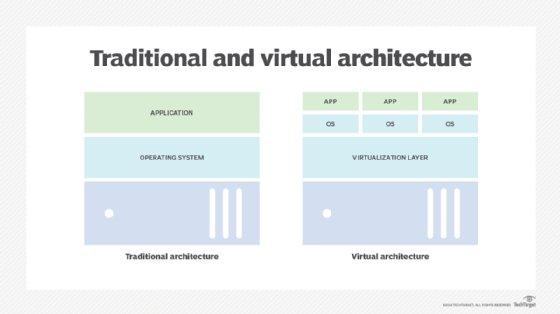
Virtualization technology serves as the backbone of modern cloud hosting solutions, enabling the creation of multiple virtual instances on a single physical server. This process maximizes resource utilization, leading to efficient management of data and applications. By abstracting the hardware, virtualization allows for seamless scalability and flexibility, making it easy for businesses to adjust their computing resources based on demand. Key benefits of virtualization in cloud hosting include:
- Cost Efficiency: Reduces the need for physical hardware investments.
- Scalability: Simplifies the expansion of services without significant infrastructure changes.
- Improved Resource Management: Optimizes server load to ensure high performance.
- Disaster Recovery: Facilitates quick recovery solutions through easy backup and restoration of virtual machines.
The architecture of virtualization technology also enhances security and isolation between different workloads. This means that even if one virtual environment is compromised, it does not affect the others, providing robust protection for sensitive data. Furthermore, the adoption of containerization techniques, a form of virtualization, allows applications to run in isolated environments, improving deployment speed and efficiency. A comparison table illustrating typical virtualization models can further clarify their roles in cloud environments:
| Virtualization Model | Characteristics |
|---|---|
| Full Virtualization | Emulates hardware; supports multiple OS. |
| Paravirtualization | Requires modified OS for better performance. |
| Container-Based | Lightweight; shares OS kernel; fast deployment. |
Optimizing Resource Utilization Through Virtualization Strategies
Virtualization strategies have revolutionized the way organizations manage their IT resources, enabling them to achieve higher efficiency and better control over their infrastructure. By abstracting physical hardware, virtualization allows multiple virtual machines to run on a single physical server, leading to significant cost savings and improved resource distribution. Key benefits include:
- Increased Scalability: Easily adapt to fluctuating workloads by deploying additional virtual machines without the need for extra hardware.
- Enhanced Disaster Recovery: Streamline backup processes and ensure business continuity with easier recovery of virtual environments.
- Optimized Performance: Improve application performance through load balancing and resource allocation based on demand.
Moreover, implementing effective virtualization strategies can lead to more sustainable IT practices. By maximizing utilization rates and minimizing physical resource consumption, organizations can lower their carbon footprint. Centralized management tools further facilitate this by providing insights into resource usage. A quick comparison of resource utilization before and after virtualization can clearly illustrate this impact:
| Resource Type | Before Virtualization | After Virtualization |
|---|---|---|
| Physical Servers | 25 | 10 |
| Server Utilization Rate | 15% | 70% |
| Power Consumption (kWh) | 5,000 | 2,000 |
Through these transformations, businesses not only enhance efficiency but also pave the way for innovative cloud hosting solutions that drive operational excellence in an increasingly competitive digital landscape.
Evaluating the Security Benefits of Virtualization in Cloud Environments
One of the primary advantages of virtualization in cloud environments is its ability to isolate applications and workloads. By segmenting different applications onto separate virtual machines (VMs), organizations can significantly reduce the risk of one compromised application affecting others. This compartmentalization not only enhances security but also aids in regulatory compliance by ensuring that sensitive data remains separate from public-facing applications. Additionally, virtualization facilitates rapid deployment of security patches across multiple VMs, allowing for a more agile response to vulnerabilities compared to traditional physical infrastructures.
Moreover, virtualization enhances resource utilization efficiency, which indirectly contributes to security. Since resources can be dynamically allocated and scaled, organizations can maintain optimal performance while implementing robust security measures. This includes integrating advanced security solutions such as firewalls and intrusion detection systems within the virtualization layer itself. To illustrate the benefits, consider the table below summarizing key security advantages:
| Security Feature | Description |
|---|---|
| Isolation | Separates VMs to prevent cross-contamination from security breaches. |
| Patch Management | Quick deployment of updates and patches across all VMs enhances overall security. |
| Resource Efficiency | Optimizes resource allocation for better performance and security integration. |
Best Practices for Implementing Virtualization in Your Cloud Hosting Solutions
Implementing virtualization in cloud hosting solutions requires a strategic approach to fully leverage its benefits. First, organizations should assess their workload requirements and match them with the most suitable virtualization technology. Choosing between hypervisor types, such as Type 1 and Type 2, can significantly impact performance, scalability, and efficiency. Furthermore, engaging in regular capacity planning and monitoring ensures that resources align with anticipated demand, mitigating performance bottlenecks. It is also imperative to adopt a multi-layer security framework, integrating virtualization-specific security measures to protect virtual machines and data effectively.
Additionally, fostering a collaborative culture among IT teams is essential for a smooth transition to virtual environments. Consistent training and knowledge sharing facilitate proficiency in managing virtualized infrastructures, while also keeping teams updated on best practices. Another vital aspect is to establish a robust disaster recovery and backup plan, as virtualization can simplify recovery but still requires deliberate strategies. Below is a simple comparison of essential virtualization options for cloud hosting:
| Virtualization Type | Benefits | Considerations |
|---|---|---|
| Full Virtualization | Flexibility, Isolation | Overhead on resources |
| Paravirtualization | Performance, Lower Latency | Requires OS modifications |
| OS-level Virtualization | Lightweight, Resource Efficient | Limited OS compatibility |
Final Thoughts
the interplay between virtualization and cloud hosting solutions is undeniably transformative. As businesses continue to embrace digitalization, understanding the nuances of how virtualization enhances cloud infrastructure becomes increasingly vital. From improved resource allocation to superior scalability and enhanced security protocols, virtualization not only optimizes existing cloud services but also paves the way for innovations that can redefine how we think about hosting.
As we look to the future, it’s clear that enterprises must adopt a proactive stance towards these technologies to remain competitive. By leveraging the power of virtualization within their cloud strategies, organizations can not only streamline operations but also elevate their service offerings. The journey into virtualization and cloud hosting is one marked by continual evolution; staying informed and adaptive is the key to unlocking its full potential.
Thank you for joining us in this exploration. We encourage you to keep questioning, learning, and innovating in your own virtualization endeavors. As always, your insights and experiences are invaluable, so feel free to share your thoughts in the comments below. Let’s continue this conversation and navigate the future of cloud hosting together!