
Enhancing Website Performance with Cloud Hosting Solutions
In today’s digital landscape, where speed, reliability, and user experience reign supreme, website performance has become a critical factor in maintaining a competitive edge. As more businesses transition to online platforms, the demand for efficient and scalable hosting solutions has surged. Enter cloud hosting—a revolutionary approach that not only meets these demands but elevates website performance to unprecedented levels. In this article, we will explore how cloud hosting solutions enhance website responsiveness, increase uptime, and offer unmatched flexibility, enabling businesses to thrive in an ever-evolving online environment. Whether you’re a small startup or an established enterprise, understanding the advantages of cloud hosting is essential for optimizing your website’s performance and ensuring your digital presence stands out. Join us as we delve into the transformative power of cloud hosting and discover how it can propel your website to new heights.
Table of Contents
- Understanding the Key Benefits of Cloud Hosting for Website Performance
- Optimizing Resource Allocation: How Cloud Solutions Improve Speed and Reliability
- Implementing Content Delivery Networks to Enhance User Experience
- Measuring Success: Tools and Metrics for Evaluating Cloud Hosting Performance
- The Way Forward
Understanding the Key Benefits of Cloud Hosting for Website Performance
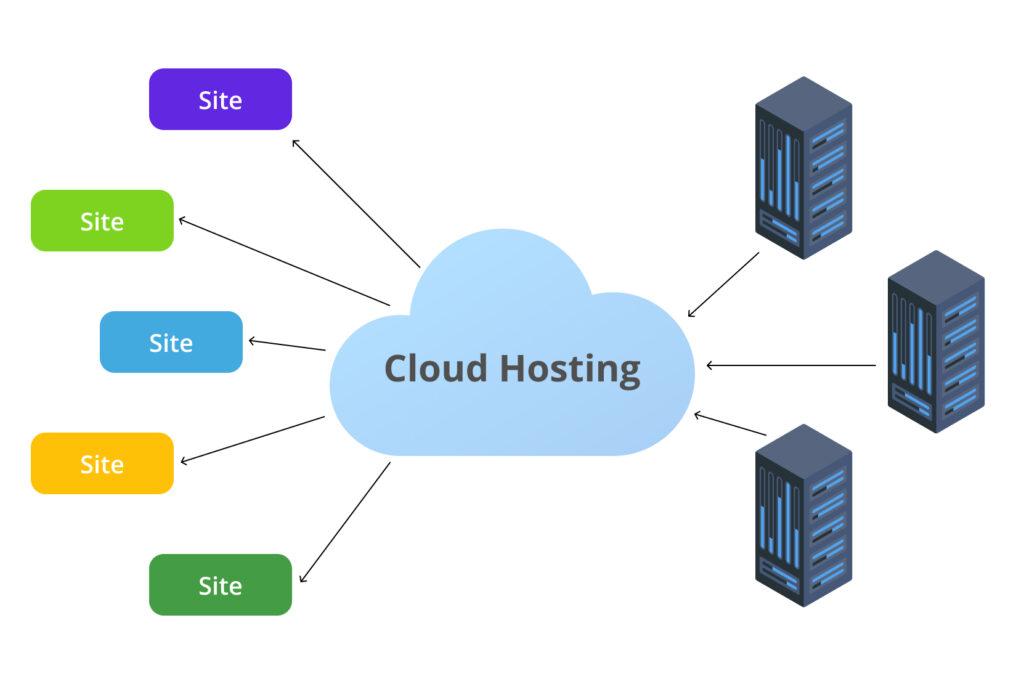
Cloud hosting offers a multitude of advantages that can significantly enhance website performance. By distributing resources across multiple servers, it ensures high availability and reliability, minimizing downtime and allowing websites to handle spikes in traffic seamlessly. This architecture also enables automatic scaling, so businesses can adjust their hosting resources as needed, optimizing performance dynamically based on current demand. Additionally, cloud hosting often comes with built-in load balancing, which distributes incoming website traffic evenly across servers, further improving load times and overall user experience.
Another noteworthy benefit is the reduction in latency. With cloud servers strategically located around the globe, users can connect to the closest server, resulting in faster data transfer and quicker access to content. This geographical diversity not only improves website load times but also enhances SEO performance, as search engines favor faster websites. Furthermore, cloud hosting providers typically offer robust security features, including automatic updates, firewall protection, and data encryption, safeguarding sensitive information while ensuring optimal functionality. The combination of these elements can lead to improved visitor satisfaction and higher conversion rates.
Optimizing Resource Allocation: How Cloud Solutions Improve Speed and Reliability
With the advent of cloud technology, businesses can now leverage advanced solutions to optimize their resource allocation significantly. By distributing workloads across multiple servers and data centers, cloud hosting not only enhances speed but also ensures high reliability. When traffic spikes occur, cloud resources can be scaled instantly, accommodating increased demand without compromising website performance. This flexible approach allows companies to avoid costly downtime, leading to a better user experience and improved customer satisfaction. Additionally, cloud environments support redundancy, which means that if one server fails, others can seamlessly take over, ensuring continuous operation and minimizing disruptions.
Moreover, transitioning to cloud-based solutions empowers businesses to adopt a more efficient use of resources. The scalability offered by cloud hosting provides automatic resource adjustments based on real-time needs, which optimizes costs and enhances performance. Consider the following benefits:
- Dynamic Resource Scaling: Easily adjust resources up or down based on current traffic demands.
- Cost-Effectiveness: Pay only for what you use, reducing waste and operational costs.
- Geographical Redundancy: Improved reliability through data stored in various locations to prevent data loss.
Here’s a simple comparison of cloud hosting advantages versus traditional hosting:
| Feature | Cloud Hosting | Traditional Hosting |
|---|---|---|
| Scalability | On-demand, automatic scaling | Limited, requires manual adjustments |
| Cost Efficiency | Pay-as-you-go model | Fixed monthly rates |
| Redundancy | Multiple data centre support | Single location dependency |
Implementing Content Delivery Networks to Enhance User Experience
Incorporating a Content Delivery Network (CDN) into your web infrastructure significantly boosts performance and optimizes the overall user experience. By distributing static resources such as images, stylesheets, and scripts across multiple geographically distributed servers, a CDN minimizes latency. When users access your site, they are served content from the closest server location, ensuring faster load times and reducing the possibility of bottlenecks. This is particularly effective during high traffic events, as a CDN can scale resources automatically to handle increased demand without compromising the user experience.
Implementing a CDN also enhances reliability and security, providing a robust solution to potential downtimes and attacks. Here are several key advantages of utilizing a CDN:
- Reduced Latency: Faster delivery of content to users can lead to improved engagement.
- Increased Availability: Multiple server locations offer redundancy, ensuring your site remains accessible even under high loads.
- Enhanced Security: CDNs often come equipped with security features, mitigating risks from DDoS attacks.
To illustrate the impact of a CDN, consider the following table comparing the performance of a website with and without a CDN:
| Metric | No CDN | With CDN |
|---|---|---|
| Average Load Time | 3.5 seconds | 1.2 seconds |
| User Engagement Rate | 50% | 75% |
| Downtime Incidents | 5/month | 1/month |
Measuring Success: Tools and Metrics for Evaluating Cloud Hosting Performance
When it comes to evaluating the effectiveness of cloud hosting, leveraging a variety of tools and metrics is key to gaining comprehensive insights. Essential performance indicators to monitor include:
- Uptime: Tracking the percentage of time the server is operational; aim for 99.9% or higher.
- Response Time: Measuring how quickly your server responds to user requests.
- Latency: Evaluating the time delay during data transmission.
- Server Load: Monitoring the traffic and workload on your server to anticipate traffic spikes.
In addition to these metrics, consider implementing specialized performance monitoring tools that offer real-time analysis and reporting capabilities. Some popular options include:
| Tool | Description |
|---|---|
| Google Analytics | Tracks user interactions and traffic patterns. |
| Pingdom | Monitors uptime and response times, providing alerts. |
| Load Impact | Simulates traffic to assess load capabilities. |
| New Relic | Offers deep performance insights and application monitoring. |
The Way Forward
leveraging cloud hosting solutions can significantly elevate your website’s performance, ensuring a faster, more reliable, and scalable experience for your users. By choosing the right cloud provider, optimizing your resources, and implementing effective performance strategies, you can not only enhance load times and service stability but also prepare your business for future growth in a competitive digital landscape.
As we continue to embrace the benefits of cloud technology, remember that the key to success lies in continuous monitoring and adaptation. Regularly assess your website’s performance, gather user feedback, and stay informed about emerging trends in cloud solutions. With the right approach, you’ll be well-equipped to deliver an exceptional online experience that keeps your visitors coming back for more.
Thank you for joining us in this discussion on enhancing website performance. If you have any questions or insights to share, feel free to leave a comment below. Let’s continue the conversation on how we can harness the power of cloud hosting for a brighter digital future.