
Understanding Data Backup Solutions in Cloud Hosting
: A Comprehensive Guide
In today’s digital landscape, where data reigns supreme, safeguarding your information has never been more critical. As businesses and individuals increasingly rely on cloud hosting solutions, the importance of robust data backup strategies cannot be overstated. A single data loss incident can lead to significant financial loss, reputational damage, and operational disruptions. This is where understanding data backup solutions in cloud hosting becomes essential.
In this article, we’ll delve into the various types of data backup solutions available in the cloud, exploring their features, benefits, and potential pitfalls. Whether you’re a small business owner looking to protect client information or an enterprise striving to manage vast amounts of data, having a solid grasp of backup solutions can ensure your data remains secure and accessible. Join us as we uncover the intricacies of cloud-based backup systems, empowering you to make informed decisions that enhance your data security strategy.
Table of Contents
- The Importance of Data Backup in Cloud Hosting
- Types of Cloud Backup Solutions: Choosing the Right Fit
- Best Practices for Implementing Effective Data Backup Strategies
- Evaluating Cloud Backup Providers: Key Factors to Consider
- Concluding Remarks
The Importance of Data Backup in Cloud Hosting
In today’s digital landscape, the significance of data backup cannot be overstated, especially for businesses leveraging cloud hosting solutions. Data loss can stem from various unpredictable events, such as hardware failures, human errors, or even cyberattacks. This makes it crucial for organizations to implement robust backup strategies to safeguard their critical information. By utilizing cloud-based backup services, companies can ensure that their data is not only stored securely but also easily accessible in the event of an incident. A well-structured backup plan provides a safety net that mitigates risks, allowing businesses to recover quickly and maintain continuity without significant downtime.
Moreover, effective data backup strategies in cloud hosting come with added benefits that reinforce their importance. Consider the following advantages:
- Scalability: Cloud-based solutions offer the flexibility to adjust storage needs based on growth.
- Cost-efficiency: Many cloud providers offer pay-as-you-go models, eliminating unnecessary expenditures.
- Automation: Scheduled backups reduce the likelihood of human error and ensure regular updates.
- Remote Access: Data can be retrieved from anywhere, enabling faster restoration processes.
Here is a simple comparison table illustrating the features of various cloud backup solutions:
| Service | Storage Capacity | Price (per month) | Key Features |
|---|---|---|---|
| CloudBackup Pro | 500 GB | $20 | Automated backups, remote access |
| DataSafe | 1 TB | $35 | Scalable plans, encryption |
| SecureStore | 2 TB | $50 | Multi-device support, 24/7 support |
Types of Cloud Backup Solutions: Choosing the Right Fit
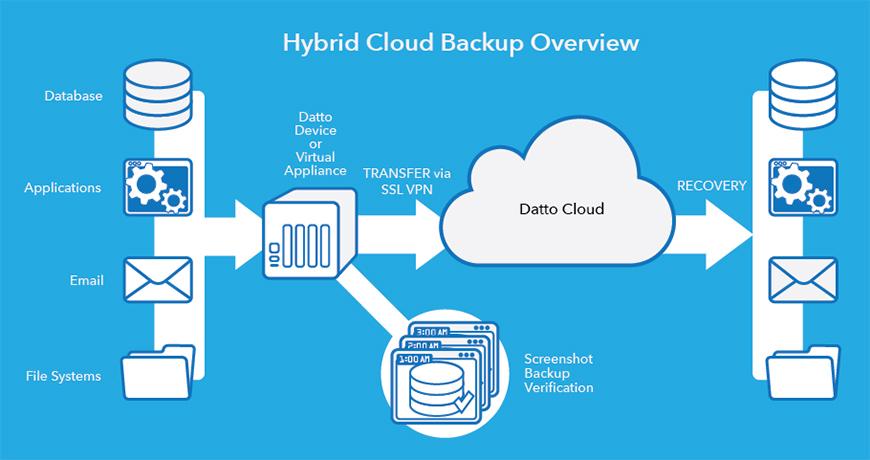
When selecting a cloud backup solution, understanding the different types available is crucial to finding the best fit. Cloud backup options generally fall into three major categories: public, private, and hybrid. Public cloud solutions are cost-effective, offering scalability and no hardware maintenance but may raise concerns about data security. In contrast, private cloud backup provides greater control and security, ideal for businesses with sensitive data, although at a higher cost. Lastly, hybrid solutions combine both public and private elements, delivering flexibility and enhanced data security, making them suitable for organizations seeking a custom balance between accessibility and control.
Moreover, organizations should consider additional factors such as ease of use, recovery speed, and backup frequency when evaluating options. Leading providers often incorporate user-friendly interfaces and robust support services. To aid in your decision, consider the following key attributes:
| Feature | Public Cloud | Private Cloud | Hybrid Cloud |
|---|---|---|---|
| Cost | Low | High | Moderate |
| Security | Medium | High | High |
| Scalability | High | Low | High |
| Control | Low | High | Moderate |
By carefully assessing these characteristics alongside your business requirements, you can make an informed decision that aligns with your organization’s goals and supports your data integrity needs. A thorough understanding of each option ensures that the chosen solution not only meets current demands but also adapts to future growth.
Best Practices for Implementing Effective Data Backup Strategies
To ensure your data backup strategy is robust, begin by assessing your data needs. Identify the critical data that must be backed up regularly, including customer information, financial records, and intellectual property. Maintain a clear understanding of how often this data changes and the necessary retention periods. By defining these parameters, you’ll be better equipped to select a backup solution that aligns with your operational requirements. Additionally, consider implementing the 3-2-1 backup rule, which advocates for three total copies of your data, stored on two different media types, with one copy located offsite. This method enhances your data’s security and accessibility.
Incorporating automation into your backup process can significantly reduce the risk of human error and ensure consistency. Utilize cloud hosting solutions that offer automated backup features, allowing for scheduled backups at your convenience. Keep in mind the importance of regular testing and verification of your backup restores. This involves performing routine checks to guarantee that your backups are functional and can be restored when needed. You might also consider establishing a backup status dashboard for real-time monitoring. Below is a simple table to illustrate different aspects of effective backup strategies:
| Backup Type | Frequency | Location |
|---|---|---|
| Full Backup | Weekly | Cloud |
| Incremental Backup | Daily | Local & Offsite |
| Differential Backup | Every 2-3 Days | Cloud |
Evaluating Cloud Backup Providers: Key Factors to Consider
When evaluating cloud backup providers, several key factors demand your attention to ensure that your data remains secure and easily accessible. First and foremost, consider security measures, as the protection of your data is paramount. Look for providers that offer encryption methods for both data at rest and in transit, coupled with robust compliance certifications such as GDPR or HIPAA. Additionally, assess the reliability of the provider by checking their uptime guarantees and service level agreements (SLAs), which should ideally reflect a commitment to minimal downtime.
Another critical factor is the provider’s scalability and flexibility. As your business grows, your backup needs may evolve, so opt for providers which offer customizable options to adapt to your changing requirements. Furthermore, evaluate the ease of use in their backup and restore processes. A user-friendly interface can significantly save time and reduce the chances of errors during data recovery. Lastly, take into account the cost structure; ensure it aligns with your budget while providing the features you need for optimal performance.
| Factor | Importance | Considerations |
|---|---|---|
| Security | High | Encryption, Compliance |
| Reliability | High | Uptime, SLAs |
| Scalability | Medium | Custom Options |
| Ease of Use | High | Interface, Processes |
| Cost Structure | Medium | Budget Alignment |
Concluding Remarks
understanding data backup solutions in cloud hosting is essential for any organization looking to safeguard its valuable information against unforeseen challenges. By leveraging the diverse options available—from snapshots and incremental backups to automatic scheduling and replication—you can ensure that your data remains protected, accessible, and recoverable.
As the digital landscape continues to evolve, so too must our approaches to data management. Embracing comprehensive backup solutions not only enhances data security but also provides peace of mind, allowing businesses to focus on growth and innovation without the constant worry of data loss.
Remember, investing in a reliable backup strategy is not just a technical necessity; it’s a strategic decision that can have lasting implications for your organization’s resilience and success. Take the time to evaluate your needs, explore the myriad options out there, and choose a cloud hosting provider that prioritizes robust backup solutions. Your future self—and your organization—will thank you for it.
Stay informed, stay protected, and remember: in the realm of data management, an ounce of prevention is worth a pound of cure.