
Exploring Shared Hosting vs. WordPress Hosting: Key Differences
When it comes to launching a website, choosing the right hosting solution is crucial for both performance and user experience. Among the myriad of options available, shared hosting and WordPress hosting stand out as two popular choices, each tailored to specific needs and preferences. But what exactly sets them apart? In this article, we will delve into the key differences between shared hosting and WordPress hosting, exploring their unique advantages, potential drawbacks, and the ideal scenarios for each. Whether you’re a budding blogger, a small business owner, or a seasoned web developer, understanding these distinctions will empower you to make an informed decision that aligns with your online goals. Join us as we navigate the intricacies of these hosting options and help you find the perfect home for your website.
Table of Contents
- Understanding Shared Hosting and WordPress Hosting Features
- Performance and Scalability: Evaluating Your Options
- Security Considerations for Shared and WordPress Hosting
- Choosing the Right Hosting Solution for Your Needs
- Key Takeaways
Understanding Shared Hosting and WordPress Hosting Features
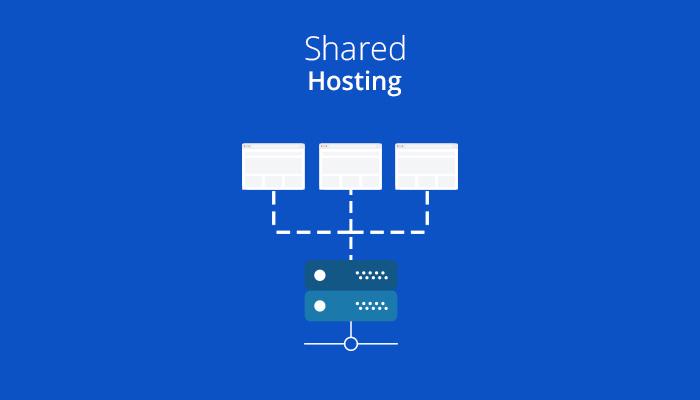
When exploring the landscape of web hosting, two primary options frequently surface: shared hosting and WordPress hosting. Shared hosting is a cost-effective choice, where multiple websites share the same server resources. This means that while it can be suitable for small, personal websites, it may not provide the performance or speed required for high-traffic sites. Key characteristics of shared hosting include:
- Affordability: Lower monthly prices attract many users.
- Resource Sharing: Multiple websites operate on the same server, which can affect performance.
- General Compatibility: Supports various CMS, but may not be optimized for any specific platform.
On the other hand, WordPress hosting is specifically tailored for WordPress sites, offering optimizations and features that enhance performance. This type of hosting ensures that the server environment is configured for WordPress, which can lead to faster load times and better security. Notable features of WordPress hosting include:
- Pre-installed WordPress: Allows users to start without complicated setups.
- Automatic Updates: Ensures the WordPress core and plugins are regularly updated.
- Enhanced Security: Provides specific measures to protect WordPress sites from common threats.
| Feature | Shared Hosting | WordPress Hosting |
|---|---|---|
| Performance | Variable | Optimized |
| Ease of Setup | Simple | Very Simple |
| Security | Basic | Advanced |
| Best Suited For | Small Sites | WordPress Users |
Performance and Scalability: Evaluating Your Options
When it comes to hosting options, understanding performance and scalability is crucial for the long-term success of your website. Shared hosting typically offers limited resources shared among multiple users. This can lead to slower load times and performance dips, especially during peak traffic times. Conversely, WordPress hosting is specifically optimized for WordPress websites, often providing dedicated resources and caching solutions that can significantly enhance speed and performance. With this specialized setup, websites are less likely to experience slowdowns, leading to a better user experience and improved SEO.
Moreover, scalability can be a determining factor for businesses planning to grow. Shared hosting usually makes it difficult to upgrade resources quickly or manage increased traffic without migrating to another hosting solution. In contrast, most WordPress hosting providers offer a range of scalable plans that allow you to seamlessly increase bandwidth, storage, and other resources. This flexibility ensures that your website can handle spikes in traffic without compromising performance. Below is a comparative overview:
| Feature | Shared Hosting | WordPress Hosting |
|---|---|---|
| Resource Allocation | Shared amongst users | Dedicated, WordPress-optimized |
| Performance during Traffic Spikes | Often slow | Optimized for high performance |
| Scalability | Difficult to upgrade | Flexible plans available |
Security Considerations for Shared and WordPress Hosting
When it comes to hosting environments, security is a paramount concern, especially for those utilizing shared or WordPress hosting services. In shared hosting, multiple users share the same server resources, which can expose your website to various security risks if another site on the server is compromised. As a result, you may find your site vulnerable to cross-contamination from malware or hacking attempts. Regularly monitoring your site and implementing strong passwords are essential measures to mitigate these risks. Furthermore, consider employing the following security enhancements:
- Regular Backups: Ensure that your data is backed up frequently to recover easily in case of an attack.
- Firewall Protection: Install a web application firewall to block malicious traffic.
- SSL Certificates: Implementing SSL encrypts the data exchanged between your server and visitors.
In contrast, WordPress hosting is specifically optimized for WordPress sites, often including additional layers of security tailored to the platform. This specialized environment typically updates software automatically and incorporates security plugins designed to fortify WordPress installations. However, users must still remain proactive since vulnerabilities can arise from outdated themes or plugins. Key security measures to consider include:
| Security Measure | Description |
|---|---|
| Regular Updates | Ensure WordPress core, themes, and plugins are always up to date. |
| Two-Factor Authentication | Enhances login security by requiring an additional verification step. |
| Malware Scanning | Regular scans can detect vulnerabilities before they are exploited. |
Choosing the Right Hosting Solution for Your Needs
When selecting a hosting solution, consider your specific needs and goals. Shared hosting is often ideal for beginners or small websites due to its affordability and ease of use. It allows you to share server resources with multiple sites, which can lower costs significantly. However, this comes with trade-offs, such as slower loading times and potential security issues. If your website is expected to grow or requires higher performance, you may want to explore more robust options. Here are some key points to consider for shared hosting:
- Cost-effective: Suitable for small budgets.
- User-friendly: Generally simple setup and management.
- Limited Resources: Bandwidth and storage are shared among users.
On the other hand, WordPress hosting is tailor-made for WordPress websites, offering optimized environments with specialized support and features. This type of hosting often includes automatic updates, one-click installations, and enhanced security measures designed specifically for WordPress sites. If content management is your priority and you are looking for reliability and speed, this option is likely your best bet. Consider these advantages:
- Enhanced Performance: Built-in caching and server optimization.
- Security Features: Regular backups and malware scanning.
- Specialized Support: WordPress-savvy technical support team.
Key Takeaways
choosing the right hosting service is pivotal for the success of your website. While shared hosting offers an economical solution that can be ideal for smaller sites or those just starting, WordPress hosting provides optimized performance specifically tailored for WordPress environments. Understanding the key differences between these two options—be it speed, support, or scalability—will empower you to make an informed decision that aligns best with your needs and goals.
Whether you’re looking for flexibility, customization, or simplicity, the decision should reflect not only your current requirements but also your future growth. By weighing the advantages and drawbacks of each hosting type, you can create a solid foundation for your online presence. Remember, the right hosting choice can significantly enhance your website’s performance and user experience, setting you up for success in the digital landscape. Happy hosting!