
Unlocking DNS: The Backbone of Web Hosting Explained
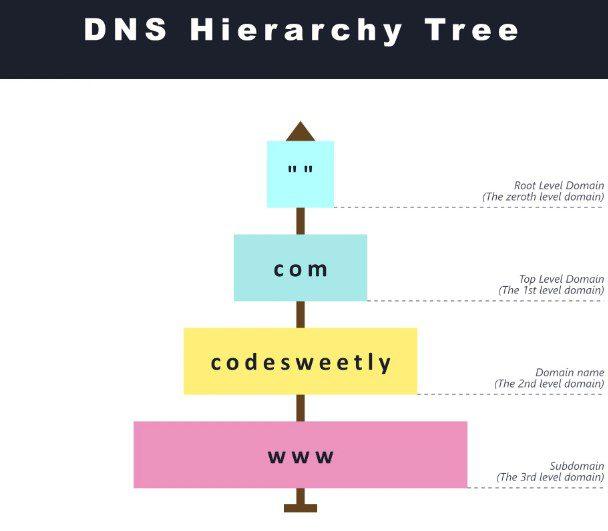
In the vast and complex landscape of the internet, the Domain Name System (DNS) quietly performs a critical function that many users take for granted. Often overshadowed by more visible components of web hosting, such as servers and applications, DNS serves as the essential framework that translates human-friendly domain names into machine-readable IP addresses. This intricate process is pivotal for loading websites, sending emails, and facilitating the multitude of online services we rely on every day.
In this article, we will delve into the fundamentals of DNS, elucidating its role as the backbone of web hosting and how it impacts user experience. From understanding how DNS works to exploring its various components, we aim to demystify this vital system and highlight its importance in ensuring seamless connectivity in our digital world. Whether you’re a seasoned web developer, a business owner looking to establish an online presence, or simply a curious tech enthusiast, this exploration of DNS will equip you with the knowledge to navigate and optimize your online endeavors effectively. Let’s unlock the secrets behind the scenes and discover how DNS shapes the internet as we know it.
Table of Contents
- Understanding the Role of DNS in Web Hosting Architecture
- Common DNS Records and Their Functions in Website Management
- Best Practices for Configuring DNS for Optimal Performance
- Troubleshooting DNS Issues: Tips and Tools for Webmasters
- Concluding Remarks
Understanding the Role of DNS in Web Hosting Architecture
Domain Name System (DNS) serves as the critical linking mechanism between human-readable domain names and the numerical IP addresses that computers use to identify themselves on the network. When a user enters a website URL in their browser, the DNS resolves that domain into a specific IP address, enabling the browser to access the appropriate web server. This conversion process, often referred to as “DNS resolution,” is not just a single-step action; it involves multiple components working seamlessly together. The primary elements include:
- DNS Resolver: Acts as the intermediary that processes the user’s request.
- Root Nameservers: The first step in the hierarchy, directing queries to the appropriate top-level domain nameservers.
- Authoritative Nameservers: Provide the definitive record for the queried domain, guiding the resolver toward the correct IP address.
To visualize the interaction within DNS, consider the following table that outlines the key players involved in the resolution process and their respective functions:
| Component | Function |
|---|---|
| DNS Resolver | Initiates the DNS query process and fetches the IP address. |
| Root Nameserver | Directs the query based on the domain’s top-level domain. |
| Authoritative Nameserver | Provides the final IP address linked to the requested domain. |
Understanding how these elements fit into the broader web hosting architecture is essential for effective website management and performance optimization. Each component contributes to the reliability and speed of a domain’s reachability, affecting overall user experience and search engine rankings. In essence, a well-configured DNS setup not only facilitates basic connectivity but also plays a significant role in a website’s security, load balancing, and redundancy strategies.
Common DNS Records and Their Functions in Website Management
Understanding the various types of DNS records is essential for effective website management. Each record serves a distinct purpose, playing a pivotal role in guiding internet traffic and ensuring a seamless user experience. Here are some of the most common records you’ll encounter:
- A Record: Maps a domain name to its corresponding IPv4 address, directing users to the correct server.
- AAAA Record: Functions like an A record but specifically maps to an IPv6 address, accommodating the growing internet protocol.
- CNAME Record: Lets you alias one domain name to another, allowing multiple subdomains to point to a primary domain easily.
- MX Record: Indicates which mail servers are responsible for receiving emails on behalf of your domain, ensuring your messaging runs smoothly.
- TXT Record: Allows you to add arbitrary text data to your DNS record, often used for verification purposes like SPF and DKIM.
In addition to these, other records like the NS (Name Server) Record define which servers are authoritative for a particular zone, while the SRV Record is employed for specifying services offered at specific ports. Below is a concise comparison to highlight their core functions:
| Record Type | Purpose |
|---|---|
| A Record | Links domain to IPv4 address |
| AAAA Record | Links domain to IPv6 address |
| CNAME Record | Redirects to another domain |
| MX Record | Guides email to the correct server |
| TXT Record | Holds text data for various purposes |
Best Practices for Configuring DNS for Optimal Performance
To ensure your DNS configuration yields optimal performance, it’s essential to adopt a strategic approach. Start by choosing the right DNS provider. Select one that offers high availability, robust security features, and a global presence to minimize latency. Additionally, regularly monitor your DNS performance to identify any slowdowns or downtime issues. You can utilize DNS monitoring tools that alert you to any performance anomalies, allowing for swift resolution and maintaining a seamless user experience.
Another crucial practice is to implement DNS caching effectively. By leveraging both client-side and resolver caching, you can reduce the load on your DNS servers and speed up resolution times for frequently visited sites. Consider utilizing a Content Delivery Network (CDN) that provides DNS services, which can further enhance performance by directing traffic to the nearest data center. Below is a simple table illustrating key factors for effective DNS caching:
| Factor | Description |
|---|---|
| TTL** (Time to Live) | Set appropriate TTL values to balance between freshness and caching efficiency. |
| CDN Integration | Use a CDN to cache DNS responses closer to end users for faster resolution. |
| Redundancy | Configure secondary DNS servers for failover to enhance reliability. |
Troubleshooting DNS Issues: Tips and Tools for Webmasters
Troubleshooting DNS issues can be a daunting task for webmasters, particularly when their website is experiencing downtime or is inaccessible. Fortunately, there are various tips and tools that can help streamline the process. First, verify your DNS settings to ensure that they are correctly configured according to your hosting provider’s guidelines. Use online tools like What’s My DNS or DNS Checker to confirm that your domain resolves correctly across multiple locations worldwide. Establish a checklist for common errors such as TTL values, CNAME records, and A records, as misconfigurations in these settings can often lead to accessibility issues.
Additionally, employing command-line tools can provide immediate insights into DNS functionality. Commands such as nslookup and dig are invaluable for testing your DNS records and can reveal any discrepancies or propagation delays. For example, an easy-to-understand breakdown could be represented in the table below:
| Command | Purpose |
|---|---|
nslookup example.com |
Queries the DNS server for the IP address of the domain. |
dig example.com |
Provides detailed information about all DNS records for the domain. |
ping example.com |
Tests if the server responds, helping measure connection success. |
Concluding Remarks
As we conclude our exploration of DNS and its critical role in web hosting, it’s clear that the Domain Name System is more than just a technical framework—it’s the unsung hero behind our online experiences. By translating human-friendly domain names into the numeric IP addresses that computers understand, DNS enables seamless navigation through the vast digital landscape.
Understanding how DNS works not only empowers you to troubleshoot issues more effectively but also equips you with the knowledge to optimize your website performance and security. As you embark on your web hosting journey or refine your existing setup, remember that leveraging DNS appropriately can lead to increased accessibility, improved loading times, and an enhanced user experience.
In a world where every millisecond counts and online reputation is paramount, ensuring robust and efficient DNS management is imperative. Stay informed, make proactive decisions, and watch as your digital presence flourishes.
Thank you for joining us in this deep dive into the backbone of web hosting. If you have any questions or would like to share your experiences with DNS, feel free to leave a comment below. Your insights are always valued in our blog community!