
Understanding RAID Storage’s Impact on Dedicated Server Hosting
In the digital age, where data is the backbone of every business, the performance and reliability of your server infrastructure can make or break your operations. For businesses leveraging dedicated server hosting, understanding the nuances of storage solutions is crucial for optimizing performance and ensuring data integrity. One such pivotal technology is Redundant Array of Independent Disks (RAID). This powerful method of combining multiple physical disk drives into a single logical unit can significantly influence not only how data is stored and accessed but also how reliable and efficient your dedicated server will be. In this article, we will explore the various RAID levels, their specific impacts on server performance, and how choosing the right RAID configuration can lead to improved uptime, faster data retrieval, and enhanced data protection. Whether you’re a seasoned IT professional or a business owner seeking to make informed decisions about your hosting solutions, this comprehensive guide will shed light on the key aspects of RAID storage and its critical role in dedicated server hosting.
Table of Contents
- Exploring the Fundamentals of RAID Storage Architectures
- Assessing Performance Benefits and Trade-offs for Dedicated Servers
- Evaluating Data Redundancy and Recovery Strategies in RAID Configurations
- Best Practices for Implementing RAID in Dedicated Hosting Environments
- In Conclusion
Exploring the Fundamentals of RAID Storage Architectures
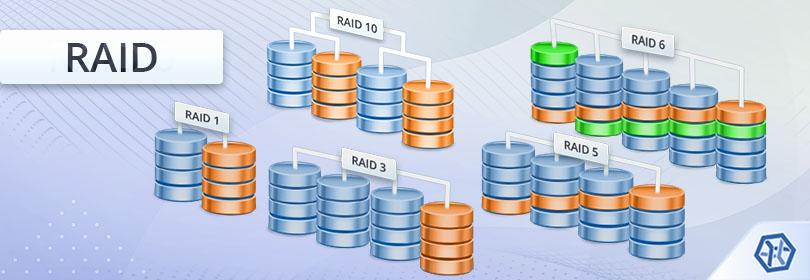
RAID, which stands for Redundant Array of Independent Disks, is a data storage virtualization technology that combines multiple physical disk drive components into a single logical unit for improved data redundancy and performance. There are several RAID levels, each with unique characteristics and advantages, which help optimize performance based on specific use cases. Understanding the various configurations of RAID not only aids in enhancing data reliability but also plays a critical role in the efficiency and speed of dedicated server hosting environments. Some common RAID types include:
- RAID 0: Striping, which improves speed but offers no redundancy.
- RAID 1: Mirroring, which provides redundancy by duplicating data across multiple disks.
- RAID 5: Striping with parity, balancing both performance and fault tolerance.
- RAID 10: A combination of mirroring and striping, delivering high performance along with data redundancy.
In the context of dedicated server hosting, employing the right RAID configuration is pivotal for ensuring maximum uptime and data integrity. For instance, RAID 5 is often favored for its efficient use of disk space while still retaining a protective layer against disk failures, making it a strong choice for businesses that handle large volumes of transactional data or web applications. Alternatively, RAID 10 is preferred in scenarios requiring optimal performance and redundancy, such as high-traffic websites or database servers. The decision on which RAID level to implement should be influenced by factors like:
| Factor | RAID 5 | RAID 10 |
|---|---|---|
| Cost Efficiency | Moderate | Higher |
| Read Speed | High | Very High |
| Write Speed | Moderate | High |
| Redundancy Level | Good | Excellent |
Ultimately, selecting an appropriate RAID storage architecture should align with the specific performance needs and business requirements, ensuring that dedicated servers can operate smoothly while safeguarding critical data against hardware failures.
Assessing Performance Benefits and Trade-offs for Dedicated Servers
When evaluating the performance of dedicated servers, the choice between different RAID configurations can significantly influence outcomes. Each RAID level offers a unique blend of speed, redundancy, and storage capacity, catering to various needs. For instance, RAID 0 maximizes speed through data striping, making it suitable for applications requiring high throughput. However, it does so at the expense of data safety since it offers no redundancy. On the other hand, RAID 1 mirrors data across two disks, enhancing reliability but potentially limiting available storage space. Other levels, like RAID 5 and RAID 10, attempt to strike a balance by providing both performance and redundancy. Understanding these configurations is essential in forming an infrastructure capable of supporting business-critical applications effectively.
Trade-offs are often a pivotal component of assessing performance benefits. Selecting a higher RAID level may introduce a slight performance overhead due to the parity calculations involved, particularly in RAID 5 configurations. Conversely, opting for a simpler setup like RAID 1 may mean sacrificing some performance in read/write operations, though it enhances data safety. Businesses must weigh the implications of these configurations against their specific application requirements. To guide this decision-making process, a table comparing the key characteristics of common RAID levels follows:
| RAID Level | Data Redundancy | Performance | Storage Efficiency |
|---|---|---|---|
| RAID 0 | No | High | 100% |
| RAID 1 | Yes | Moderate | 50% |
| RAID 5 | Yes | Moderate | Approximately 66% |
| RAID 10 | Yes | High | 50% |
Evaluating Data Redundancy and Recovery Strategies in RAID Configurations
When it comes to RAID configurations, understanding the nuances of data redundancy and recovery is essential for maximizing uptime and data integrity. Various RAID levels, such as RAID 1, RAID 5, and RAID 10, each offer unique approaches to redundancy. For example, RAID 1 mirrors data across multiple hard drives, ensuring that if one drive fails, the other retains an exact copy. Similarly, RAID 5 distributes data and parity information across three or more disks, allowing for recovery in the event of a single disk failure. By opting for the right RAID level based on your specific needs, businesses can achieve a balanced approach between performance and redundancy.
Recovery strategies within these RAID configurations often focus on the speed and effectiveness of data restoration. Organizations typically implement a combination of hot spares and regular backups to enhance this aspect. A hot spare is a designated, unused drive in a RAID setup that automatically takes the place of a failed drive. This minimizes downtime significantly. In addition, incorporating comprehensive backup solutions ensures that data can be quickly restored, even in catastrophic scenarios. Below is a comparison table that highlights key characteristics of various RAID levels:
| RAID Level | Redundancy Method | Minimum Drives | Performance |
|---|---|---|---|
| RAID 1 | Mirroring | 2 | Read = Fast; Write = Slow |
| RAID 5 | Striping with parity | 3 | Read = Fast; Write = Moderate |
| RAID 10 | Mirroring + Striping | 4 | Very Fast |
Best Practices for Implementing RAID in Dedicated Hosting Environments
When implementing RAID in dedicated hosting environments, it is crucial to evaluate the specific needs of your application and workload. Different RAID configurations offer varying levels of performance, redundancy, and fault tolerance. Selecting the right level of RAID, such as RAID 1 for mirroring or RAID 10 for a combination of striping and mirroring, can significantly enhance data integrity and availability. Additionally, consider leveraging enterprise-grade drives designed for continuous operation to minimize the risk of failure and to support higher data throughput while maintaining lower latencies.
Regular maintenance and monitoring are essential to ensuring optimal RAID performance. Implement a proactive strategy that includes:
- Regular health checks: Use tools to monitor the status of the RAID array, ensuring all drives are functioning correctly.
- Scheduled backups: Even with RAID redundancy, maintain comprehensive backup strategies to secure against data loss during catastrophic events.
- Firmware updates: Keep your RAID controller and drives up-to-date to capitalize on performance improvements and security patches.
By adhering to these best practices, server administrators can maximize the benefits of RAID configurations in dedicated hosting setups, ultimately improving system reliability and uptime.
In Conclusion
understanding the nuances of RAID storage is essential for anyone considering dedicated server hosting. As we’ve explored, RAID configurations not only enhance data redundancy and performance but also play a critical role in overall system reliability. By selecting the right RAID level based on your specific needs—whether that be speed, redundancy, or a combination of both—you can significantly improve your server’s efficiency and safeguard against potential data loss.
As technology continues to evolve, so do the challenges and opportunities presented in the realm of data management. Keeping abreast of storage solutions, like RAID, is vital for businesses looking to optimize their IT infrastructure. Whether you are a small startup or an established enterprise, investing time in understanding these technologies can lead to informed decisions that support your growth and operational excellence.
Remember, the right RAID setup is not just about current demands but also about future-proofing your hosting solutions against the ever-changing landscape of data storage. If you have any questions or need further guidance on implementing RAID in your dedicated server environment, feel free to reach out or leave your comments below. Stay informed, stay secure, and ensure that your data is always in the best hands.