
Step-by-Step Guide to Installing SSL on WordPress Hosting
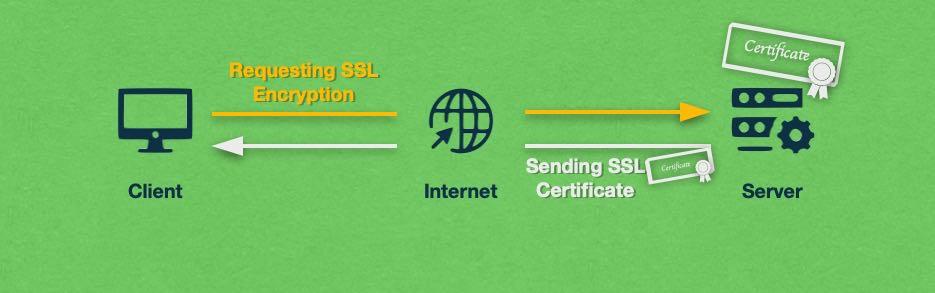
In today’s digital landscape, ensuring the security of your website is not just an option—it’s a necessity. As cyber threats continue to evolve, protecting your visitors’ data and boosting your site’s credibility have become paramount. One of the most effective ways to achieve this is by installing an SSL (Secure Sockets Layer) certificate on your WordPress hosting. An SSL certificate encrypts the data exchanged between your website and its users, safeguarding sensitive information like login credentials and payment details.
In this comprehensive step-by-step guide, we’ll walk you through the process of installing SSL on your WordPress site. Whether you’re a seasoned developer or a beginner, our clear instructions will help you secure your website and enhance its performance. We’ll cover everything from choosing the right SSL certificate for your needs to configuring your WordPress installation to take full advantage of the added security. Let’s dive in and take the first steps toward a safer, more trusted online presence!
Table of Contents
- Understanding SSL and Its Importance for Your WordPress Site
- Choosing the Right SSL Certificate for Your Hosting Needs
- Step-by-Step Installation Process for SSL on WordPress
- Verifying and Troubleshooting SSL Implementation on Your Site
- The Conclusion
Understanding SSL and Its Importance for Your WordPress Site
Secure Sockets Layer (SSL) is a technology that creates a secure, encrypted connection between a web server and a browser. This critical feature ensures that information transferred across the Internet remains private and integral. For WordPress site owners, implementing SSL not only protects sensitive data, such as user credentials and payment information but also enhances SEO performance. Major search engines like Google favor HTTPS websites, potentially improving your site’s ranking and visibility. To harness these benefits, it’s vital to understand the significance of SSL and how it contributes to building trust with your audience.
When you install an SSL certificate, your website URL changes from http:// to https://, indicating that the site is secure. Here are key reasons to prioritize SSL for your WordPress site:
- Enhanced Security: Encrypts data between users and your server.
- Improved SEO: HTTPS is a ranking factor for search engines.
- Increased Trust: Helps visitors feel confident in data safety.
- Compliance: Meets data protection regulations like GDPR.
Furthermore, with various SSL certificate options available, such as Domain Validation (DV), Organization Validation (OV), and Extended Validation (EV), you can choose one that best fits your needs. The installation process is typically straightforward and can often be done directly through your hosting provider. The table below summarizes the different types of SSL certificates:
| Type of Certificate | Validation Level | Typical Use Cases |
|---|---|---|
| Domain Validation (DV) | Basic | Personal blogs, small websites |
| Organization Validation (OV) | Medium | Businesses, non-profits |
| Extended Validation (EV) | High | E-commerce, financial institutions |
Choosing the Right SSL Certificate for Your Hosting Needs
When selecting an SSL certificate for your WordPress hosting, it’s crucial to assess your specific requirements and the level of security you need. There are several types of SSL certificates available, each catering to different levels of trust and verification. Consider the following options:
- Domain Validated (DV): Best for personal websites and blogs, as it verifies only the domain ownership.
- Organization Validated (OV): Suitable for business websites, providing a higher level of trust by validating the organization behind the domain.
- Extended Validation (EV): Ideal for e-commerce and financial websites, offering the highest level of assurance with a thorough vetting process.
Additionally, consider the warranty and the support services that come with each certificate type. A robust warranty can protect you against losses if your SSL certificate is misused. Review the following aspects:
| Certificate Type | Best For | Validation Level | Typical Price |
|---|---|---|---|
| DV | Personal Websites | Basic | $5 – $10 |
| OV | Business Websites | Medium | $50 – $150 |
| EV | E-Commerce | High | $100 – $300 |
Step-by-Step Installation Process for SSL on WordPress
Installing an SSL certificate on your WordPress site not only enhances security but also boosts your website’s SEO ranking. To begin the installation process, first log in to your web hosting account and navigate to the SSL management section. Many hosting providers offer free SSL certificates through services like Let’s Encrypt. Look for the option to enable SSL; this typically involves just a few clicks. Once you’ve activated the SSL certificate, proceed to your WordPress site’s dashboard.
Next, ensure that your website is fully configured to use HTTPS. This can be accomplished through the following steps:
- Go to Settings → General in your WordPress dashboard.
- Change the WordPress Address (URL) and Site Address (URL) to use https://.
- Update your .htaccess file for redirecting HTTP traffic to HTTPS (backup the file before making changes).
- Install a plugin like Really Simple SSL to assist in the configuration.
| Step | Description |
|---|---|
| 1 | Log in to your hosting account and enable SSL. |
| 2 | Update URLs in WordPress settings. |
| 3 | Edit .htaccess for redirects. |
| 4 | Use a plugin for additional help. |
After completing these steps, it’s essential to test your website to ensure that SSL has been implemented correctly. This can be done using online tools like SSL Checker or by directly visiting your site with “https://” in the URL. Any mixed content warnings that might appear can usually be resolved by replacing HTTP URLs within your content and images with HTTPS versions. Ultimately, having an SSL certificate not only fortifies your website’s security but also assures your visitors that their data is safe when interacting with your site.
Verifying and Troubleshooting SSL Implementation on Your Site
Once your SSL certificate is installed, it’s essential to verify that it’s working correctly. You can easily check this by visiting your site with “https://” in the URL. If your SSL is properly set up, you should see a padlock icon in the browser’s address bar. Additionally, consider using online tools like SSL Labs’ SSL Test to analyze your SSL certificate for vulnerabilities and ensure it is correctly configured. Look out for the following:
- Certificate Validity: Check the expiration date and ensure it’s not self-signed.
- Supported Protocols: Confirm that your server supports modern protocols like TLS 1.2 or 1.3.
- Mixed Content Issues: Ensure all links and resources on your site load over HTTPS.
If you encounter any issues during verification, troubleshooting is your next step. One common problem is mixed content, where some resources load over HTTP instead of HTTPS. Use plugins such as *Really Simple SSL* to help fix these issues automatically. After that, clear your site’s cache and your browser cache to ensure you’re viewing the most updated version. If problems persist, review your server configuration and DNS settings. Below is a quick checklist to help you troubleshoot effectively:
| Issue | Possible Solution |
|---|---|
| Site not loading on HTTPS | Check SSL installation and server settings |
| Mixed content warnings | Update all resources to HTTPS |
| Browser compatibility issues | Test on multiple browsers/devices |
The Conclusion
securing your WordPress site with SSL is not just a technical requirement; it’s a vital aspect of building trust with your visitors. By following the step-by-step guide outlined above, you can ensure that your website is both safe and compliant with modern web standards. Once you have made the switch to HTTPS, you’ll not only enhance the security of your site but also improve its SEO performance and boost your credibility in the eyes of your audience.
As you embark on this essential journey towards better website security, remember to keep backups and document every step of the process. The digital landscape is ever-evolving, and staying one step ahead ensures that your site remains protected and your users’ data secure.
If you encounter any challenges or have questions along the way, don’t hesitate to reach out for help or consult the vast resources available in the WordPress community. With a secure site in place, you can focus on what truly matters—creating incredible content and engaging with your audience. Thank you for reading, and happy securing!