
Maximize Your Site’s Efficiency: Tips for Shared Hosting Performance
In today’s digital landscape, where online presence can make or break a business, the efficiency of your website is paramount. For many small to medium-sized enterprises, shared hosting offers a cost-effective solution to maintain an online presence. However, shared hosting environments can also come with their own set of challenges, including slow load times and limited server resources. The good news is that there are numerous strategies you can implement to enhance your site’s performance, even on a shared hosting plan. In this article, we’ll explore practical tips and best practices that will help you maximize your site’s efficiency, ensuring a smoother user experience and improved search engine rankings. Whether you’re launching a new site or looking to optimize an existing one, these insights will empower you to make the most out of your shared hosting service. Let’s dive in!
Table of Contents
- Understanding the Limitations of Shared Hosting for Optimal Performance
- Key Factors Influencing Website Speed on Shared Hosting
- Essential Optimization Techniques for Improved Load Times
- Monitoring and Maintaining Your Sites Efficiency on Shared Hosting
- In Retrospect
Understanding the Limitations of Shared Hosting for Optimal Performance
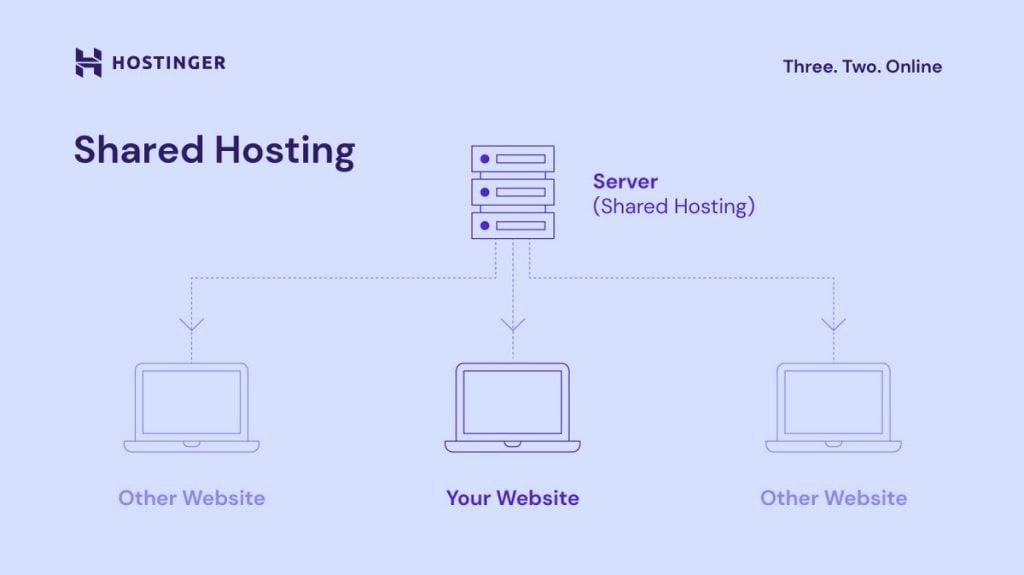
While shared hosting is an economical choice for many websites, it does come with inherent limitations that can affect your site’s performance. Resource allocation is perhaps the most significant drawback; multiple websites share the same server resources, which can lead to slow loading times or downtime, especially if another site experiences a traffic spike. Other factors include the use of shared IP addresses and limited control over server settings, which can restrict your ability to optimize your site for speed and efficiency. Without dedicated resources, even well-optimized sites can suffer when resource-heavy applications or scripts from neighboring sites place demands on the server.
Moreover, the security concerns of shared hosting can’t be overlooked. Because multiple sites are hosted on the same server, a vulnerability in one website can compromise the security of others. This risk of cross-site contamination can lead to potential data breaches, negatively impacting your site’s reputation and performance. Many shared hosting environments also limit the use of certain plugins or features, which can hinder your ability to implement robust security measures or utilize performance-enhancing tools. Consider these limitations when evaluating your site’s needs, as they can provide insight into whether upgrading to a more dedicated hosting solution may be warranted.
Key Factors Influencing Website Speed on Shared Hosting
When operating on shared hosting, several pivotal elements can directly affect your website’s loading time. One of the primary factors is server resource allocation. Since multiple websites share the same server, limited CPU and memory resources can lead to slower performance, especially during peak traffic times. Additionally, the quality of the shared hosting provider plays a crucial role; choices with slower servers or inadequate uptime can result in significant delays. High-quality providers often use advanced caching technologies that enhance speed, so opting for a reputable host can make an immediate difference.
Moreover, the website design and complexity are significant contributors to speed variations. Sites laden with heavy images, numerous plugins, or complex scripts will naturally take longer to load. Therefore, adhering to best practices in web design—such as optimizing images and minimizing HTTP requests—can enhance performance. Another key consideration is location of the server. A server situated farther from your target audience can lead to increased latency. Utilizing a Content Delivery Network (CDN) can mitigate this issue by caching your content across various global servers, ensuring faster access for users regardless of their location.
Essential Optimization Techniques for Improved Load Times
To achieve faster load times for your website on shared hosting, consider implementing asset optimization. This involves minimizing the size of CSS, JavaScript, and images. Utilize tools like UglifyJS or CSSNano to compress and minify your files, which reduces their size without affecting functionality. Additionally, enable Gzip compression on your server; this dramatically decreases page size before it reaches the client, improving load times significantly. Another key technique is to use lazy loading for images and videos. This method ensures that media files only load when they enter the viewport, cutting down on initial load times.
Another essential strategy is to leverage a Content Delivery Network (CDN). A CDN distributes your site’s static files across various servers located around the globe, allowing users to access the nearest server, which speeds up load times. Establish caching policies on your site to store frequently accessed data temporarily. You can use plugins like WP Super Cache or W3 Total Cache for WordPress, which can optimize delivery by serving cached versions of your pages. Here’s a simple table to summarize some key optimization techniques:
| Technique | Description | Benefit |
|---|---|---|
| Minification | Reduce file sizes by removing unnecessary characters from code. | Faster load times by decreasing file weight. |
| CDN | Distribute content across global servers. | Decreased latency and improved user experience. |
| Lazy Loading | Load media only as users scroll down the page. | Less initial data to load for faster access. |
Monitoring and Maintaining Your Sites Efficiency on Shared Hosting
Effectively monitoring your site’s performance on shared hosting is crucial for ensuring optimal operation. Start by utilizing tools such as Google Analytics and Pingdom to track your site’s performance metrics, including load times and user engagement. Regularly review your hosting dashboard to keep an eye on resource usage, such as CPU and memory limits. By understanding these metrics, you can make informed decisions about necessary upgrades or optimizations. Additionally, consider implementing a Content Delivery Network (CDN) to distribute traffic and serve your content faster, alleviating some of the strain on your shared server.
Maintaining your site’s efficiency involves a combination of proactive tactics and ongoing adjustments. Here are some key practices to consider:
- Optimize Images: Compress images without sacrificing quality to reduce load times.
- Minify CSS and JavaScript: Decrease file sizes and improve speed by removing unnecessary characters.
- Caching: Use caching plugins to store static copies of your site, enhancing load speeds for repeat visitors.
- Regular Backups: Schedule frequent backups to avoid data loss and minimize downtime during server issues.
These steps not only help maintain efficiency but also enhance user experience and SEO rankings, ultimately driving more traffic to your website.
In Retrospect
maximizing your site’s efficiency on shared hosting is not just about speed; it’s about creating a seamless user experience that keeps your visitors engaged and coming back for more. By implementing the tips we’ve discussed—from optimizing images and utilizing caching solutions to selecting the right plugins and monitoring performance—you will be well on your way to enhancing your website’s overall functionality and responsiveness.
Remember, the digital landscape is continually evolving, and staying proactive about your site’s performance will set you apart from the competition. Don’t hesitate to explore new tools and techniques as they become available, and regularly assess your site’s health to ensure it meets both your needs and the expectations of your audience.
If you found these tips helpful, be sure to share this article with fellow website owners or leave your thoughts in the comments below. Together, let’s forge a path to a more efficient and high-performing online presence. Happy hosting!