
Maximize Your Online Presence: Shared Hosting for Small Businesses
In today’s digital-first landscape, having a robust online presence is no longer a luxury but a necessity for small businesses seeking growth and visibility. Whether you’re a budding entrepreneur or an established local favorite, your website is the cornerstone of your online identity and customer engagement. One of the foundational elements that can significantly influence your website’s performance and reliability is your choice of hosting. Enter shared hosting—a cost-effective solution tailored for small businesses looking to enhance their online presence without breaking the bank. In this article, we’ll dive into the benefits of shared hosting, explore how it can maximize your online visibility, and provide actionable tips to ensure your business stands out in a crowded digital marketplace. Join us as we unravel the power of shared hosting and how it can be a springboard for your small business’s online success.
Table of Contents
- Understanding the Benefits of Shared Hosting for Small Businesses
- Evaluating Key Features to Look for in Shared Hosting Plans
- Optimizing Your Website Performance on Shared Hosting Platforms
- Harnessing SEO Strategies to Boost Your Online Visibility
- To Conclude
Understanding the Benefits of Shared Hosting for Small Businesses
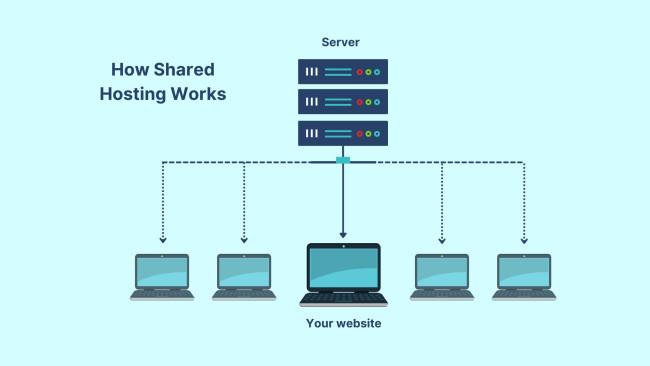
For small businesses looking to establish an online presence, shared hosting offers an ideal, cost-effective solution. By sharing server resources with other websites, businesses can significantly reduce their hosting expenses while still enjoying reliable performance. This setup allows for a straightforward website launch, enabling entrepreneurs to focus on building their brand rather than getting bogged down in technical details. Additionally, most shared hosting providers come with user-friendly control panels and one-click installations for popular software like WordPress, making it accessible even for those with limited technical skills.
Moreover, shared hosting packages often include a range of features that enhance productivity and effectiveness. These can include:
- Scalability: Easily upgrade to higher plans as your business grows.
- Customer Support: Access to technical assistance around the clock ensures immediate help whenever needed.
- Security Measures: Built-in security protocols safeguard your website from threats.
| Feature | Benefit |
|---|---|
| Cost Efficiency | Lower monthly fees for tight budgets. |
| Technical Maintenance | Server management handled by the hosting provider. |
| Backup Solutions | Automatic backups safeguard your data. |
Evaluating Key Features to Look for in Shared Hosting Plans
When selecting a shared hosting plan, it’s essential to assess various features that can significantly impact your website’s performance and security. One of the primary considerations should be uptime guarantees. Choose a provider that offers at least 99.9% uptime, ensuring that your website is accessible to customers consistently. Additionally, consider the storage and bandwidth limits. Look for plans that provide ample space for your files and sufficient bandwidth to accommodate your site’s traffic without additional fees. Security features such as SSL certificates and DDoS protection are also critical, especially for small businesses that handle transactions and sensitive data.
Moreover, the customer support offered by your hosting provider cannot be overlooked. Opt for plans that include 24/7 support through various channels like live chat, email, and phone to quickly address any issues that may arise. Another vital aspect to evaluate is the scalability options. As your business grows, you may need to upgrade your hosting plan without migrating your site to a different provider. check for extras such as website builders, one-click application installers, and backup services, which can enhance your web presence and ease the management of your business online.
Optimizing Your Website Performance on Shared Hosting Platforms
To enhance the performance of your website on shared hosting platforms, start by optimizing images. Large image files can significantly slow down your site, so consider compressing them without sacrificing quality. Tools like TinyPNG or ImageCompressor can help reduce file sizes. Additionally, implement lazy loading for images to ensure that they only load when users scroll to them, which can improve both speed and user experience. Also, minimize HTTP requests by combining CSS and JavaScript files, reducing the number of files that need to be loaded every time a user accesses your site.
Another essential factor in improving your website’s performance is leveraging a content delivery network (CDN). CDNs help distribute your website’s static content across multiple geographical locations, allowing users to access files from the nearest server, which speeds up loading time. Implementing a caching strategy is equally crucial; use caching plugins such as W3 Total Cache or WP Super Cache to store a static version of your webpage for returning visitors. This will minimize server load and improve the speed of subsequent visits. Consider the following strategies:
| Strategy | Benefits |
|---|---|
| Image Optimization | Reduces load time and enhances SEO. |
| Using a CDN | Improves global access speed and reliability. |
| Enabling Caching | Decreases server load and speeds up page access. |
| Minimizing Plugins | Enhances performance and security. |
Harnessing SEO Strategies to Boost Your Online Visibility
Implementing effective SEO strategies is essential for small businesses looking to establish a strong online presence. By focusing on both on-page and off-page optimization, you can significantly improve your website’s visibility in search engine results. Some crucial elements include:
- Keyword Research: Identify relevant keywords that potential customers are searching for related to your products or services.
- Content Quality: Create high-quality, informative content that engages your audience and keeps them on your site longer.
- Mobile Optimization: Ensure that your website is mobile-friendly, as an increasing number of users browse on their phones.
- Backlink Building: Seek opportunities to earn backlinks from reputable sites, enhancing your site’s authority.
To further illustrate the importance of these strategies, consider the following table that summarizes common SEO practices and their impact:
| SEO Practice | Description | Impact |
|---|---|---|
| Keyword Optimization | Incorporating targeted keywords into your content. | Increases searchability and relevance. |
| Site Speed | Optimizing page load times for a smoother user experience. | Reduces bounce rates, improving rankings. |
| Local SEO | Optimizing for local searches to reach your community. | Attracts local customers and enhances visibility. |
To Conclude
establishing a strong online presence is no longer just an option for small businesses; it’s a necessity. Shared hosting offers an accessible, cost-effective solution that enables you to launch and maintain your website with ease. By choosing the right shared hosting provider, you can unlock a host of benefits—reliable uptime, user-friendly interfaces, and essential support—allowing you to focus on what matters most: growing your business.
As you embark on your journey to maximize your online presence, take the time to evaluate your hosting needs and the features that align with your goals. The right shared hosting plan can be a powerful catalyst for your digital growth, providing the foundation for superior customer engagement and ultimately, increased revenue.
Remember, in the digital age, your website is often the first impression customers have of your business. With effective shared hosting, you can ensure that impression is a positive one. Invest wisely in your online infrastructure and watch as your small business thrives in the competitive online marketplace. Thank you for joining us on this exploration of shared hosting—here’s to your success!