
Mastering VPS: A Professional Guide to Hosting Multiple Websites
In today’s digital landscape, the ability to host multiple websites efficiently and reliably is essential for businesses and entrepreneurs alike. Virtual Private Servers (VPS) offer a robust solution to this challenge, providing the flexibility, performance, and security needed to manage various online projects seamlessly. Whether you’re a seasoned developer looking to optimize your hosting capabilities or a newcomer eager to explore the world of VPS, this comprehensive guide will empower you with the knowledge and tools required to master VPS and elevate your web hosting experience. From understanding the fundamental concepts of VPS to practical tips for configuration and management, we’ll walk you through the essential steps to ensure your websites thrive in a competitive environment. Join us as we delve into the intricacies of VPS hosting and learn how to harness its full potential to achieve your digital ambitions.
Table of Contents
- Understanding VPS Technology and Its Advantages for Hosting Multiple Websites
- Essential Configuration Tips for Optimizing Your VPS Performance
- Effective Strategies for Managing Website Security on a VPS
- Choosing the Right Control Panels and Software for Streamlined Website Management
- In Retrospect
Understanding VPS Technology and Its Advantages for Hosting Multiple Websites
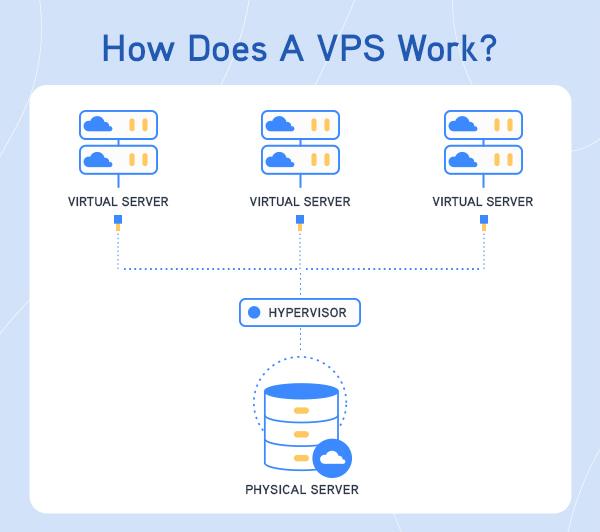
Virtual Private Server (VPS) technology offers a robust solution for individuals and businesses looking to host multiple websites with efficiency and control. Unlike shared hosting, where resources are divided among numerous users, a VPS allocates dedicated resources to each client, providing a stable environment that enhances performance. This separation ensures that the activities or traffic of one website do not adversely affect the others. With root access, users can install custom software, manage their configurations, and optimize their settings based on specific requirements, making VPS a highly flexible option for diverse web hosting needs.
The advantages of utilizing VPS for hosting multiple websites are multifaceted. Key benefits include:
- Scalability: Easily upgrade resources (CPU, RAM, storage) as your website grows.
- Enhanced Security: Isolation of each VPS instance reduces the risk of attacks from neighboring users.
- Cost-Effectiveness: More affordable than dedicated servers while offering comparable features.
- Full Customization: Complete control over the server environment to match project requirements.
| Feature | VPS Hosting | Shared Hosting |
|---|---|---|
| Resource Allocation | Dedicated | Shared |
| Performance | High | Variable |
| Customization | Full | Limited |
| Security Level | High | Moderate |
Essential Configuration Tips for Optimizing Your VPS Performance
To unlock the full potential of your VPS and enhance website performance, begin by fine-tuning the server’s configuration settings. Adjusting the PHP settings to suit your applications is a critical step. Consider modifying parameters such as memory_limit, upload_max_filesize, and post_max_size to accommodate the needs of your sites. Additionally, enabling OPcache can significantly reduce server load times by caching precompiled script bytecode, leading to quicker page delivery.
Next, focus on resource allocation and monitoring. To achieve a balanced performance across multiple websites, leverage tools like htop or netdata for real-time monitoring of CPU and memory usage. Implement regular backups and configure a firewa to bolster security. Furthermore, utilizing a Content Delivery Network (CDN) can offload traffic from your VPS, ensuring that visitors experience faster content delivery, regardless of their geographic location.
Effective Strategies for Managing Website Security on a VPS
Managing website security on a VPS involves implementing a multi-layered approach to safeguard your digital assets. Start with regular software updates; keeping your operating system, control panels, and applications up-to-date ensures you have the latest security patches. Additionally, employ firewall protection to monitor incoming and outgoing traffic, blocking malicious activity before it can infiltrate your server. Strengthening your access control protocols is also critical; use strong, unique passwords for all accounts and, whenever possible, enable two-factor authentication (2FA). This extra layer of security significantly reduces the risk of unauthorized access.
Incorporating security monitoring tools can further enhance your VPS security. Consider using intrusion detection systems (IDS), which can alert you to suspicious activity, and regularly back up your data not only to protect against data loss but also to facilitate quick recovery in the event of a breach. It’s also wise to engage in regular audits of your security measures, ensuring that you stay ahead of potential vulnerabilities. Below is a quick overview of tools and practices that can help maintain robust security on your VPS:
| Security Measure | Description |
|---|---|
| Firewall | Blocks unauthorized access and monitors traffic. |
| Updates | Regularly apply updates to software and applications. |
| Backups | Data backups to ensure recovery from data loss. |
| Monitoring Tools | Tools to detect unusual activities or intrusions. |
| Audits | Regular reviews of security protocols and measures. |
Choosing the Right Control Panels and Software for Streamlined Website Management
When managing multiple websites, selecting the appropriate control panels and software is essential for ensuring efficient operation and ease of maintenance. Opt for control panels that offer user-friendly interfaces and robust functionalities. Popular options include:
- cPanel – Known for its intuitive design and extensive features, making it ideal for beginners and professionals alike.
- Plesk – Provides a flexible framework suitable for Windows or Linux servers with a focus on supporting various web technologies.
- Webmin – An open-source alternative that offers comprehensive management tools for advanced users willing to customize their setups.
In addition to control panels, the choice of software plays a crucial role in optimizing performance and streamlining workflows. Consider integrating CMS solutions like WordPress or Joomla for content management, and additional tools such as:
- Softaculous – Automates the installation of applications and frameworks, saving you time and effort.
- FileZilla – A reliable FTP client to facilitate file transfers between your local system and servers.
- SSL Certificate managers – Essential for securing your websites and boosting their credibility.
| Feature | cPanel | Plesk | Webmin |
|---|---|---|---|
| Platform | Linux | Linux & Windows | Linux |
| User-Friendly | High | Moderate | Low |
| Customization | Limited | Moderate | High |
In Retrospect
mastering the intricacies of Virtual Private Servers (VPS) opens up a world of possibilities for web hosting, especially for those looking to manage multiple websites efficiently. By understanding the foundational concepts, leveraging advanced configurations, and implementing robust security measures, you can ensure optimal performance and reliability for all your online ventures.
As the digital landscape continues to evolve, having the right tools and knowledge can set you apart from the competition. Whether you’re a seasoned developer or a business owner looking to enhance your online presence, this professional guide equips you with the insights needed to navigate the VPS environment with confidence.
We encourage you to take the plunge and explore all the benefits VPS hosting has to offer. With careful planning and solid execution, you can transform your hosting experience, streamline your workflow, and ultimately achieve your online goals. Remember, mastery comes with practice, so don’t hesitate to test and refine your strategies as you go. Thank you for joining us on this journey to VPS mastery; may your multiple websites flourish and thrive!