
Mastering Shared Hosting: A Guide to Hosting Multiple Websites
In today’s digital landscape, establishing a robust online presence is vital for businesses, creatives, and entrepreneurs alike. As your projects grow, so does the need for streamlined website management and effective resource utilization. This is where shared hosting shines, offering a cost-effective solution that caters to the needs of individuals and small teams looking to host multiple websites under a single umbrella. In this comprehensive guide, we’ll explore the ins and outs of mastering shared hosting, breaking down its benefits, challenges, and best practices. Whether you’re managing multiple blogs, portfolios, or business sites, our expert insights will equip you with the knowledge to optimize your hosting experience, maximize performance, and scale seamlessly as your online ventures expand. Join us as we demystify shared hosting and set you on the path to becoming a proficient multi-site manager.
Table of Contents
- Understanding Shared Hosting and Its Benefits for Multiple Websites
- Choosing the Right Shared Hosting Provider for Your Needs
- Optimizing Performance and Security for Hosted Websites
- Managing and Updating Your Multiple Websites Efficiently
- Future Outlook
Understanding Shared Hosting and Its Benefits for Multiple Websites
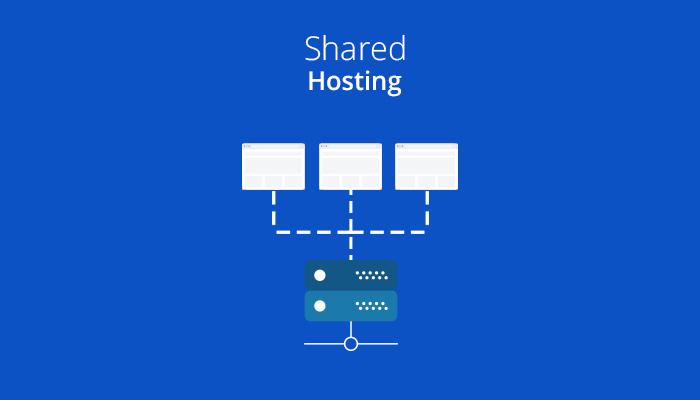
Shared hosting is an economical solution for managing multiple websites from a single server, offering numerous advantages that cater to both new and established webmasters. This setup allows multiple websites to share resources like CPU, RAM, and storage space, resulting in lower costs while still providing sufficient performance for most users. By consolidating your web presence under one hosting plan, you can easily manage different domains, streamline your website administration, and take advantage of cost-saving opportunities. Key benefits of shared hosting include:
- Affordability: Ideal for budget-conscious users
- Convenience: Simplified management of multiple sites in one place
- Ease of Use: User-friendly interfaces that facilitate website management
- Support: Access to customer service for technical assistance
Another compelling aspect is the accessibility of features that are essential for running multiple websites smoothly. Most shared hosting providers offer a variety of one-click installation tools, making it effortless to set up popular content management systems like WordPress. This means you can launch new projects quickly without extensive technical knowledge. Moreover, shared hosting often includes website backups, email accounts, and security features that protect all your sites under one umbrella, ensuring a hassle-free experience. Here is a comparison of typical features among various shared hosting services:
| Feature | Basic Plan | Advanced Plan |
|---|---|---|
| Websites Supported | 1-3 | Unlimited |
| Disk Space | 10 GB | 50 GB |
| Email Accounts | Up to 5 | Unlimited |
| SSL Certificate | Not Included | Free |
Choosing the Right Shared Hosting Provider for Your Needs
Choosing the right shared hosting provider is crucial for successfully managing multiple websites. When evaluating potential hosts, consider the essential features and services that will best meet your specific needs. Look for providers that offer scalability, allowing you to upgrade easily as your websites grow, and reliable uptime guarantees to ensure consistent access for your visitors. It’s also important to check for customer support availability, as responsive and knowledgeable support can save you valuable time during any technical hiccups.
Additionally, pay attention to the security features offered by the hosting provider. A good shared hosting service should include options such as SSL certificates and regular backups to protect your data. Price is undoubtedly a factor, but don’t let it be the sole deciding characteristic; consider the overall value provided instead. Research customer reviews and ask for recommendations to identify hosts with a good reputation. A comparison table can help visualize your options:
| Provider | Uptime | Support | Starting Price |
|---|---|---|---|
| Host A | 99.9% | 24/7 Live Chat | $3.99/month |
| Host B | 99.8% | Email Support | $2.99/month |
| Host C | 99.95% | Phone & Chat | $4.50/month |
Optimizing Performance and Security for Hosted Websites
When managing multiple websites on a shared hosting plan, it’s crucial to strike a balance between performance and security. Caching is one of the most effective ways to enhance your site’s speed. Utilizing plugins like W3 Total Cache or WP Super Cache can significantly reduce load times, making your sites more responsive. Additionally, leveraging Content Delivery Networks (CDN) helps distribute content globally, ensuring faster access for visitors regardless of their geographic location. Remember to optimize images by using formats such as WebP and employing lazy loading techniques to decrease initial load times and overall bandwidth usage.
Security should also be a top priority to protect your websites from potential threats. Start by implementing SSL certificates for all sites to encrypt data transmission. Regularly updating WordPress core, themes, and plugins is essential; you can automate updates to ensure your sites are always secure. It’s also advisable to utilize strong, unique passwords across your sites and enable two-factor authentication (2FA) for additional security. regularly monitor your websites for malware and vulnerabilities using tools such as Sucuri or Wordfence, which provide real-time security updates and ensure your sites remain safe from cyber threats.
Managing and Updating Your Multiple Websites Efficiently
Managing several websites can be a daunting task, but with the right strategies, you can streamline the process and maintain efficiency. First and foremost, consider implementing a centralized management system, such as a dashboard that allows you to oversee all your sites from one interface. This way, you can easily track updates, monitor performance, and access all necessary tools without logging in and out of each individual site. It’s also wise to establish a consistent update schedule for plugins, themes, and WordPress core files across all sites to enhance security and functionality.
In addition to a centralized management system, establishing effective workflows is crucial. You can create checklists for regular maintenance tasks, such as backups, security scans, and content updates. For better organization, consider using project management tools that allow you to assign tasks, set deadlines, and monitor progress. An added benefit is using a table to track important details about each site, like the last update or specific plugin requirements.
| Website | Last Update | Plugins Installed |
|---|---|---|
| siteone.com | 2023-10-15 | Yoast, WooCommerce |
| site-two.net | 2023-10-10 | Contact Form 7, Elementor |
| mysite.org | 2023-10-12 | WP Super Cache, Akismet |
Future Outlook
Conclusion
In the ever-evolving landscape of digital presence, mastering shared hosting is a crucial step for anyone looking to manage multiple websites efficiently and effectively. By understanding the nuances of resource allocation, security measures, and optimization techniques, you empower yourself to create a seamless experience for your visitors while maintaining a cost-effective solution.
As you embark on your journey of shared hosting, remember that the right tools and knowledge pave the way for success. Utilize the tips and strategies outlined in this guide to navigate the complexities of hosting multiple websites with confidence. Embrace the challenges, stay informed about updates in the industry, and continually optimize your sites for both performance and user experience.
Whether you’re a budding entrepreneur, a seasoned blogger, or a web developer, shared hosting offers a versatile and budget-friendly avenue to showcase your ideas and services online. With careful planning and dedication, you can turn your shared hosting environment into a thriving digital hub.
Thank you for following along, and best of luck on your multi-website hosting journey! If you have any questions or insights from your experiences, feel free to share in the comments below. Happy hosting!