
Mastering Page Builders: A Guide for WordPress Hosting
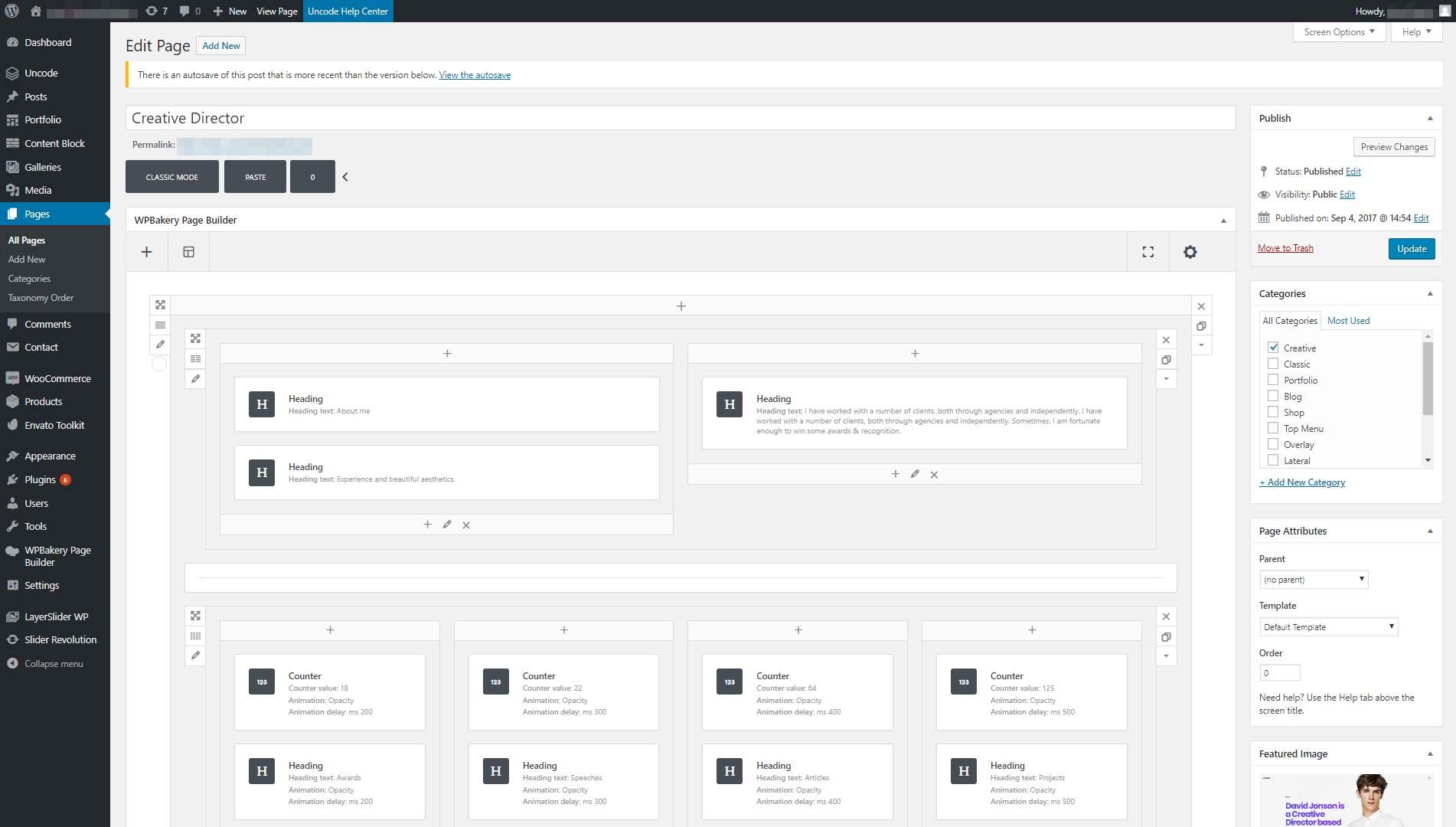
In the dynamic world of website creation, WordPress has firmly established itself as a go-to platform for users ranging from seasoned developers to novice bloggers. At the heart of this versatility lies the power of page builders—tools that enable users to design and customize their websites with ease, without the need for complex coding knowledge. Whether you’re launching a personal blog, an e-commerce site, or a portfolio, mastering these page builders can significantly enhance your site’s functionality and visual appeal. However, understanding how to effectively integrate these tools with your WordPress hosting is crucial for unlocking their full potential. In this comprehensive guide, we’ll break down the essentials of page builders, explore their key features, and provide tips to ensure seamless integration with WordPress hosting solutions. Whether you’re looking to elevate your existing site or build something remarkable from scratch, this guide will equip you with the knowledge to transform your vision into reality. Let’s dive in and start building!
Table of Contents
- Understanding the Fundamentals of Page Builders in WordPress Hosting
- Evaluating the Top Page Builders: Features, Pros, and Cons
- Optimizing Your Sites Performance with Effective Page Builder Techniques
- Common Challenges and Solutions When Using Page Builders in WordPress
- Wrapping Up
Understanding the Fundamentals of Page Builders in WordPress Hosting
Understanding how page builders work is crucial for anyone looking to create a stunning website on WordPress. Page builders are tools that allow users to design and create web pages without any coding knowledge. With an intuitive drag-and-drop interface, these builders simplify the process of crafting complex layouts and adding dynamic content. They typically come with a variety of pre-designed templates and elements, which help accelerate the web development process significantly. Some popular features include:
- Responsive Design: Ensuring your site looks good on all devices.
- Customization Options: Allowing you to tweak layouts, colors, and fonts easily.
- Third-Party Integrations: Supporting plugins for SEO, forms, and e-commerce.
When selecting a page builder, consider not only the ease of use but also its compatibility with your WordPress hosting. Not all page builders work seamlessly with every hosting provider, and some may require specific server configurations for optimal performance. Here’s a comparison of a few well-known page builders relevant to WordPress hosting:
| Page Builder | Ease of Use | Performance | Cost |
|---|---|---|---|
| Elementor | High | Optimized | Free / Premium |
| Beaver Builder | Moderate | Stable | Premium |
| Divi Builder | High | Excellent | Subscription |
Evaluating the Top Page Builders: Features, Pros, and Cons
When it comes to selecting the right page builder for your WordPress site, understanding the features, pros, and cons can significantly influence your decision-making process. Popular options such as Elementor, Beaver Builder, and Divi offer a range of functionalities that can cater to different needs. Elementor is renowned for its user-friendly drag-and-drop interface, extensive template library, and rich third-party add-ons, making it ideal for beginners and experienced developers alike. On the other hand, Beaver Builder is highlighted for its robust performance and ability to create highly customizable layouts, which is particularly advantageous for those looking to create complex designs with ease. Divi, with its advanced visual editor and powerful design capabilities, stands out for users who want a lot of customization options but may require a steeper learning curve.
While each page builder has its strengths, there are also important considerations to keep in mind. A few key drawbacks include the potential for bloated code and increased load times associated with some builders like Elementor. Additionally, users of Beaver Builder may find that while it’s great for reusable templates, it lacks some of the pre-designed layout options available in Elementor or Divi. Visual performance can also vary, with Divi noted for occasional bugs that necessitate updates for optimal usage. Below is a concise comparison of these builders for quick reference:
| Page Builder | Features | Pros | Cons |
|---|---|---|---|
| Elementor | Drag-and-drop, templates, widgets | Easy to use, extensive integrations | Can lead to bloated code |
| Beaver Builder | Custom layouts, reusable rows | Performance-focused, reliable | Fewer templates available |
| Divi | Visual editor, theme options | Highly customizable, strong community | Steeper learning curve |
Optimizing Your Sites Performance with Effective Page Builder Techniques
To enhance your website’s performance, it is crucial to adopt effective strategies when utilizing page builders. By following best practices, you can ensure that your site is not only aesthetically pleasing but also functions seamlessly. One primary technique is minimizing unnecessary elements. This can be achieved by limiting the use of heavy media files and opting for optimized images that load quickly. Furthermore, consider using built-in features of your page builder wisely. Streamlining your design with fewer animations and transitions can dramatically improve load times and user experience.
Another important aspect is leveraging caching and CDNs (Content Delivery Networks). Most page builders integrate well with caching plugins, which can compress and store frequently accessed data to reduce server load. Additionally, utilizing a CDN can help serve content from locations closer to your visitors, reducing latency. Implementing these optimizations not only boosts your site’s speed but also enhances search engine ranking, making it more accessible to broader audiences. Here’s a quick overview of the essential techniques:
| Technique | Benefits |
|---|---|
| Minimize Heavy Media Files | Improves load speed |
| Use Optimized Images | Reduces bandwidth use |
| Leverage Caching | Decreases server load |
| Implement a CDN | Enhances accessibility |
Common Challenges and Solutions When Using Page Builders in WordPress
Using page builders in WordPress offers flexibility and customization, but it can come with its fair share of challenges. One common issue is performance lag; heavy page builders can slow down your website, impacting user experience and SEO. To mitigate this, consider optimizing your images, using caching plugins, and selecting a lightweight theme that pairs well with your chosen page builder. Another frequent hurdle is compatibility with existing plugins or themes, which can lead to visual discrepancies or functionality issues. Always ensure that you keep your plugins and themes updated, and run tests after each update to catch potential conflicts early.
SEO optimization can also become complicated when using page builders, as their coded output may not always align with best practices. To address this challenge, utilize SEO plugins like Yoast SEO or Rank Math, which can help manage meta tags and readability scores effectively. Additionally, be mindful of overusing elements that require JavaScript, as excessive scripts can hinder site speed. You can enhance speed and performance by selectively enabling elements or using the built-in design optimizations found in most page builders. Below is a table summarizing these challenges and solutions:
| Challenges | Solutions |
|---|---|
| Performance Lag | Optimize images & use caching plugins |
| Compatibility Issues | Keep plugins/themes updated & run tests |
| SEO Optimization | Utilize SEO plugins & manage scripts |
| Overusing Elements | Use built-in optimizations & enable selectively |
Wrapping Up
As we conclude this comprehensive guide to mastering page builders in WordPress hosting, it’s clear that the right tools can transform your website from a mere online presence to a captivating digital experience. By understanding the capabilities of various page builders, you can effectively tailor your site to meet both your aesthetic and functional needs.
Remember, the key to success lies not only in choosing the right page builder but also in mastering its features to harness your creativity and streamline your workflow. Whether you’re a seasoned developer or just starting your journey in web design, taking the time to explore the vast possibilities that page builders offer will undoubtedly pay off in the long run.
We encourage you to experiment, stay updated on new trends and features, and always seek out the best hosting options to support your ambitions. With the knowledge and tools at your disposal, you’re well on your way to building stunning, user-friendly websites that stand out in today’s competitive online landscape.
Thank you for joining us in this exploration of WordPress page builders. Here’s to your success in mastering these powerful tools and creating websites that not only meet but exceed expectations! Happy building!