
Effective Strategies to Monitor WordPress Hosting Performance
Introduction: Unlocking Optimal Performance with Effective Monitoring Strategies for WordPress Hosting
In the fast-paced digital landscape, where every second counts, the performance of your WordPress site can be the difference between a satisfied visitor and a lost opportunity. As the engine behind 43% of all websites on the internet, WordPress’s popularity is matched only by the importance of ensuring its seamless operation. Whether you run a personal blog, a corporate website, or an eCommerce store, monitoring your hosting performance is crucial for delivering a reliable and swift user experience.
In this article, we delve into effective strategies that can help you keep a close eye on your WordPress hosting performance. From understanding key performance indicators to leveraging cutting-edge tools, we’ll equip you with the knowledge you need to optimize your site’s speed, uptime, and overall efficiency. By implementing these monitoring techniques, you’ll not only enhance user satisfaction but also boost your site’s search engine rankings and increase conversions. Join us as we explore the best practices that can transform your WordPress hosting experience.
Table of Contents
- Understanding the Importance of Monitoring WordPress Hosting Performance
- Key Performance Indicators to Track for Optimal Hosting Health
- Tools and Techniques for Effective Performance Monitoring
- Proactive Strategies to Enhance Your WordPress Hosting Experience
- The Way Forward
Understanding the Importance of Monitoring WordPress Hosting Performance
Monitoring the performance of your WordPress hosting is crucial for ensuring that your website operates efficiently and delivers a positive user experience. A slow-loading site can lead to high bounce rates, reduced customer engagement, and ultimately, loss of revenue. To maintain optimal performance, consider tracking key metrics such as load times, server response times, and overall uptime. By staying informed about these factors, you can promptly identify issues and implement solutions before they impact your visitors.
Implementing an effective monitoring strategy involves utilizing various tools and techniques to gain insights into your site’s performance. Here are some essential components to incorporate into your approach:
- Real-time Monitoring: Use tools such as Pingdom or UptimeRobot to keep tabs on your site’s uptime and performance.
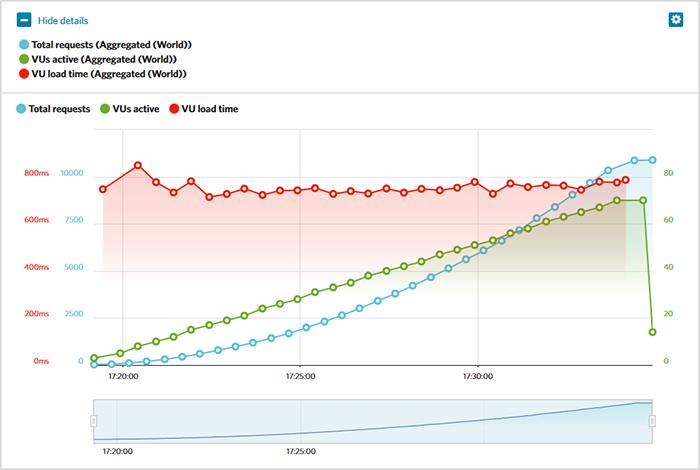
- Performance Testing: Regularly perform load testing with tools like Load Impact to assess how your hosting handles traffic spikes.
- Error Tracking: Employ solutions like Sentry or Google Analytics to capture and analyze website errors that can affect user experience.
| Metric | Recommended Threshold |
|---|---|
| Load Time | Under 3 seconds |
| Uptime | 99.9% |
| Server Response Time | Under 200 ms |
Key Performance Indicators to Track for Optimal Hosting Health
Monitoring the health of your WordPress hosting environment is crucial for ensuring optimal performance. To gauge this effectively, several key performance indicators (KPIs) should be regularly tracked. These include:
- Uptime Percentage: Aim for 99.9% uptime to ensure your site is always accessible.
- Page Load Time: Ideally, your pages should load in under 3 seconds.
- Server Response Time: Monitor how quickly your server responds to requests; under 200 ms is excellent.
- Traffic Volume: Keep an eye on the number of visitors to determine server strain.
- Resource Usage: Track CPU and memory usage to prevent overloads.
Another critical aspect of hosting health is error tracking. Important error metrics include:
| Error Type | Possible Cause | Frequency |
|---|---|---|
| 500 Internal Server Error | Faulty plugins or themes | Check after each update |
| 404 Not Found | Broken links or missing files | Weekly audit |
| Timeout Errors | Server overload | Monitor peak traffic times |
By keeping a close eye on these KPIs, you can proactively address performance issues and ensure your WordPress site runs smoothly.
Tools and Techniques for Effective Performance Monitoring
To achieve optimal performance monitoring for your WordPress hosting, leveraging the right tools and techniques is crucial. One widely used approach involves employing performance monitoring plugins, which seamlessly integrate into your WordPress dashboard. These plugins track essential metrics such as load time, uptime, and responsiveness. Popular options include:
- New Relic – Provides detailed insights into server performance.
- Query Monitor – Helps diagnose issues related to database queries.
- WP Performance Profiler – Evaluates overall site performance through real-time analytics.
In addition to plugins, utilizing external monitoring services can enhance your strategy. These services often provide a broader perspective by tracking performance from different global locations, ensuring that your audience receives a consistent experience regardless of their geographical location. Consider the following tools to augment your monitoring efforts:
- Pingdom – Offers detailed uptime and performance analysis.
- GTmetrix – Analyzes web speed and provides actionable recommendations.
- PageSpeed Insights – Google’s tool for measuring site performance and optimization suggestions.
Using these tools collectively can provide a robust monitoring system that not only highlights current performance issues but also helps in planning long-term improvements. Below is a brief comparison table summarizing the core features of a few popular performance monitoring tools:
| Tool | Core Feature | Real-time Monitoring | Uptime Alerts |
|---|---|---|---|
| New Relic | Advanced performance metrics | Yes | Yes |
| Pingdom | Uptime and response time tracking | Yes | Yes |
| GTmetrix | Speed analysis and optimization | No | No |
Proactive Strategies to Enhance Your WordPress Hosting Experience
In order to elevate your WordPress hosting experience, it’s essential to implement proactive strategies that focus on both performance metrics and user satisfaction. One of the first steps is to regularly conduct performance audits utilizing tools such as Google PageSpeed Insights or GTmetrix. These platforms provide valuable insights into your site’s loading speed, and pinpoint areas for improvement. Additionally, keeping a close eye on your site’s server response times is crucial; ideally, this metric should be under 200ms. By monitoring these factors, you can swiftly identify bottlenecks and optimize resource usage.
Another effective approach is to invest in a reliable Content Delivery Network (CDN) to distribute your website’s content across multiple servers globally. This not only enhances your site’s loading speeds for international visitors but also reduces the strain on your primary server. Moreover, consider implementing regular backups and updates for both your site and plugins, as outdated components can lead to vulnerabilities and slow performance. Here’s a quick checklist to keep in mind:
- Regular performance audits
- Monitor server response times
- Utilize a CDN for faster content delivery
- Implement routine backups
- Keep software and plugins updated
| Strategy | Benefits |
|---|---|
| Performance Audits | Identify slow points and optimize speed |
| CDN Implementation | Faster load times and reduced server load |
| Routine Backups | Protection against data loss |
| Regular Updates | Improved security and functionality |
The Way Forward
monitoring your WordPress hosting performance is not just a beneficial practice—it’s essential for maintaining a robust online presence. By implementing the strategies outlined in this article, you can ensure that your website runs smoothly, loads quickly, and delivers an excellent user experience. Regular performance assessments, combined with the right tools and metrics, can help you identify potential issues before they become significant problems, ultimately saving you time and resources.
Remember that a well-optimized website not only boosts your search engine rankings but also enhances user satisfaction and retention. Whether you’re a seasoned web administrator or just starting your WordPress journey, prioritizing performance monitoring will empower you to make informed decisions about your hosting environment.
Stay proactive, and don’t hesitate to revisit your strategy regularly as your website grows and evolves. With the right approach, you can enjoy the peace of mind that comes from knowing your site is performing at its best. Happy monitoring!