
Demystifying Bandwidth and Storage in Shared Hosting
In a digital landscape where online presence is paramount, understanding the nuances of web hosting can be the key to your success. Among the most pivotal concepts that often leave website owners scratching their heads are bandwidth and storage. While these terms may seem straightforward, their implications for performance, user experience, and ultimately, your website’s success are far more complex than they appear. This article aims to demystify these essential components of shared hosting, breaking down their meanings, functions, and the impact they have on your site’s efficiency and sustainability. Whether you’re a novice stepping into the world of hosting or a seasoned pro looking to refresh your knowledge, our exploration will provide clarity and equip you with the insights needed to make informed decisions about your web hosting needs. Join us as we unravel the intricacies of bandwidth and storage, empowering you to optimize your online presence effectively.
Table of Contents
- Understanding Bandwidth: Key Concepts and Myths
- Types of Storage Solutions in Shared Hosting Explained
- Optimizing Bandwidth Usage for Enhanced Performance
- Best Practices for Managing Storage in Your Shared Hosting Account
- To Conclude
Understanding Bandwidth: Key Concepts and Myths
Bandwidth often gets conflated with other terms, leading to misunderstandings that can hinder your web performance. In essence, bandwidth refers to the maximum rate of data transfer across a network path. To break it down simply, think of it as the width of a highway: the wider it is, the more cars (or data) can travel simultaneously. Moreover, bandwidth is generally measured in bits per second (bps), and factors such as the number of visitors to your site and the size of your hosted files play pivotal roles in determining how efficiently your bandwidth is utilized. Common misconceptions include:
- More bandwidth means faster load times: It’s not purely about quantity; website optimization also plays a crucial role.
- Unlimited bandwidth is truly unlimited: Providers often have fair usage policies that enforce limits under specific conditions.
- Bandwidth and storage are the same: While they interact, bandwidth pertains to data transfer speed, while storage refers to the amount of data you can store.
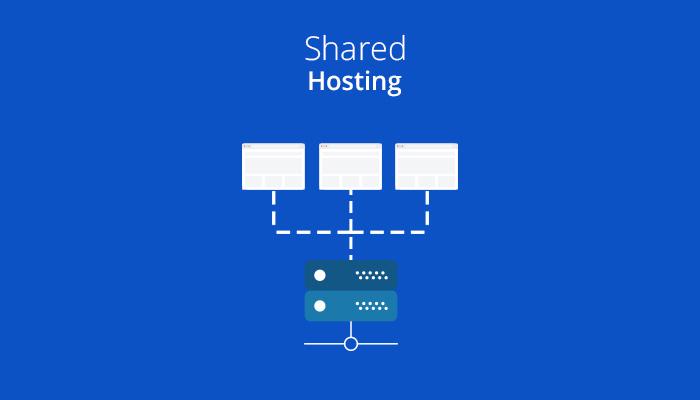
Storage, on the other hand, is a critical element of shared hosting that must not be overlooked. It represents the total amount of data files, databases, and media you can store on your server. In shared hosting environments, multiple websites coexist on the same server, which means resource allocation needs to be effectively managed. Here’s a simple comparison of storage options you might encounter:
| Storage Type | Description |
|---|---|
| SSD Storage | Faster data access and improved performance compared to traditional HDD. |
| HDD Storage | Typically more affordable, but slower in data retrieval times. |
| Cloud Storage | Scalable and flexible; pay for only what you use. |
Types of Storage Solutions in Shared Hosting Explained
When it comes to shared hosting, understanding the various types of storage solutions can significantly influence your website’s performance and scalability. Here’s a breakdown of the most common storage options:
- Standard SSD Storage: Offers faster read/write speeds compared to traditional HDDs, making it ideal for high-traffic websites.
- Cloud Storage: Provides flexibility and scalability by leveraging distributed servers and allowing quick data retrieval, great for dynamic content.
- Backup Storage: Typically included with shared hosting plans, this option ensures that your website data is securely stored and can be restored in case of emergencies.
Different hosting providers also offer varying features and limitations associated with these storage types. Here’s a quick comparison of storage solutions based on key attributes:
| Storage Type | Speed | Scalability | Backup Options |
|---|---|---|---|
| Standard SSD | High | Limited | Regular Backups |
| Cloud Storage | Variable | Flexible | On-Demand Backups |
| Backup Storage | N/A | Fixed | Comprehensive Backups |
Optimizing Bandwidth Usage for Enhanced Performance
To harness the full potential of your shared hosting experience, it’s essential to focus on optimizing bandwidth consumption. Begin by analyzing your website traffic patterns to identify peak hours and periods of low activity. This information can guide you in scheduling bandwidth-heavy tasks, such as backups and content uploads, during off-peak times. Additionally, implementing caching techniques can significantly reduce the amount of data transmitted over the network, allowing regular visitors to access your site’s content faster and using less bandwidth.
Another effective strategy involves minimizing large file transfers. Utilize image compression tools to reduce the size of media files without sacrificing quality. Furthermore, you can enhance load times and optimize bandwidth by using a Content Delivery Network (CDN). CDNs store copies of your website’s static content in multiple locations to serve users from the closest server, effectively decreasing load times and lessening bandwidth strain on your main server. Here’s a quick comparison of different optimization tactics:
| Optimization Strategy | Benefits |
|---|---|
| Caching | Reduces server strain by minimizing repeated data fetching |
| Image Compression | Lowers file size, improving load speed and reducing bandwidth |
| Content Delivery Network | Enhances speed and efficiency by distributing content globally |
Best Practices for Managing Storage in Your Shared Hosting Account
Managing storage in a shared hosting account requires a strategic approach to optimize performance and ensure that resources are used efficiently. Start by regularly monitoring your disk space usage, which can help identify unnecessary files and large media that may be taking up valuable storage. Implementing a clear organization system for your files will not only enhance accessibility but also streamline the backup process. Consider the following practices:
- Clean up unused files: Routinely delete old backups and unused plugins or themes.
- Utilize external storage: Offload large files, such as high-resolution images and videos, to third-party cloud services.
- Optimize images: Compress and resize images before uploading to save bandwidth and storage space.
Additionally, it’s essential to set rules for file naming and organization, which will help in maintaining structure—especially as your website grows. Using descriptive folder names will make it easier to locate files swiftly and will help in preventing any accidental overwrite. Regularly reviewing your database for redundant entries can also aid in conserving space. A simple way to keep track of your storage allocation is through:
| Item | Recommended Action |
|---|---|
| Database Size | Optimize and clean up |
| Media Files | Compress and archive |
| Backup Files | Delete old versions |
To Conclude
understanding bandwidth and storage is essential for anyone considering shared hosting for their website. With the insights we’ve explored, you should now feel more equipped to navigate the often-confusing landscape of web hosting. By recognizing the differences between bandwidth and storage, as well as how they affect your site’s performance, you can make more informed decisions—whether you’re launching a personal blog, an online portfolio, or a business site.
Remember, while shared hosting offers a cost-effective solution for many, it’s crucial to evaluate your specific needs and future growth potential. Don’t hesitate to reach out to your hosting provider with questions or clarifications; they can be a valuable resource in ensuring you choose the best plan for your requirements.
As technology continues to evolve, so will the demands on your website. Staying informed will help you adapt and succeed in the digital landscape. With a clear understanding of these fundamentals, you can confidently embark on your web hosting journey and focus on what truly matters: creating great content and connecting with your audience. Thank you for joining us in this exploration, and happy hosting!