
Unlocking the Benefits of Shared Hosting for Beginners
In today’s digital landscape, establishing an online presence has become essential for individuals and businesses alike. Whether you’re launching a personal blog, showcasing your portfolio, or kickstarting a small business website, the choice of web hosting can significantly impact your online journey. For beginners, the array of hosting options can be daunting, but shared hosting emerges as a popular and practical solution. This article will delve into the myriad benefits of shared hosting, explaining why it is an ideal choice for those just starting out. From cost-effectiveness to user-friendly management tools, we’ll explore how shared hosting not only meets the necessities of budding webmasters but also sets the foundation for future growth. Join us as we unlock the potential of shared hosting and guide you through its advantages tailored specifically for beginners.
Table of Contents
- Understanding Shared Hosting and Its Key Features
- Evaluating Cost-Effectiveness: Why Shared Hosting is Ideal for Beginners
- Ease of Use: Navigating User Interfaces and Control Panels
- Enhancing Performance: Tips for Optimizing Your Shared Hosting Experience
- The Way Forward
Understanding Shared Hosting and Its Key Features
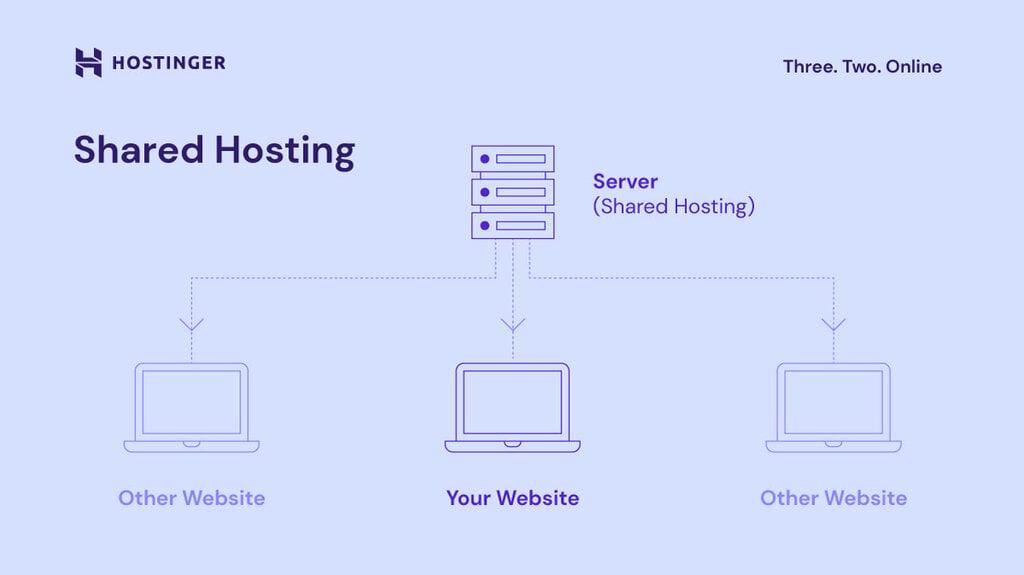
Shared hosting is an economical solution for those embarking on their web hosting journey. In this setup, multiple websites are hosted on a single server, allowing users to share resources such as bandwidth, storage, and processing power. This sharing model significantly reduces operational costs, making it an attractive choice for beginners, bloggers, and small businesses. The simplicity of management is another appealing feature, as most providers offer user-friendly control panels, enabling users to easily set up domains, install applications, and manage their email accounts.
Among the key characteristics that make shared hosting a popular option are:
- Affordability: With costs being divided among multiple users, shared hosting plans are usually budget-friendly.
- Automatic Updates: Many shared hosting providers handle software updates, ensuring that all users benefit from the latest security patches and feature enhancements.
- Technical Support: Beginners can rely on the technical support offered by hosting providers to troubleshoot issues and guide them through hosting-related challenges.
- Scalability: As your website grows, you can easily upgrade to higher plans or transition to more robust hosting solutions.
Below is a brief comparison table showcasing some of the popular shared hosting providers and their features:
| Provider | Monthly Cost | Storage | Support |
|---|---|---|---|
| Bluehost | $2.95 | 50 GB | 24/7 |
| HostGator | $2.75 | Unmetered | 24/7 |
| SiteGround | $3.99 | 10 GB | 24/7 |
This overview illustrates how shared hosting not only makes web hosting accessible but also provides a supportive environment for those looking to establish an online presence without the complexities often associated with managing a dedicated server.
Evaluating Cost-Effectiveness: Why Shared Hosting is Ideal for Beginners
When starting out in the digital world, cost can be a significant factor in selecting a hosting solution. Shared hosting provides an economical approach that enables beginners to establish their online presence without overwhelming financial commitments. By sharing server resources with other websites, users benefit from lower operating costs, making it an attractive option for new ventures. The affordability of shared hosting often includes essential services such as automated backups, technical support, and user-friendly control panels, which simplifies the technical side of website management for those just starting.
Moreover, the combined services offered by shared hosting providers can further enhance cost-effectiveness. Many plans incorporate features that allow beginners to take advantage of scaling options as their website grows. This means that as you expand your online footprint, you can seamlessly upgrade to higher-tier plans without any major disruptions. Here are some typical features included in shared hosting that contribute to its overall value:
- Affordable Pricing: Ideal for those on a tight budget.
- Pre-installed Applications: Easy installation of CMS like WordPress, which saves time.
- Customer Support: 24/7 assistance for troubleshooting and queries.
| Feature | Shared Hosting | Other Hosting Types |
|---|---|---|
| Cost | Low | High |
| Resource Sharing | Yes | No |
| Technical Support | Included | Variable |
Ease of Use: Navigating User Interfaces and Control Panels
One of the standout advantages of shared hosting for beginners is the simplicity of its user interfaces and control panels. Most hosting providers offer intuitive dashboards that are designed to be user-friendly, ensuring that even those with minimal technical experience can navigate their way easily. Common features you can expect from these interfaces include:
- Drag-and-drop functionality for file management
- One-click application installations for popular content management systems (CMS) like WordPress
- Simple email setup and management tools
The layout of these control panels is often clean and organized, allowing new users to focus on what matters most: setting up their website. With helpful tutorials and FAQs integrated directly into the control panel, beginners can find answers to common questions without needing to reach out for support. Many providers even include features such as:
- Step-by-step wizards for setting up websites
- Performance monitoring tools to track website health
- User-friendly backup options to safeguard data
| Feature | Benefit |
|---|---|
| One-click installations | Quickly launch your site without technical struggles |
| Performance analytics | Monitor site traffic and optimize functionality |
Enhancing Performance: Tips for Optimizing Your Shared Hosting Experience
To maximize the potential of your shared hosting environment, consider implementing these essential strategies. First and foremost, ensure that your website is optimized for speed. This can be achieved through various methods such as compressing images, enabling browser caching, and minimizing CSS and JavaScript files. Another key element is choosing the right Content Management System (CMS) or website builder; lightweight platforms often perform better on shared hosting plans. In addition, consider using a Content Delivery Network (CDN) to distribute your content globally, which reduces load times significantly for users regardless of their geographic location.
Fast loading times aren’t the only priority; security measures are equally vital to protect your site from potential threats. Regularly update your software, plugins, and themes to safeguard against vulnerabilities. Implementing SSL certificates is crucial as it encrypts data exchanged on your site and enhances your credibility with users. Additionally, choose reliable backup solutions to ensure your website can be restored quickly in case of unforeseen issues. By following these best practices, you can significantly enhance the performance and reliability of your shared hosting experience.
The Way Forward
shared hosting presents an excellent starting point for beginners venturing into the world of website creation and management. Its affordability, user-friendly interfaces, and robust support systems make it a practical choice for those looking to establish their online presence without overwhelming complexity. As you embark on your digital journey, remember that shared hosting not only provides the foundational tools you need but also opens the doors to future growth and possibilities. Whether you aim to run a personal blog, a small business site, or a portfolio, embracing shared hosting can help simplify your path toward success. As you grow in your web endeavors, keep learning, experimenting, and adapting. With shared hosting, the initial step of launching your website is just the beginning of a fulfilling online experience. Happy hosting!