
Understanding Hosting Software’s Impact on VPS Performance
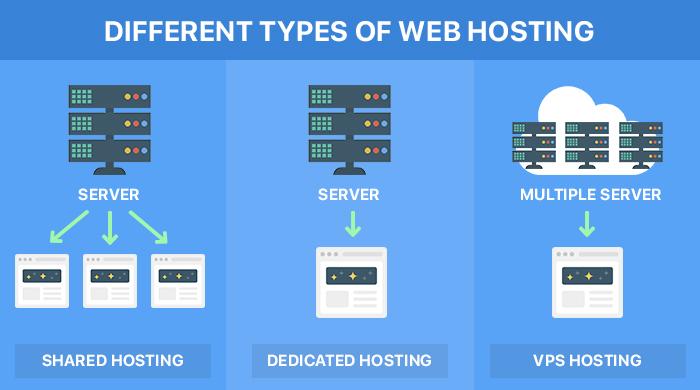
In the dynamic landscape of web hosting, Virtual Private Servers (VPS) have emerged as a preferred choice for businesses and developers seeking a balance between power, flexibility, and cost-effectiveness. However, the true potential of any VPS can only be unlocked by the hosting software that drives it. From operating systems to control panels, the software environment plays a critical role in determining not just the performance and security of your server, but also the overall efficiency of the applications running on it. In this article, we will explore the intricate relationship between hosting software and VPS performance, examining how different configurations, software choices, and optimizations can significantly impact your server’s responsiveness, scalability, and reliability. Whether you are a seasoned IT professional or a newcomer to the world of VPS hosting, understanding these nuances will empower you to make informed decisions that enhance your digital infrastructure. Join us as we delve into the essentials of hosting software and its profound effect on your VPS experience.
Table of Contents
- The Role of Hosting Software in Enhancing VPS Efficiency
- Key Performance Metrics Influenced by Hosting Software
- Best Practices for Selecting Optimal Hosting Solutions
- Troubleshooting Common VPS Performance Issues Related to Software
- Future Outlook
The Role of Hosting Software in Enhancing VPS Efficiency
To truly optimize the performance of Virtual Private Servers (VPS), the choice of hosting software can significantly influence overall system efficiency. The integration of robust hosting applications enables users to leverage enhanced resource management and application deployment. Key advantages include:
- Improved Scalability: Hosting software allows seamless resource allocation as traffic demands fluctuate.
- Enhanced Security: Advanced security features by leading software can protect against unauthorized access and vulnerabilities.
- Better Monitoring Tools: Integrated analytics can help track performance metrics in real-time, allowing for reactive optimizations.
Additionally, selecting the right hosting platform can lead to reduced downtime and faster load times. For instance, utilizing containerization technology can facilitate application isolation and minimize interference, thus improving response times. Consider the following comparison of popular hosting software:
| Hosting Software | Key Feature | Performance Rating |
|---|---|---|
| cPanel | User-friendly Interface | 4.5/5 |
| Plesk | Enhanced Security Tools | 4.8/5 |
| Webmin | Flexible Management Options | 4.2/5 |
Key Performance Metrics Influenced by Hosting Software
The performance of a Virtual Private Server (VPS) can be significantly affected by the choice of hosting software. Several key performance metrics emerge as critical indicators of how well the VPS operates, including CPU Utilization, Memory Usage, Disk I/O Rates, and Network Latency. Each of these metrics can experience variation based on the efficiency of the software stack in use. For example, an optimized hosting environment can reduce CPU cycles wasted on unnecessary processes, leading to lower CPU utilization, while memory-efficient applications can allow more resources to be available for critical tasks, enhancing overall performance.
Moreover, monitoring these performance metrics allows for proactive management and optimization of server resources. Employing hosting software that supports real-time analytics can help identify performance bottlenecks and facilitate better resource allocation. Here’s a summary of how hosting software can influence vital performance metrics:
| Performance Metric | Influenced By | Potential Impact |
|---|---|---|
| CPU Utilization | Efficient process management | Reduces lag, increases responsiveness |
| Memory Usage | Optimized memory allocation | Enables larger applications to run smoothly |
| Disk I/O Rates | Faster file system access | Boosts application load times |
| Network Latency | Quality of network protocol | Improves user experience and response times |
Best Practices for Selecting Optimal Hosting Solutions
Choosing the right hosting solution for your Virtual Private Server (VPS) can profoundly affect performance and reliability. Prioritize scalability, ensuring that the hosting provider allows for easy upgrades as your business grows. Look for options that offer customizable resources, including CPU, RAM, and storage, tailored to your website’s needs. Additionally, consider providers that offer transparent pricing structures to avoid unexpected costs down the line. Evaluating customer support is equally important; opt for hosts that provide 24/7 assistance via multiple channels, such as live chat, email, or phone. This can dramatically reduce downtime and mitigate issues swiftly.
Furthermore, pay attention to the location of data centers, as this can impact loading speeds and SEO performance. If your target audience is based in a specific region, choosing a provider with nearby data centers can enhance user experience. It’s also wise to assess the provider’s security measures, such as DDoS protection and regular backups, to safeguard your data. Lastly, look for hosting solutions with a solid reputation; customer reviews and performance benchmarks can provide valuable insights into the reliability and speed of the service. Here’s a quick comparison table of key factors to consider:
| Feature | Importance Level |
|---|---|
| Scalability | High |
| Transparent Pricing | Medium |
| Customer Support | High |
| Data Center Location | Medium |
| Security Measures | High |
Troubleshooting Common VPS Performance Issues Related to Software
When dealing with performance issues on your Virtual Private Server (VPS), it’s essential to explore the software layer as a potential culprit. Outdated software can significantly hinder performance, leading to slow response times and inefficient resource utilization. Ensure that all installed applications, operating systems, and packages are kept up to date to benefit from performance improvements, security patches, and bug fixes. Additionally, the configuration settings of your software can heavily influence load times and resource handling. Poorly configured web servers, for example, can lead to excessive memory usage or slow database queries, which affects overall performance.
Another common issue arises from conflicting software running on the same VPS. Application incompatibilities can cause CPU spikes or memory leaks, leading to degraded performance. Regularly monitor your server’s performance metrics to identify and troubleshoot these conflicts early. It’s also worth considering the resource consumption of various installed services. Some software options are inherently heavier than others. Below is a simple table comparing the resource usage of popular web server options:
| Web Server | Average Memory Usage | Performance Rating |
|---|---|---|
| Apache | 100 MB | ★★★☆☆ |
| Nginx | 50 MB | ★★★★☆ |
| LiteSpeed | 60 MB | ★★★★★ |
Future Outlook
grasping the relationship between hosting software and VPS performance is essential for anyone looking to optimize their virtual private server environment. The right hosting software not only enhances speed and reliability but also ensures that you can effectively scale your resources as your needs evolve. By understanding the intricacies of how different software solutions interact with your VPS, you can make informed choices that align with your specific requirements, whether that’s for personal projects or enterprise-level applications.
As you navigate the landscape of hosting options, consider taking the time to evaluate the software that powers your VPS. Remember, performance is not just a metric—it’s a cornerstone of user experience and operational success. By investing in quality hosting software, you’re not only safeguarding your applications but also setting the stage for future growth.
Thank you for joining us on this exploration of VPS performance and hosting software. We hope this article has equipped you with valuable insights to enhance your server setup and drive your projects forward. If you have any questions or would like to share your experiences, feel free to leave a comment below. Happy hosting!