
Understanding cPanel: Essential Tool for Web Hosting Success
Understanding cPanel: An Essential Tool for Web Hosting Success
In today’s digital landscape, having a robust online presence is paramount for businesses and individuals alike. Whether you’re launching a personal blog, an e-commerce store, or a corporate website, the foundation of your online success often lies in effective web hosting. Enter cPanel—a powerful and intuitive control panel that has become a staple for web hosting management. If you’re navigating the complexities of web hosting, understanding cPanel can significantly streamline your experience, empowering you to manage your site with confidence and ease. In this article, we’ll delve into the core functionalities of cPanel, exploring how it simplifies tasks like domain management, file uploading, and email configuration, ultimately setting the stage for your online success. Whether you’re a seasoned web developer or a novice just starting out, grasping the ins and outs of cPanel is an essential step in your web hosting journey. Let’s unlock the potential of this indispensable tool together!
Table of Contents
- Understanding the Core Features of cPanel for Effective Web Management
- Navigating the cPanel Interface: Tips for Streamlined Workflow
- Leveraging cPanels Tools for Enhanced Website Performance
- Common cPanel Challenges and Best Practices for Resolution
- Closing Remarks
Understanding the Core Features of cPanel for Effective Web Management
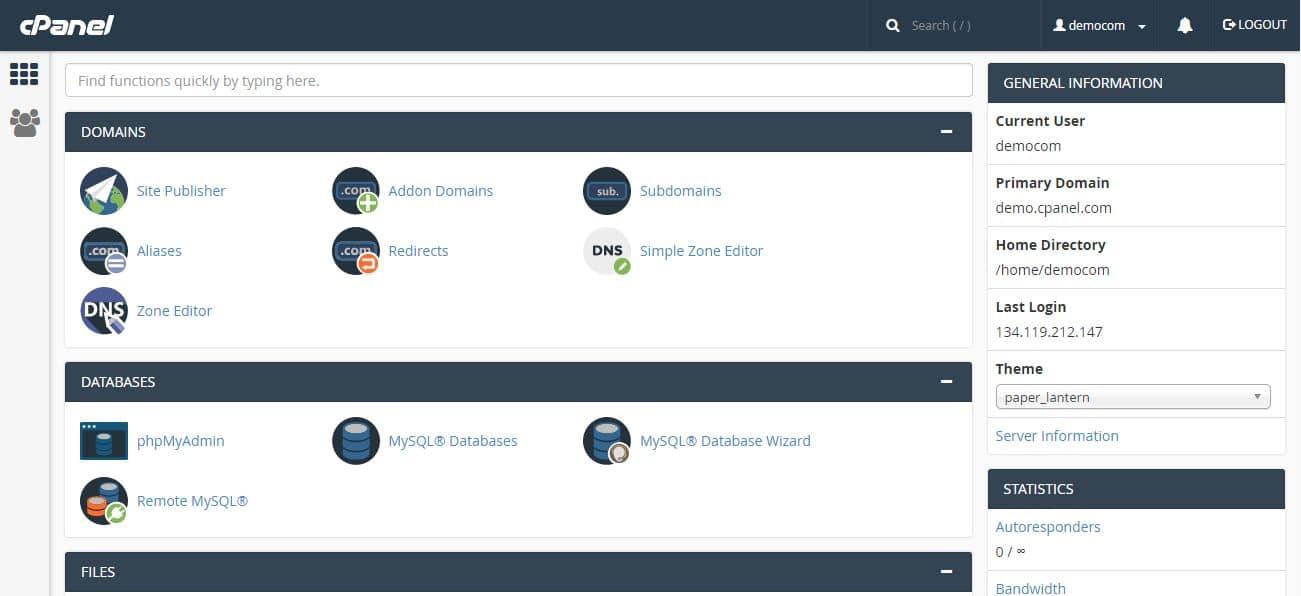
cPanel is a powerful web hosting control panel that simplifies the management of your website. With its user-friendly interface, users can easily navigate through an array of features designed to provide an efficient hosting experience. File Management is one of the core features, allowing users to upload, delete, and organize files through the intuitive File Manager. Additionally, Domain Management tools enable users to add and manage domains, subdomains, and parked domains effortlessly, ensuring complete control over your online presence.
Moreover, cPanel offers robust Database Management capabilities, supporting both MySQL and PostgreSQL databases. Users can create and manage databases, as well as access phpMyAdmin through cPanel for more advanced database tasks. Email Management is equally comprehensive, providing tools for setting up email accounts, managing forwarders, and accessing webmail. Below is a brief overview of these core features:
| Feature | Description |
|---|---|
| File Manager | Manage files and folders easily without needing FTP tools. |
| Domain Management | Add, remove, and manage your domains with minimal effort. |
| Database Management | Access advanced database tools and easily manage your MySQL or PostgreSQL databases. |
| Email Management | Create and manage email accounts, along with advanced features like SpamAssassin. |
Navigating the cPanel Interface: Tips for Streamlined Workflow
To enhance your efficiency while navigating the cPanel interface, consider customizing your dashboard for quick access to frequently used tools. You can rearrange icons by simply dragging them, allowing you to prioritize essential functions such as File Manager, Email Accounts, and Database Management right on your home screen. Additionally, using the search bar at the top of the interface can save you time when looking for specific features. By typing the relevant keyword, cPanel immediately filters options, guiding you to the desired tool without unnecessary scrolling.
Another crucial tip is to leverage the Metrics section for insightful data analysis. This area provides various analytics tools, including Awstats, Webalizer, and Visitors, which can help you track your website’s performance. For example, understanding visitor trends and resource usage can help you make informed decisions about optimization and scalability. Incorporating these insights into your regular workflow can pave the way for a proactive approach to site management, ultimately leading to improved performance and user experience.
Leveraging cPanels Tools for Enhanced Website Performance
When it comes to optimizing your website’s performance, cPanel is a powerhouse equipped with a variety of tools designed to enhance every aspect of your site. By harnessing features like Caching, File Manager, and Resource Usage Monitoring, you can significantly improve load times and overall user experience. Embracing these utilities not only boosts website speed but also promotes better SEO rankings, ultimately driving more traffic to your platform. Here are some essential tools to consider:
- Optimized Apache Configurations: Adjust server settings for enhanced performance.
- Content Delivery Network (CDN) Integration: Utilize CDNs for faster content delivery across geographic locations.
- Image Optimization: Use built-in optimization tools to compress images without losing quality.
Another valuable feature within cPanel is the Softaculous auto-installer, which allows for the swift installation of essential applications and frameworks. This tool is indispensable for maintaining website efficiency by enabling timely updates and installations of plugins that aid in performance optimization. The table below highlights some popular applications that can enhance your site’s functionality:
| Application | Purpose |
|---|---|
| WordPress | Blog and CMS |
| WooCommerce | E-commerce |
| Joomla | Content Management |
| Drupal | Advanced CMS |
Utilizing these tools in cPanel allows you to efficiently manage your website while ensuring its peak performance. By regularly monitoring your site’s metrics and employing the various features offered, you can maintain a high-performing environment and foster an experience that keeps visitors returning for more.
Common cPanel Challenges and Best Practices for Resolution
Users frequently encounter several challenges while navigating cPanel, and being aware of these issues can significantly enhance your experience. Issues such as forgotten passwords, database errors, and email configuration headaches are common stumbling blocks. Many users also grapple with understanding resource limitations set by their hosting plans, leading to unexpected downtime or performance bottlenecks. To tackle these hurdles effectively, it’s essential to familiarize yourself with cPanel’s extensive documentation and support community. Leveraging forums and tutorials can provide practical solutions, while using the built-in File Manager and Backup Wizard features can simplify managing files and restoring previous versions.
Implementing best practices can further mitigate these challenges, ensuring a smoother cPanel experience. Here are a few key strategies to adopt:
- Regular Backups: Schedule daily or weekly backups to safeguard your data.
- Security Measures: Use strong passwords and enable two-factor authentication to protect your accounts.
- Monitoring Resources: Regularly check usage stats to avoid exceeding server limits and maintain optimal performance.
- Stay Updated: Keep your website’s software, plugins, and themes updated to minimize security risks.
| Challenge | Best Practice |
|---|---|
| Forgotten Password | Utilize the password recovery feature. |
| Database Errors | Regularly optimize and repair databases. |
| Email Configuration | Follow guidelines for setting up email clients. |
Closing Remarks
cPanel stands out as an essential tool for anyone looking to navigate the complex world of web hosting with ease and efficiency. Whether you’re a seasoned developer or a newcomer, cPanel simplifies the management of your hosting environment, enabling you to focus more on building your website and less on the technical intricacies. Its user-friendly interface and robust features ensure that you have all the necessary tools at your fingertips to maintain your site effectively, from setting up email accounts to managing databases and securing your data.
As you embark on your web hosting journey, understanding the capabilities of cPanel will undoubtedly equip you for success. Remember that consistent practice and exploration of its features can turn a complex task into a seamless experience. We encourage you to delve deeper into cPanel’s functionalities to maximize your web hosting potential and create a vibrant online presence.
Thank you for joining us in this exploration of cPanel. Stay tuned for more insights and tips to enhance your web hosting mastery, and don’t hesitate to reach out with any questions or topics you’d like us to cover in future articles. Happy hosting!