
Top Tips for Effectively Managing Your Shared Hosting Account
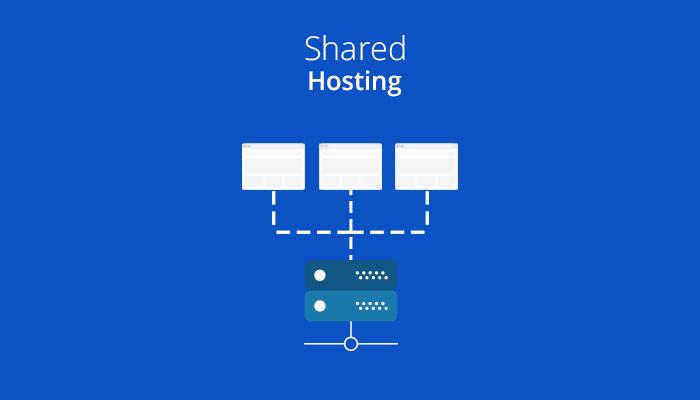
In today’s digital landscape, where the online presence of businesses and individuals is more crucial than ever, shared hosting has emerged as a go-to solution for many. It offers an affordable and user-friendly way to launch websites without the complexities of dedicated servers. However, managing a shared hosting account can often feel overwhelming, especially for those who are new to the process. From resource allocation to ensuring optimal performance, there’s a lot to keep in mind. In this article, we’ll explore the top tips for effectively managing your shared hosting account—insights that will help you maximize your resources, enhance your website’s performance, and navigate the sometimes perplexing world of web hosting with confidence. Whether you’re a seasoned site owner or just starting out, these strategies will empower you to take control of your online space. Let’s dive in!
Table of Contents
- Understanding Your Shared Hosting Plan and Features
- Enhancing Security Measures for Your Website
- Optimizing Performance Through Resource Management
- Regular Maintenance Practices for a Smooth Experience
- In Summary
Understanding Your Shared Hosting Plan and Features
When it comes to managing your shared hosting account, it’s essential to have a clear understanding of the features included in your plan. Shared hosting typically means that your website shares server resources with other websites, making it a cost-effective solution for many. Key aspects to be aware of include:
- Disk Space: This is the amount of storage you have for your website’s files and databases. Monitor usage to avoid hitting limits.
- Bandwidth: This refers to the data transfer limit. Keep track of your site’s traffic to ensure you don’t exceed your plan’s allowance.
- Support Services: Identify the type of customer support available, such as live chat or email, and their response times.
- Control Panel: Familiarize yourself with the control panel provided (like cPanel or Plesk), as this is where you’ll manage your hosting account.
Understanding these features allows you to optimize performance and prevent potential issues. Additionally, many hosting providers offer installation tools that simplify adding applications like WordPress or Joomla, which can enhance your website’s functionality without requiring extensive technical knowledge. Here’s a simple table outlining common features you might find in shared hosting plans:
| Feature | Details |
|---|---|
| Max Domains | 1- unlimited depending on the plan |
| Email Accounts | Varies, often includes 1-5 addresses |
| SSL Certificate | Typically included for secure connections |
| Backups | Daily, weekly, or manual options |
Enhancing Security Measures for Your Website
Ensuring the safety and security of your website is paramount, especially when utilizing shared hosting accounts. Shared environments can expose vulnerabilities if not managed correctly. Begin by implementing strong passwords not just for your hosting account but also for your FTP, databases, and CMS. Use a password manager to generate and store complex passwords, incorporating a mix of letters, numbers, and special characters. Additionally, regularly update your passwords every few months to further enhance security.
Another effective measure includes installing SSL certificates to enable HTTPS, which encrypts data transferred between your website and its visitors, building trust and improving your site’s SEO. Furthermore, regularly monitor user access and permissions, ensuring only necessary staff have administrative roles. To streamline your security efforts, consider setting up automated backups and utilizing security plugins tailored to your platform, which can help defend against common threats like malware and unauthorized access:
| Backup Type | Frequency | Storage Location |
|---|---|---|
| Full Backup | Weekly | Cloud Storage |
| Database Backup | Daily | Local Server |
| Incremental Backup | Every Hour | Remote Server |
Optimizing Performance Through Resource Management
Effective resource management is crucial for optimizing the performance of your shared hosting account. Since multiple users share the same server resources, being mindful of how you utilize these resources can significantly enhance your website’s speed and reliability. Here are some key strategies to consider:
- Monitor Resource Usage: Regularly check your bandwidth, CPU, and memory consumption. Most hosting providers offer dashboards where you can track this data easily.
- Optimize Images and Files: Compress images and remove unnecessary files to free up disk space and improve loading times. Tools like TinyPNG or WP Smush can be incredibly helpful.
- Leverage Caching: Use caching plugins to reduce server load. Caching stores static versions of your web pages, allowing quicker access for returning visitors.
- Limit Plugins: While plugins can enhance your website’s functionality, too many can slow it down. Disable and delete any plugins that are not essential.
In addition to these practices, consider implementing a content delivery network (CDN) for better distribution of your website’s assets. CDNs can significantly reduce loading times by storing copies of your site in various locations around the globe. Here’s a simple table outlining popular CDN providers:
| Provider | Key Feature | Best For |
|---|---|---|
| Cloudflare | Free tier available | Small to medium websites |
| Akamai | Enterprise-level solutions | Large businesses |
| KeyCDN | Pay-as-you-go pricing | Budget-conscious users |
Regular Maintenance Practices for a Smooth Experience
Ensuring optimal performance of your shared hosting account is primarily about implementing routine maintenance practices. Regularly backing up your data is essential; it not only secures your content against data loss but also saves time during server migrations or restoration. Schedule automated backups if your hosting provider offers this feature, or consider using plugins that simplify the process for WordPress sites. Additionally, keeping themes, plugins, and core files up-to-date is crucial to mitigate security vulnerabilities. Older versions often contain bugs that may compromise the functionality and safety of your website.
Furthermore, monitoring resource usage can help you identify and address potential issues before they escalate. You can use tools and plugins to monitor CPU, bandwidth, and memory usage. To present this data more efficiently, you may want to utilize a simple table to track your resources, which can be easily integrated into your dashboard.
| Resource | Usage (%) | Status |
|---|---|---|
| CPU | 20 | Normal |
| Memory | 75 | High |
| Bandwidth | 50 | Normal |
it’s wise to periodically audit your website for broken links and optimize your databases to enhance performance. Tools and plugins are available for checking link integrity and cleaning up database clutter. By investing a few minutes into these regular maintenance tasks, you can ensure that your shared hosting account runs smoothly, efficiently, and securely.
In Summary
efficiently managing your shared hosting account is vital for ensuring your website’s performance, security, and overall success. By following the tips outlined in this article—such as regularly monitoring your resource usage, implementing strong security measures, and staying organized with your files—you can maintain an optimal hosting environment that fosters growth and enhances user experience.
Remember, a well-managed hosting account not only saves you time and headaches but also sets the foundation for your online presence. Whether you’re running a personal blog or a growing business, these best practices will help you navigate the often-complex world of shared hosting with confidence and ease.
Thank you for reading! We hope you found these insights beneficial. If you have any questions or would like to share your own tips and experiences, feel free to leave a comment below. Happy hosting!