
Step-by-Step Guide: Upgrading from Shared to VPS Hosting
In today’s digital age, the performance of your website can make or break your online presence. For many entrepreneurs and businesses, shared hosting serves as a reliable starting point, offering a budget-friendly option to get a website up and running. However, as your traffic grows and your needs become more complex, you may find that shared hosting no longer meets your requirements. If you’re experiencing slow load times, limited resources, or a lack of control over your server environment, it might be time to consider an upgrade to Virtual Private Server (VPS) hosting.
In this comprehensive guide, we’ll walk you through the benefits of moving to a VPS, key factors to consider, and a step-by-step process to ensure a smooth transition. Whether you’re a seasoned web admin or a first-time user ready to elevate your site’s performance, our insights will help you make the best decisions for a more powerful and flexible hosting solution. Let’s dive in and explore how upgrading to VPS hosting can empower your online endeavors.
Table of Contents
- Understanding the Differences Between Shared Hosting and VPS Hosting
- Assessing Your Websites Needs: When Is the Right Time to Upgrade
- A Comprehensive Checklist for a Smooth VPS Migration
- Top VPS Hosting Providers: Recommendations for Every Budget
- The Way Forward
Understanding the Differences Between Shared Hosting and VPS Hosting
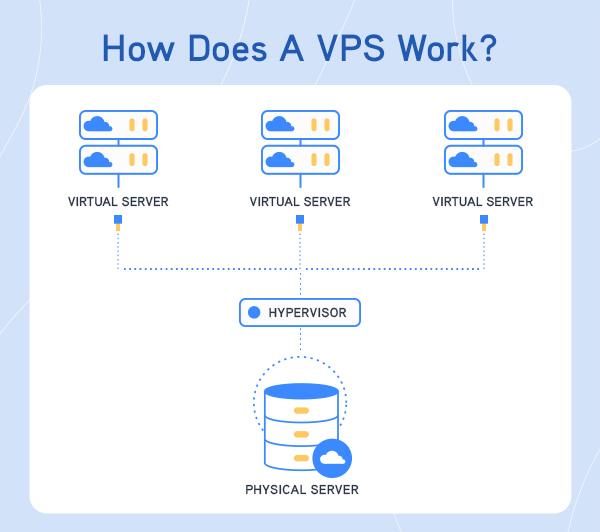
When considering an upgrade from shared hosting to VPS hosting, it’s vital to recognize the fundamental distinctions between the two. Shared hosting involves multiple websites sharing the same server resources, which can lead to limitations in performance and security. This setup is ideal for small websites or blogs with limited traffic. On the other hand, VPS (Virtual Private Server) hosting offers a dedicated portion of a server’s resources, providing users with enhanced performance, greater control, and improved security features. This means that your website can handle higher traffic, run complex applications, and experience fewer downtimes due to the isolation from other users.
To further illustrate the differences, consider these key factors:
- Performance: VPS offers superior speed and reliability due to allocated resources.
- Control: With VPS, you gain root access, allowing you to customize configurations and install software.
- Security: VPS is less vulnerable to attacks from other sites compared to shared hosting.
- Scalability: VPS allows for easy scaling as your website grows, unlike the fixed resources in shared hosting.
Here’s a simple comparison table to visualize these differences:
| Feature | Shared Hosting | VPS Hosting |
|---|---|---|
| Resource Allocation | Shared among multiple users | Dedicated resources per user |
| Performance | Variable, based on other sites | Consistent and reliable |
| Control | Limited | Full administrative access |
| Cost | Lower | Higher |
Assessing Your Websites Needs: When Is the Right Time to Upgrade
Upgrading your hosting plan is a crucial decision that can greatly influence your website’s performance, speed, and overall user experience. To determine whether it’s time to move from shared hosting to a VPS, consider several factors. First, evaluate your current website traffic. If you consistently notice slow loading times or downtime during peak hours, it’s a clear indicator that shared hosting can no longer meet your needs. Additional signs include:
- Increased Visitor Volume: Sudden spikes in traffic can overwhelm shared resources.
- Website Performance Issues: Frequent slowdowns or crashes can deter users.
- Specific Resource Usage: If you’re close to using your disk space or bandwidth limits.
Secondly, assess the functionality and resources necessary for your website. Shared hosting often comes with limitations on certain features, such as database access or software installations. If you require more control over your environment or wish to run applications with specific requirements, a VPS could be the solution. Important considerations include:
- Custom Software Needs: Need to install applications or frameworks uniquely tailored to your business.
- Security Concerns: A VPS provides isolated resources, enhancing security for sensitive data.
- Scalability: Anticipating future growth can make a VPS the right choice for scalability.
A Comprehensive Checklist for a Smooth VPS Migration
Before initiating your move from shared hosting to a Virtual Private Server (VPS), it’s crucial to ensure that all components are in place for a seamless transition. Start by backing up all your data—files, databases, and configurations should all be saved to avoid any potential loss during migration. Next, verify your DNS settings to ensure your domain points to the new server upon completion. It’s also beneficial to create a detailed inventory of your applications and services running on the shared host to facilitate proper installation on the VPS. Here’s a handy checklist for your migration preparations:
- Backup Data: Ensure local copies of your files and databases are safely saved.
- DNS Configuration: Document current settings and plan for changes.
- Inventory of Services: List all apps, plugins, and services for matching setups.
- Choose a VPS Provider: Research and select a hosting provider that fits your needs.
- Plan for Downtime: Notify users if necessary and find optimal migration times.
Once the preliminary steps are completed, focus on the actual migration phase. Start by setting up your new VPS environment to replicate the functionality of your shared hosting space. Ensure your server has the necessary software and versions, creating a secure environment to host your applications. After transferring your data and applications, conduct testing to ensure everything operates smoothly on the VPS. Lastly, monitor the transition closely to address any issues that may arise. Use the table below as a guide for post-migration tasks:
| Post-Migration Task | Status |
|---|---|
| Verify all applications are running as expected | Pending |
| Check website performance and speed | Pending |
| Monitor server load and resources | Pending |
| Update DNS records to point to the new VPS | Pending |
Top VPS Hosting Providers: Recommendations for Every Budget
When considering a move to VPS hosting, it’s essential to select a provider that aligns with your requirements and budget. For those on a tight budget, DigitalOcean offers a variety of plans starting as low as $5 per month. Their user-friendly interface and strong developer community make spinning up a virtual server a breeze. For slightly higher budgets, Vultr provides excellent performance with a competitive pricing structure, offering integrated solutions that are perfect for small businesses looking to scale. If you aim for premium features without breaking the bank, Linode offers a solid reputation for performance and customer support, making it a worthwhile investment.
For enterprises or larger projects, Amazon Lightsail presents an attractive option, bundling resources and services at a predictable monthly cost. Their extensive array of additional AWS services makes integration seamless. If you’re seeking a more managed experience, A2 Hosting is known for its reliable VPS solutions, coupled with stellar customer support and SSD storage for boosted speed. Consider the specifics of your project, including expected traffic, storage needs, and application requirements, to choose the best VPS provider that suits your operational needs and financial plan.
The Way Forward
Conclusion
Upgrading from shared to VPS hosting is a significant step towards enhancing your online presence and optimizing your site’s performance. By following the steps outlined in this guide, you can ensure a seamless transition that not only improves speed and reliability but also provides you with greater control over your hosting environment.
As your website grows, investing in VPS hosting can be a game-changer, offering you the scalability and flexibility needed to meet the demands of your audience. Remember to carefully evaluate your needs, choose the right provider, and take advantage of the features that VPS hosting offers.
With a solid foundation in place, you can focus on what truly matters—building and maintaining a successful online venture. If you have any questions or need further assistance during your upgrade process, don’t hesitate to reach out or leave a comment below. Your journey to a more powerful hosting solution starts now—embrace the change and watch your website thrive!