
Step-by-Step Guide to Seamlessly Migrate Your Website
Introduction
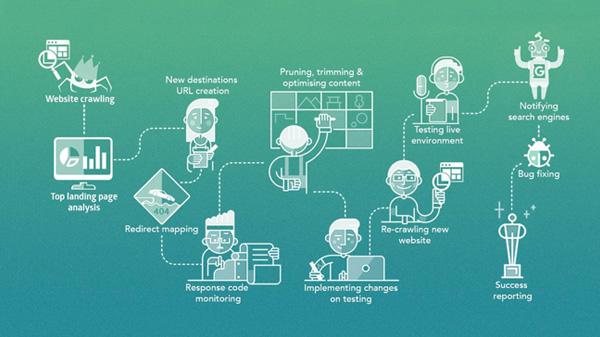
In today’s digital landscape, maintaining a dynamic and efficient online presence is crucial for businesses and individuals alike. Whether you’re upgrading to a more robust hosting platform, switching domains, or simply refreshing your design, migrating your website can be a daunting task. With the risk of lost data, broken links, and downtime lingering in the background, proper planning and execution are essential. This comprehensive step-by-step guide will walk you through the seamless migration of your website, ensuring that every element transitions smoothly and your audience remains engaged. From pre-migration preparations to final checks, we’ll cover the critical aspects to help you execute a successful migration with confidence. Get ready to unlock a smoother, more efficient online experience for both you and your users!
Table of Contents
- Understanding the Necessity of Website Migration and Its Benefits
- Preparing for a Smooth Transition: Key Steps Before Migration
- Executing the Migration Process: Tools and Best Practices
- Post-Migration Checklist: Ensuring a Successful Launch and Monitoring Performance
- Concluding Remarks
Understanding the Necessity of Website Migration and Its Benefits
Website migration is an essential process that can significantly enhance a site’s performance, usability, and SEO. As technology advances and user needs evolve, maintaining an up-to-date online presence is crucial. A well-planned migration allows businesses to take advantage of new features, improve site architecture, and ensure compatibility with modern browsers and devices. Key reasons for migration include:
- Improved Website Performance: A new host or platform can provide faster load times.
- Enhanced Security Features: Upgrading to a more secure system protects against cyber threats.
- Optimized User Experience: Adopting responsive design and modern UX practices can retain users more effectively.
Additionally, the benefits extend beyond just aesthetics and performance. Effective migration can lead to better search engine rankings and increased traffic. Businesses can also streamline their content management processes, allowing for more efficient updates and maintenance. When executed correctly, the migration process can result in:
| Benefit | Description |
|---|---|
| SEO Improvements | Optimized site structure enhances visibility on search engines. |
| Increased Traffic | Better design and content attract more visitors. |
| Cost Efficiency | Potential savings with optimized hosting solutions. |
Preparing for a Smooth Transition: Key Steps Before Migration
Before you embark on the migration journey, it’s crucial to conduct a thorough audit of your existing website. This process should identify your most valuable content, traffic sources, and any potential technical issues. Analyze your site’s current performance metrics, user experience, and SEO standings to establish a baseline. Key steps in this preparatory phase include:
- Inventory Existing Content: List all pages, posts, and media files, noting their importance and traffic levels.
- Evaluate SEO Performance: Use tools like Google Analytics and Search Console to assess your current keyword rankings and backlinks.
- Check Technical Health: Identify broken links, slow-loading pages, and other issues that may affect migration.
Once you have a clear picture of your current site, the next step is to create a detailed migration plan. This will serve as your roadmap throughout the process and ensure nothing critical is overlooked. Essential components of your migration plan should include:
- Timeline: Set realistic deadlines for each stage of the migration.
- Backup Strategy: Ensure a full backup of your website is completed before making any changes.
- Redirect Plan: Develop a strategy for 301 redirects to preserve SEO value and minimize traffic loss.
| Task | Responsible | Deadline |
|---|---|---|
| Content Inventory | Content Team | Week 1 |
| SEO Analysis | SEO Specialist | Week 2 |
| Backup Completion | IT Department | Week 3 |
Executing the Migration Process: Tools and Best Practices
When embarking on a website migration, choosing the right tools is crucial for a successful and efficient transition. Various plugins and applications can help facilitate this process, simplifying tasks that might otherwise be complex and time-consuming. Consider using the following tools:
- Duplicator: This WordPress plugin allows you to create a backup of your site, which can be transferred to a new location effortlessly.
- All-in-One WP Migration: Perfect for beginners, it exports your entire WordPress site including the database, media files, plugins, and themes with one click.
- WP Migrate DB Pro: This tool excels in exporting your database while handling serialized data and is especially useful for developers.
In addition to utilizing the right software, adhering to best practices will help you navigate the migration process smoothly. Key practices include:
- Backing up your website: Always create a complete backup before starting the migration to safeguard against potential data loss.
- Testing your staging site: Use a staging environment to replicate the live site and make sure everything functions as expected before going live.
- Updating DNS records: Ensure your DNS settings point to the new server once the migration is complete to minimize downtime.
| Action | Tool/Best Practice | Benefit |
|---|---|---|
| Backup | Duplicator | Data Safety |
| Testing | Staging Site | Reduce Errors |
| DNS Update | Manual Change | Minimized Downtime |
Post-Migration Checklist: Ensuring a Successful Launch and Monitoring Performance
Once your website migration is complete, it’s essential to conduct a thorough checklist to ensure everything functions properly prior to launching. Begin by verifying that all links redirect correctly to their new locations. You can use tools like Google Search Console to identify any potential issues. Testing forms and functionalities on your site is equally important; make sure that contact forms are sending submissions to the correct email addresses. Additionally, monitoring page speed and optimizing performance should be a priority, as a slow website can deter visitors.
Next, implement ongoing monitoring to track your website’s performance post-launch. Utilize analytics tools such as Google Analytics and Hotjar to analyze user behavior and engagement. A sample of key metrics to focus on includes:
| Metric | Importance |
|---|---|
| Page Load Time | Impacts user retention |
| Bounce Rate | Indicates level of visitor engagement |
| Conversion Rate | Measures success of desired actions |
By consistently monitoring these metrics, you can make informed decisions to enhance user experience and optimize your website over time. Engaging in regular audits and adjustments will also help you identify areas for improvement, ensuring that your site continues to meet its performance goals effectively.
Concluding Remarks
Conclusion
Migrating your website doesn’t have to be a daunting task. By following this step-by-step guide, you can ensure a smooth transition with minimal downtime and maximum efficiency. Remember, careful planning and thorough testing are your best allies in this process. Always keep your audience in mind—after all, a seamless experience for them is the ultimate goal.
As you embark on this journey, equip yourself with the right tools, maintain a clear timeline, and stay informed about potential pitfalls. Whether you’re upgrading your infrastructure, switching hosts, or revamping your site’s design, a successful migration is achievable with diligence and the right approach.
We hope this guide has provided you with the insights and confidence needed to navigate your website migration. If you have questions or would like to share your own experiences, feel free to leave a comment below. Happy migrating!