
Step-by-Step Guide to Seamlessly Migrate to a Dedicated Server
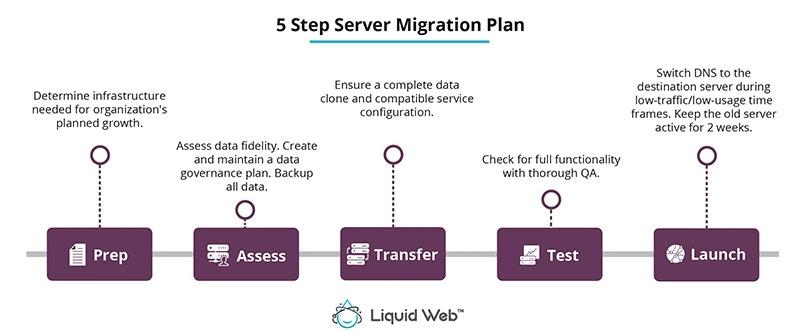
Are you considering taking your website to new heights with a dedicated server? Whether you’re experiencing increased traffic, need enhanced performance, or seek greater control over your hosting environment, migrating to a dedicated server can be a game changer. However, the process of transitioning from shared hosting or a virtual private server (VPS) can seem daunting. Fear not! In this step-by-step guide, we’ll walk you through everything you need to know to ensure a seamless migration to a dedicated server. From assessing your current setup and selecting the right server provider to executing the actual transfer and optimizing your new environment, we’ll cover all the essential steps to make the process smooth and efficient. Get ready to unlock the full potential of your website with a dedicated server – let’s dive in!
Table of Contents
- Understanding the Benefits of Dedicated Server Migration
- Preparing Your Current Environment for a Smooth Transition
- Configuring Your New Dedicated Server for Optimal Performance
- Testing and Troubleshooting Post-Migration Issues
- The Conclusion
Understanding the Benefits of Dedicated Server Migration
Shifting to a dedicated server brings a host of advantages that can significantly enhance your online operations. One of the primary benefits is improved performance. Dedicated servers offer enhanced processing power and RAM, ensuring that your applications run smoothly even during peak traffic times. This increased capacity provides faster loading times, which in turn can lead to better user experience and higher conversion rates. Additionally, with exclusive access to server resources, you can efficiently handle resource-intensive applications without the risk of slowdowns caused by other users.
Another critical benefit of migrating to a dedicated server is enhanced security. With shared hosting, multiple users may inadvertently expose your website to security vulnerabilities. However, a dedicated server isolates your data and applications from others, allowing for advanced security measures like firewalls, malware detection, and custom security configurations tailored to your specific needs. This setup not only mitigates the risk of data breaches but also helps in compliance with regulations. Here are some key benefits in a table:
| Benefit | Description |
|---|---|
| Performance | Faster load times and better handling of high traffic. |
| Security | Isolated environment with enhanced protection measures. |
| Customization | Ability to configure server settings to fit specific needs. |
| Scalability | Easy to upgrade resources as your business grows. |
Preparing Your Current Environment for a Smooth Transition
Before initiating your migration to a dedicated server, it’s essential to assess your current environment. Start by conducting a thorough inventory of your existing applications, services, and data. Identify any dependencies, outdated software, or components that may need upgrading. This evaluation will help you develop a comprehensive migration plan tailored to your specific needs. Additionally, reach out to your team to communicate the changes, ensuring everyone is on the same page regarding timelines and responsibilities. The following checklist can serve as a guide:
- Inventory Current Assets: List all applications, databases, and services.
- Identify Compatibility: Check compatibility of existing software with the new server.
- Backup Data: Create complete backups of all critical data.
- Set Goals: Establish what you want to achieve with your dedicated server.
Next, it’s crucial to ensure that your existing infrastructure supports this transition. Verify network configurations and security protocols to align with the new server environment. Engage your IT team to optimize your website and services for improved performance. To facilitate a seamless migration, consider implementing a staging environment that mirrors your existing setup, allowing for testing and adjustments before going live. Here’s a quick overview of factors to assess:
| Factor | Description |
|---|---|
| Network Bandwidth | Ensure adequate bandwidth for smooth data transfer. |
| Security Measures | Review firewalls and access permissions for the new server. |
| Monitoring Tools | Prepare tools for monitoring performance post-migration. |
Configuring Your New Dedicated Server for Optimal Performance
Once you have successfully migrated to your new dedicated server, the next step is to configure it for optimal performance. Start by assessing your server’s hardware specifications, focusing on CPU, RAM, and storage capabilities. Ensure that your resources are adequately allocated based on the types of applications you will be running. Implement software optimizations like caching solutions (e.g., Redis or Memcached) to reduce load times and enhance server responsiveness. Regularly monitor server load and adjust resource allocation as needed to maintain peak performance.
Security should also be a top priority in your configuration efforts. Utilize firewall settings and intrusion detection systems to safeguard your server against unauthorized access. Regular software updates are crucial; they not only provide new features but also patch vulnerabilities. Additionally, consider implementing a robust backup strategy. Using a combination of on-site and off-site backups ensures that your data is secure and can be easily restored in case of an emergency. Here is a simple table for your reference:
| Optimization Area | Action | Frequency |
|---|---|---|
| Resource Allocation | Review & Adjust | Monthly |
| Software Updates | Install Security Patches | Weekly |
| Backups | Perform Full Backups | Daily |
| Performance Monitoring | Check Server Load | Daily |
Testing and Troubleshooting Post-Migration Issues
After migrating to your new dedicated server, it’s essential to perform thorough testing to ensure everything is functioning as expected. Start by verifying connectivity with your server to confirm that there are no network issues. Key areas to check include:
- Access to the server via FTP or SSH.
- Performance metrics, such as response times and uptime stability.
- Application functionality, including database connections and website loading speeds.
If you encounter any issues, your troubleshooting process should be systematic. Consider the following steps:
- Review server logs for error messages that might indicate the source of the problem.
- Check configurations to ensure they match those of your previous setup.
- Utilize tools like ping and traceroute to diagnose network issues.
For your convenience, here’s a quick reference table to help you categorize common post-migration issues:
| Issue | Possible Cause | Solution |
|---|---|---|
| Website Down | DNS Propagation delay | Wait for DNS changes to fully propagate (up to 48 hours). |
| Slow Performance | Improper resource allocation | Upgrade server resources based on your load. |
| Error Messages | Incorrect file permissions | Adjust file permissions and ownership settings. |
The Conclusion
migrating to a dedicated server can seem like a daunting task, but with the right approach, it can be a smooth and efficient process. By following the step-by-step guide outlined in this article, you can ensure that your transition is seamless, minimizing downtime and maximizing performance. Remember to plan meticulously, back up your data, and check compatibility with your applications.
As you embark on this journey, keep in mind the benefits that a dedicated server brings — enhanced security, improved speed, and greater control over your hosting environment. These advantages will not only bolster your website’s performance but also provide a superior user experience for your visitors.
If you have any questions or need further assistance during your migration, don’t hesitate to reach out to professionals or consult resources that specialize in server management. Preparing thoroughly and seeking help when needed will empower you to take full advantage of your new dedicated server setup.
Thank you for reading! We hope this guide empowers you to make the right choices and embraces the new possibilities that come with a dedicated server. Happy migrating!