
Resolving Common Shared Hosting Issues: A Professional Guide
In the ever-evolving landscape of web hosting, shared hosting remains a popular choice for individuals and small businesses looking to establish their online presence without breaking the bank. While its affordability and simplicity make it an attractive option, users often encounter a variety of common issues that can disrupt their website’s performance and hinder growth. Whether it’s slow loading times, unexpected downtime, or challenges with customer support, these hurdles can be frustrating for users who expect reliability and efficiency. In this professional guide, we’ll delve into the most prevalent shared hosting issues, providing you with actionable solutions and best practices to effectively navigate and resolve them. Armed with this knowledge, you can ensure your website operates smoothly, allowing you to focus on what truly matters—growing your online venture.
Table of Contents
- Understanding Shared Hosting Limitations and Challenges
- Identifying Performance Issues and Enhancing Website Speed
- Effective Security Measures for Shared Hosting Environments
- Troubleshooting Common Configuration and Compatibility Problems
- In Summary
Understanding Shared Hosting Limitations and Challenges
While shared hosting is an attractive option for budget-conscious users, it comes with its own set of limitations and challenges that can impact performance and user experience. One of the most significant issues is the resource allocation. In a shared hosting environment, multiple websites operate from the same server resources, meaning that if one site experiences an unexpected spike in traffic or consumes excessive CPU power, it can slow down or even crash other sites on the same server. This can lead to frustrating delays for visitors and affect your site’s overall reliability.
Moreover, security vulnerabilities are a concern with shared hosting. Since multiple customers share the same server, any security breach on one site can potentially compromise all other sites. This common risk makes sites using shared hosting more susceptible to hacking attempts and malware infections. Additionally, the lack of customization options can hinder a site owner’s ability to implement specific security measures or optimize configurations for their unique needs. Other challenges include limited customer support, restricted bandwidth and storage capacity, and difficulties in scaling as traffic grows. Identifying these limitations is key to finding a more suitable hosting solution as your website evolves.
Identifying Performance Issues and Enhancing Website Speed
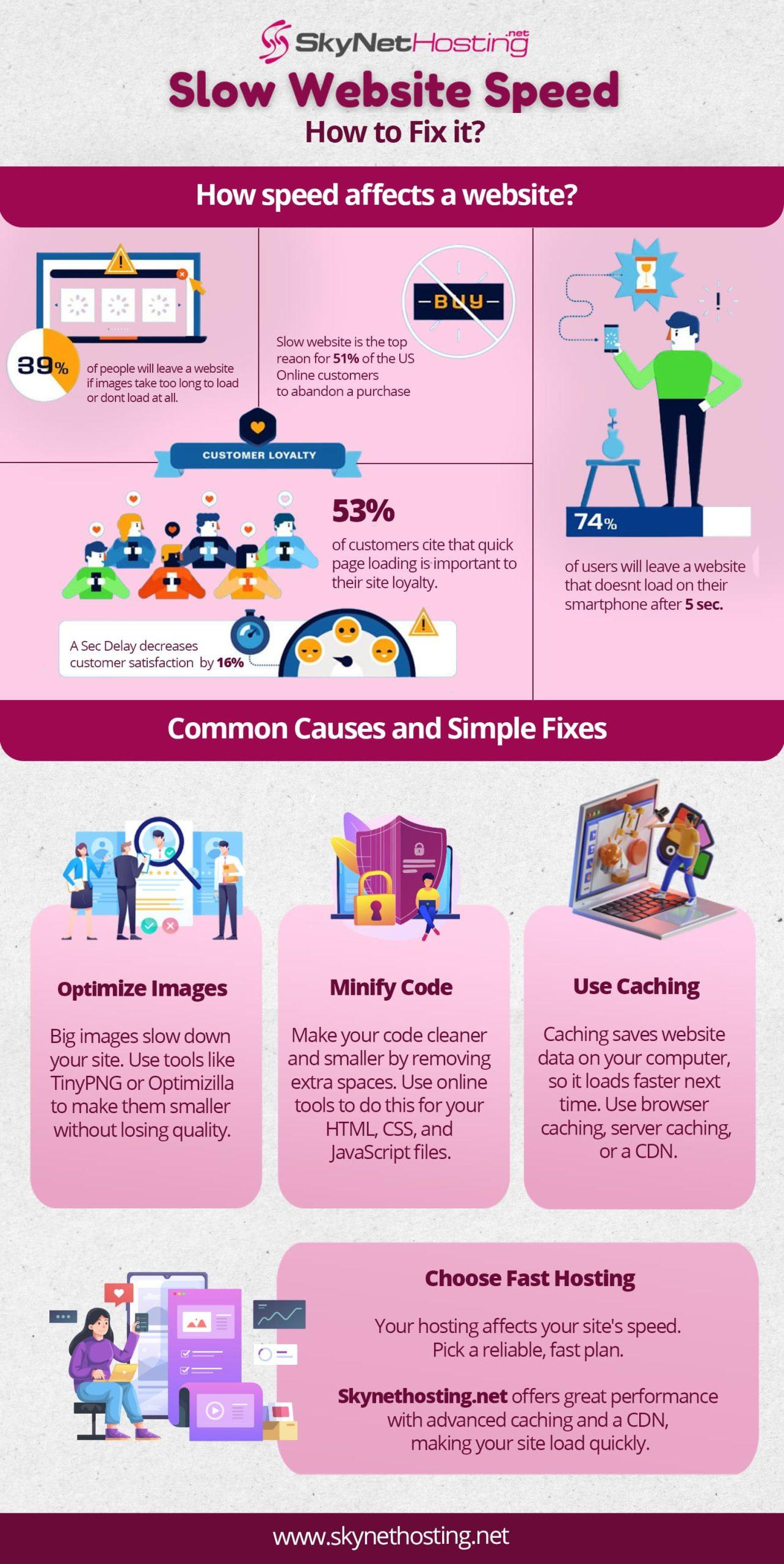
Performance issues can significantly impact user experience and site rankings. To identify these problems, start by analyzing load times using tools like Google PageSpeed Insights or GTmetrix. Look for common culprits that contribute to slow response times, such as unoptimized images, excessive JavaScript or CSS, and a lack of caching mechanisms. Implementing solutions like image compression and utilizing browser caching can lead to substantial improvements in load speed.
Another effective way to enhance website speed is to evaluate your server response time. On shared hosting, resources are often stretched thin due to multiple sites vying for the same server capabilities. Consider the following strategies to optimize performance:
- Optimize Your Database: Regularly clean up your database by removing unnecessary data, which can help speed up queries.
- Use a Content Delivery Network (CDN): A CDN can offload traffic and reduce latency by serving content from locations closer to your users.
- Minimize HTTP Requests: Reduce the number of elements required to load a page by combining files and simplifying the design.
Effective Security Measures for Shared Hosting Environments
In shared hosting environments, maintaining the security of your website is vital, as multiple users share the same server resources. To ensure optimum protection, it’s essential to implement a multi-layered security approach. Start by regularly updating all software, including the operating system, control panels, and any applications used. This practice not only fixes vulnerabilities but also enhances performance. Additionally, enforcing strong password policies for all accounts can significantly reduce the risk of unauthorized access. Consider using password managers to generate and store complex passwords securely.
Another crucial measure is to utilize firewalls and intrusion detection systems that monitor and filter incoming traffic to your site. Keeping robust backups allows you to restore your data in case of a security breach. Security plugins can also offer additional layers of protection, such as malware scanning and brute force protection. It’s advisable to periodically review access logs to better understand visitor behavior and detect any anomalies that could indicate a compromise. Below is a simple table summarizing effective security measures:
| Security Measure | Description |
|---|---|
| Software Updates | Regularly update OS, control panels, and applications. |
| Strong Passwords | Implement complex passwords for all user accounts. |
| Firewalls | Install firewalls to monitor and filter traffic. |
| Regular Backups | Create backups to safeguard against data loss. |
| Security Plugins | Use plugins for malware scanning and protection. |
Troubleshooting Common Configuration and Compatibility Problems
When dealing with shared hosting, configuration and compatibility issues can often arise, leading to site disruptions. One of the most common problems is mismatched PHP versions. It’s essential to ensure that your scripts are compatible with the PHP version your hosting provider supports. To resolve this, you may need to adjust your settings in the hosting control panel or consult with support to update the PHP version. Additionally, make sure that your plugins and themes are all compatible with the current PHP and WordPress version to avoid conflicts.
Another frequent source of issues arises from incorrect file permissions. Ensuring that your files and directories have the correct permissions is crucial for website stability and security. Here are some typical permission settings you should enforce:
| Type | Recommended Permissions |
|---|---|
| Directories | 755 |
| Files | 644 |
| wp-config.php | 600 |
A failure to adhere to these permissions can lead to access issues or may even expose your site to vulnerabilities. Regularly review and adjust settings as needed, while keeping backups to avoid data loss during troubleshooting.
In Summary
Conclusion
shared hosting can be a cost-effective and convenient solution for many website owners, but it’s not without its challenges. By understanding the common issues that can arise—such as performance lags, security vulnerabilities, and limited resources—you can take proactive steps to mitigate these problems and optimize your hosting experience.
Whether you choose to implement the solutions outlined in this guide or seek additional assistance, being informed and prepared is key to maintaining a healthy website environment. Regularly monitoring your site, utilizing available support resources, and keeping abreast of technological advancements will go a long way in enhancing your shared hosting experience.
As always, remember that a well-maintained website not only improves user experience but also boosts your online presence and credibility. If you have any further questions or need personalized advice, don’t hesitate to reach out to hosting professionals or consult community forums. Happy hosting!