
Mastering Web Hosting: How to Host Multiple Websites Smoothly
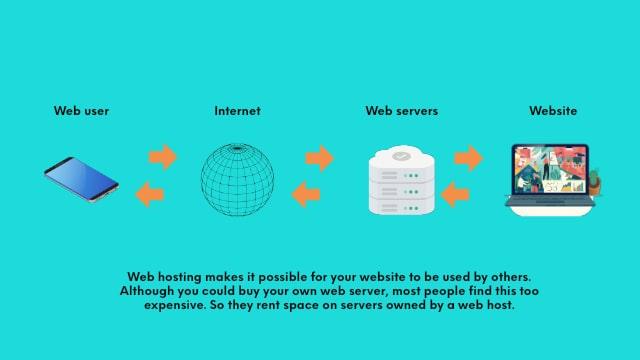
In today’s digital landscape, having a robust online presence is no longer a luxury but a necessity. Whether you’re a budding entrepreneur, a seasoned developer, or a business owner looking to expand your digital footprint, mastering the art of web hosting is essential—especially when it comes to managing multiple websites. The challenge of hosting several domains can seem overwhelming, but with the right strategies and tools, you can create a seamless experience for both yourself and your visitors. In this article, we will explore the key principles of effective web hosting, from selecting the right hosting plan and optimizing server performance to managing domain configurations and ensuring top-notch security. Join us as we dive into the world of web hosting and unlock the potential of hosting multiple websites smoothly and efficiently.
Table of Contents
- Understanding the Different Types of Web Hosting for Multi-Site Management
- Selecting the Right Hosting Provider for Optimal Performance and Scalability
- Efficiently Organizing Your Websites with Control Panels and Management Tools
- Implementing Security Measures and Backup Strategies for Multiple Sites
- Future Outlook
Understanding the Different Types of Web Hosting for Multi-Site Management
When it comes to managing multiple websites, it’s essential to understand the different types of web hosting available to ensure smooth operation and performance. Here are the primary hosting options you should consider:
- Shared Hosting: Ideal for small projects, where multiple websites share the same server resources. This option is cost-effective but can lead to performance issues as traffic increases.
- VPS Hosting: Offers more control and dedicated resources, ideal for medium-sized websites or multiple sites that require better performance without the costs of dedicated servers.
- Dedicated Hosting: Provides a server exclusively for your websites, offering maximum performance and customization but at a higher price point.
- Cloud Hosting: Utilizes a network of virtual servers, enabling scalability and flexibility, making it a great choice for businesses expecting to grow.
- Managed WordPress Hosting: Specifically optimized for WordPress sites, this option can simplify management and enhance performance with tailored resources and support.
To help clarify which option might be best for your multi-site needs, consider the following comparison:
| Hosting Type | Pros | Cons |
|---|---|---|
| Shared Hosting | Cost-effective, easy to set up | Limited resources, slow loading times |
| VPS Hosting | More control, better performance | More expensive than shared |
| Dedicated Hosting | Full resource allocation, maximum performance | High cost, complex management |
| Cloud Hosting | Scalable, flexible pricing | Variable performance at times |
| Managed WordPress Hosting | Optimized for WordPress, expert support | Higher cost, limited to WordPress |
Selecting the Right Hosting Provider for Optimal Performance and Scalability
When it comes to hosting multiple websites, selecting a provider that ensures optimal performance and scalability is paramount. Considerations such as server uptime, speed, and customer support should dominate your decision-making process. A reliable host should offer high uptime guarantees, preferably over 99.9%, along with fast loading times to enhance user experience. Additionally, check if the provider offers a Content Delivery Network (CDN) option, as this can significantly improve the loading speed of your sites by distributing content based on user location.
Furthermore, you need a hosting provider that can grow with your needs without sacrificing performance. Look for features such as:
- Flexible plans: Ensure the provider has scalable plans that accommodate rising traffic.
- Resource allocation: Opt for hosts that allow you to easily upgrade resources like CPU and RAM.
- Managed support: Choose a host that provides 24/7 customer support specializing in web hosting.
For a clearer picture, refer to the comparison table below:
| Provider | Uptime Guarantee | CDN Available | Support Type |
|---|---|---|---|
| Host A | 99.9% | Yes | 24/7 Live Chat |
| Host B | 99.95% | No | Email Support |
| Host C | 99.8% | Yes | Phone & Live Chat |
Efficiently Organizing Your Websites with Control Panels and Management Tools
Managing multiple websites can quickly become a daunting task without the right tools at your disposal. Control panels like cPanel, Plesk, and Webmin offer intuitive interfaces that simplify the management process. These tools enable you to handle various aspects of your websites, including file management, email accounts, and database administration, from a single dashboard. With features like one-click installations and automated backups, you can streamline your operations and minimize potential errors. Consider the following benefits of utilizing a control panel:
- User-Friendly Interface: Easy navigation enhances user experience, even for those without technical skills.
- Centralized Management: Control all your websites in one place, reducing the need to log into multiple accounts.
- Resource Monitoring: Keep track of bandwidth and disk usage to ensure optimal performance across all sites.
In addition to control panels, website management tools such as WordPress Multisite and ManageWP can significantly enhance your workflow. WordPress Multisite allows you to run multiple websites on a single WordPress installation, which can save space and resources while simplifying plugin and theme management. Similarly, ManageWP provides a comprehensive toolkit for managing updates, performance checks, backups, and security scans across all your sites. Below is a comparison of these two approaches:
| Feature | WordPress Multisite | ManageWP |
|---|---|---|
| Centralized Dashboard | Yes | Yes |
| Plugin & Theme Management | Single installation | Independent for each site |
| Backup Options | Built-in tools available | Customizable solutions |
| Security Monitoring | Site-wide | Individual options |
Implementing Security Measures and Backup Strategies for Multiple Sites
When managing multiple sites, it’s crucial to establish robust security measures to protect against the ever-evolving landscape of cyber threats. Begin by implementing SSL certificates for each domain to ensure encrypted transmission of data, which is essential for building trust with visitors. Regular software updates for your CMS, plugins, and themes also play a significant role in minimizing vulnerabilities. Additionally, consider adopting a Web Application Firewall (WAF) to filter out malicious traffic before it reaches your servers. Other vital security steps include:
- Utilizing strong, unique passwords for admin accounts
- Employing two-factor authentication (2FA)
- Conducting regular security audits and vulnerability scans
Backup strategies are equally significant and should be approached with a structured plan. Automated backups on a scheduled basis help ensure that you never lose critical data. Utilize reliable backup plugins that integrate seamlessly with WordPress, and store backups in multiple locations, such as cloud storage and external hard drives. A helpful way to manage your backups is through understanding different backup strategies illustrated in the table below:
| Backup Type | Description | Frequency |
|---|---|---|
| Full Backup | Complete copy of your entire site including files and database. | Weekly |
| Incremental Backup | Backs up only changes made since the last backup. | Daily |
| Database Backup | Backup of your website’s database to preserve content. | Daily |
Future Outlook
mastering web hosting and effectively managing multiple websites requires a strategic approach, the right tools, and a commitment to ongoing learning. By understanding the different hosting options available, optimizing performance, and maintaining robust security practices, you pave the way for seamless user experiences and increased site reliability. Remember, the world of web hosting is ever-evolving, so staying informed about industry trends and emerging technologies is crucial for continued success. Whether you’re a seasoned web host or just starting out, investing the time and effort into mastering these fundamentals will not only enhance your skills but also lead to greater achievements in the digital landscape. Now is the time to elevate your game and unlock the full potential of your online presence. Happy hosting!