
Mastering VPS: A Guide to Hosting Multiple Websites Seamlessly
Welcome to our comprehensive guide on mastering Virtual Private Servers (VPS) for hosting multiple websites seamlessly. In today’s digital landscape, where online presence is paramount, understanding how to efficiently manage multiple sites on a single VPS can be a game changer for businesses, developers, and digital entrepreneurs alike. Whether you’re a seasoned web admin or just starting out, leveraging the power of VPS can provide flexibility, control, and cost-effectiveness that shared hosting cannot match. In this article, we’ll explore the essential concepts of VPS hosting, delve into best practices for optimizing performance, and discuss strategies to ensure that your websites remain robust and responsive under varying traffic loads. If you’re ready to unlock the full potential of your VPS and streamline your hosting experience, let’s dive in!
Table of Contents
- Understanding VPS Hosting and Its Benefits
- Choosing the Right VPS Plan for Multiple Websites
- Configuring Your VPS for Optimal Performance
- Best Practices for Managing and Securing Your Websites on VPS
- The Way Forward
Understanding VPS Hosting and Its Benefits
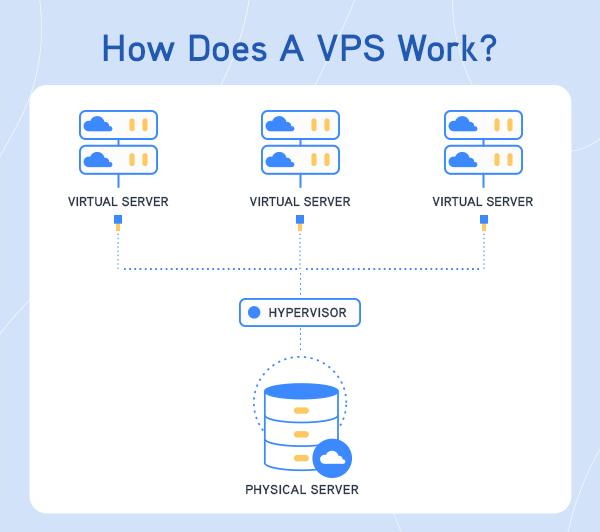
Virtual Private Server (VPS) hosting is a powerful solution that provides the benefits of dedicated server resources at a fraction of the cost. By leveraging virtualization technology, VPS hosting creates multiple isolated environments on a single physical server, allowing users to enjoy enhanced performance, improved security, and greater control over their hosting environment. This flexibility is particularly advantageous for businesses or individuals managing multiple websites, as they can customize their resources according to each site’s specific needs without the overhead of managing a dedicated server.
One of the primary appeals of VPS hosting is its scalability. As your website traffic grows or your needs change, you can easily upgrade your VPS plan to accommodate increased demands without significant downtime or hassle. Some key benefits include:
- Dedicated Resources: Each VPS has allocated CPU, RAM, and bandwidth, ensuring consistent performance.
- Root Access: Full control to install software, manage settings, and configure server environments as needed.
- Cost-Effectiveness: Affordable alternative to dedicated hosting with similar benefits.
The following table illustrates a comparison between shared hosting and VPS hosting:
| Feature | Shared Hosting | VPS Hosting |
|---|---|---|
| Resource Allocation | Shared with others | Dedicated to your server |
| Customization | Limited | Full control |
| Security | Vulnerable to neighbors | Isolated environment |
| Performance | Variable | Consistent |
Choosing the Right VPS Plan for Multiple Websites
When it comes to selecting the ideal VPS plan for hosting multiple websites, it’s crucial to evaluate several key factors that will impact your site’s performance and management. Start by considering the resource allocation, as different websites have varying demands in terms of CPU, RAM, and storage. Ensure that the plan you choose offers sufficient resources to handle peak traffic times and supports the growth of your websites. Additionally, take a close look at the scalability options provided by the VPS provider—having the ability to easily upgrade your plan will save you from potential headaches in the future.
Another critical aspect to assess is the management and support services included in the VPS plan. Look for providers that offer a user-friendly control panel, automated backup solutions, and robust customer support to assist you whenever problems arise. Consider whether you require a managed VPS solution, which can provide you with hands-on support for security patches and performance monitoring. To guide your decision-making process, you might want to compare various plans with a table that highlights the differences in key attributes:
| Provider | RAM | CPU Cores | Storage (SSD) | Support |
|---|---|---|---|---|
| Provider A | 4GB | 2 | 50GB | 24/7 Support |
| Provider B | 8GB | 4 | 100GB | Managed Services |
| Provider C | 16GB | 6 | 200GB | 24/7 Support |
Configuring Your VPS for Optimal Performance
Configuring your VPS correctly is essential to unlocking its full potential for hosting multiple websites. Start by selecting a lightweight operating system that minimizes resource consumption while maintaining user-friendliness. Popular choices like Ubuntu or CentOS allow for efficient performance. Fine-tune your server by disabling unnecessary services and applications that consume valuable CPU and RAM resources. This step ensures that your VPS dedicates maximum performance to your websites. Alongside, consider implementing server optimization techniques:
- Reduce load times by installing a caching solution, such as Varnish or Redis.
- Optimize your database with tools like phpMyAdmin to clean up old data and improve query performance.
- Implement a Content Delivery Network (CDN) to distribute your content globally, reducing latency.
- Secure your VPS with firewalls and regular updates to protect against vulnerabilities.
Monitoring resources is equally crucial for maintaining performance. Utilize tools like htop and Netdata to track CPU and memory usage in real-time. Based on your findings, you may need to adjust your resource allocations or upgrade your VPS plan. Creating a simple maintenance schedule ensures your hosting environment remains optimal. Here’s a glance at what to include:
| Task | Frequency |
|---|---|
| Update software | Monthly |
| Backup data | Weekly |
| Optimize databases | Monthly |
| Review logs | Weekly |
Best Practices for Managing and Securing Your Websites on VPS
Managing and securing your websites on a Virtual Private Server (VPS) requires a strategic approach. Start by ensuring that your server’s operating system and all software applications are always up to date. Regular updates not only enhance performance but also protect against vulnerabilities. Alongside updates, consider implementing a robust firewall to monitor incoming and outgoing traffic, establishing strict access controls to minimize risks. Additionally, use strong, unique passwords for all user accounts, and enable two-factor authentication (2FA) where possible to add an extra layer of security.
Another essential aspect of maintaining your VPS is backups. Regularly back up your websites, databases, and configuration files to ensure quick recovery in case of data loss. It’s advisable to automate backups and store them in a different location, preferably in the cloud. Furthermore, you can bolster your security posture by conducting periodic security audits to identify and resolve potential vulnerabilities. Here’s a simple table outlining key actions for effective website management:
| Action | Description |
|---|---|
| Update Software | Ensure regular updates of your OS and applications. |
| Implement Firewalls | Use both software and hardware firewalls to protect your server. |
| Enable Backups | Automate backups and store them in a secure location. |
| Conduct Security Audits | Regularly review your security measures and system configurations. |
The Way Forward
Conclusion
In the ever-evolving world of web hosting, mastering Virtual Private Servers (VPS) opens up a realm of possibilities for developers, entrepreneurs, and digital marketers alike. With the ability to host multiple websites seamlessly, a VPS can significantly enhance performance, security, and flexibility. By following the guidelines and strategies outlined in this guide, you’re well on your way to optimizing your VPS for maximum efficiency.
Remember, the key to successful multi-site hosting lies in understanding your specific needs, regularly monitoring performance, and never hesitating to adapt as your projects grow. Whether you’re running a portfolio, an e-commerce site, or a series of blogs, a well-configured VPS can serve as a robust foundation for your online presence.
As you embark on this journey, keep in mind that the hosting landscape is dynamic. Staying up-to-date with best practices and emerging technologies will ensure that your websites remain competitive and user-friendly. Don’t hesitate to explore forums, communities, and additional resources to expand your knowledge further.
Thank you for joining us in this exploration of VPS hosting. We wish you success in creating and managing your online environments with confidence and ease. Happy hosting!