
Mastering Split Tunneling: A Guide to VPN Configuration
In an era where cybersecurity is more paramount than ever, the tools we choose to protect our online activities play a crucial role in safeguarding our personal and professional information. One such tool that has gained significant attention is the Virtual Private Network (VPN). While many users are familiar with the general benefits of VPNs—like enhanced privacy and secure connections—there’s a powerful feature that often goes overlooked: split tunneling.
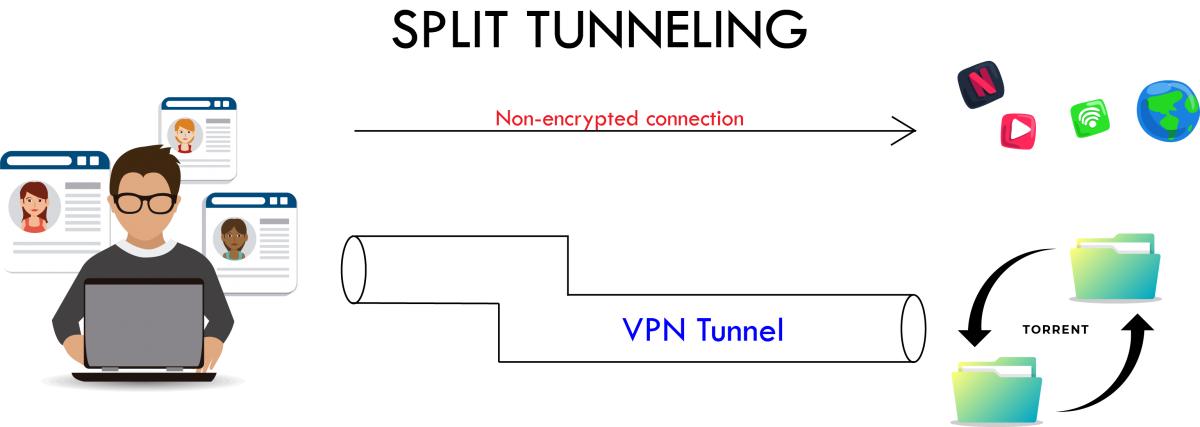
Split tunneling is a sophisticated VPN configuration that allows you to control which applications and websites use the VPN connection and which access the internet directly. This powerful functionality not only optimizes your network performance but also provides added flexibility for users who require access to both public and secured networks simultaneously.
In this comprehensive guide, we will walk you through the fundamentals of split tunneling, explain its benefits, and provide step-by-step instructions on how to configure it effectively. Whether you are a seasoned IT professional or a casual user seeking more insight into VPN capabilities, understanding and mastering split tunneling can significantly enhance your online experience. Join us as we delve into the intricacies of this dynamic technology and unlock its full potential.
Table of Contents
- Understanding the Fundamentals of Split Tunneling and Its Benefits
- Key Configuration Steps for Effective Split Tunneling Setup
- Common Challenges and Troubleshooting Tips for Split Tunneling
- Best Practices for Maximizing Security with Split Tunneling
- The Way Forward
Understanding the Fundamentals of Split Tunneling and Its Benefits
Split tunneling is a powerful feature that allows users to divide their internet traffic into two separate paths: one that goes through the VPN and another that connects directly to the internet. This selective routing can significantly enhance the user experience by improving speed and reducing latency for non-sensitive activities. For example, while accessing sensitive work-related applications securely via the VPN, users can simultaneously stream videos or browse social media without any noticeable slowdown, since these activities are not routed through the VPN. This feature is particularly beneficial for individuals who require high bandwidth for certain applications while maintaining a secure connection for others.
Moreover, the implementation of split tunneling can lead to enhanced performance and lower bandwidth costs. Businesses can allocate resources more efficiently by directing only specific traffic through the VPN, which reduces the load on the network. By optimizing data management, companies can enjoy increased productivity levels and faster access to non-sensitive resources. The following benefits illustrate why adopting split tunneling can be a game-changer:
- Increased speed: By bypassing the VPN for non-critical traffic, users experience faster internet speeds.
- Efficient bandwidth usage: Only sensitive data takes up VPN bandwidth, conserving resources for other activities.
- Cost-effectiveness: Reduced data usage lowers the costs associated with VPN services.
- Improved Accessibility: Access to local services and resources without conflicts.
Key Configuration Steps for Effective Split Tunneling Setup
To set up split tunneling effectively, the first step is to identify the specific applications and services that need to bypass the VPN. This involves conducting a thorough analysis of your network traffic to determine which components are essential for remote access and which ones can operate outside the VPN. Once you have listed these applications, ensure that your VPN client supports split tunneling and review its configuration settings. You will typically have options for application-based or IP address-based split tunneling, so choosing the right method based on your organization’s security policy is crucial.
Next, configure the split tunneling settings in your VPN client or firewall. Many modern VPN solutions provide user-friendly interfaces for this process. If you’re using a VPN service that allows for manual configuration, you might need to edit config files or use command-line interfaces. Here are some common tasks you should consider during this phase:
- Whitelist the applications/IPs you want to route outside the VPN.
- Blacklist the ones that should only use the VPN tunnel.
- Test the configuration to ensure that data is appropriately segmented.
| Configuration Aspect | Consideration |
|---|---|
| Security Level | Assess risk for apps bypassing VPN. |
| User Access | Determine who can set up and manage split tunneling. |
| Performance | Monitor network performance post-setup. |
| Documentation | Keep records of settings and changes for future reference. |
Common Challenges and Troubleshooting Tips for Split Tunneling
When implementing split tunneling, users may encounter several common challenges that can disrupt connectivity and functionality. One frequent issue is DNS leaks, which can expose your online activities despite the VPN being active. To mitigate this, ensure that you are using a VPN service with integrated DNS leak protection. Additionally, application misconfiguration can lead to certain apps not routing traffic as intended. Double-check your VPN settings and ensure that the correct applications are designated for split tunneling.
Another obstacle is IP address conflicts, where local and VPN IPs clash, causing connectivity problems. A straightforward solution is to adjust your local network settings or consult your VPN provider for recommendations on resolving these conflicts. inconsistent speeds can occur due to the performance of your chosen VPN server. If you experience slow connections, try switching to a different server or check your bandwidth settings. For those who prefer a visual overview, the following table highlights these challenges alongside their solutions:
| Challenge | Solution |
|---|---|
| DNS Leaks | Use a VPN with DNS leak protection |
| Application Misconfiguration | Verify app settings for split tunneling |
| IP Address Conflicts | Adjust local network settings |
| Inconsistent Speeds | Switch VPN servers or check bandwidth |
Best Practices for Maximizing Security with Split Tunneling
To ensure robust security while using split tunneling, it’s crucial to implement a set of best practices. Begin by identifying sensitive traffic within your organization and ensuring that it always traverses the VPN connection. This can minimize exposure to potential threats. Additionally, consider the following practices:
- Limit split tunneling to trusted applications: Only allow specific software that has been assessed and deemed secure to bypass the VPN.
- Regularly update VPN software: Maintain your VPN solutions with the latest updates to protect against vulnerabilities.
- Employ strong encryption protocols: Use protocols like OpenVPN or IKEv2 to ensure that the data flowing through your VPN remains secure.
- Conduct thorough security assessments: Regularly evaluate your split tunneling configuration to determine if any adjustments are necessary.
Another critical aspect is educating users about the implications of split tunneling. Users should be made aware of how their actions can inadvertently introduce security risks. Establish clear guidelines for remote access, including:
| Guideline | Description |
|---|---|
| Use vetted networks | Encourage users to connect only to secure, trusted networks when using split tunneling. |
| Monitor traffic | Utilize network monitoring tools to track data and detect any suspicious activities in real-time. |
| Stay updated on security threats | Regularly provide training on the latest security threats and how to mitigate them. |
The Way Forward
mastering split tunneling is an essential skill for anyone looking to maximize the benefits of their VPN while maintaining optimal performance and convenience. By selectively routing traffic, you can enjoy uninterrupted access to your favourite local services and websites while still safeguarding your sensitive data. As we’ve explored, the configuration process may vary depending on your VPN provider, but the fundamental principles remain the same.
Remember to carefully evaluate which applications or traffic require the added layer of security and which can safely operate outside the VPN tunnel. With the right approach, split tunneling can enhance your online experience without compromising security.
We hope this guide has provided you with the knowledge and confidence to implement split tunneling in your VPN setup. As technology continues to evolve, staying informed about best practices will empower you to make the most of your digital privacy tools. If you have questions or want to share your own experiences with split tunneling, feel free to leave a comment below! Happy browsing, and stay secure!