
Exploring VPS Hosting Storage Options: A Comprehensive Guide
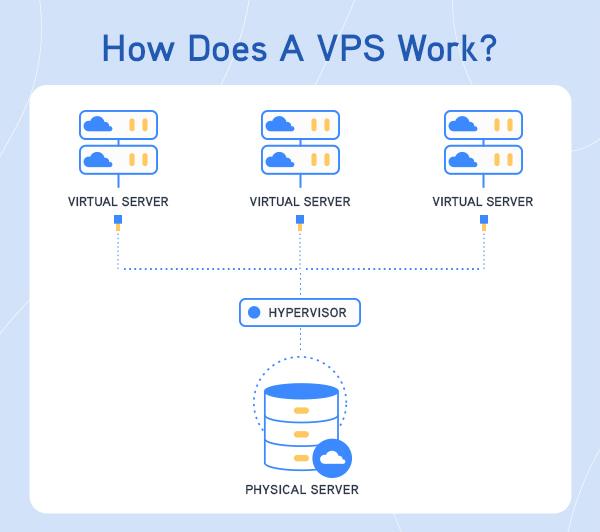
In today’s digital landscape, the demand for robust and reliable hosting solutions has never been more pressing. Virtual Private Server (VPS) hosting emerges as a powerful contender, striking a balance between shared and dedicated hosting by offering enhanced control, flexibility, and enhanced performance. However, one crucial aspect often overlooked by newcomers is the variety of storage options available within the VPS realm. From traditional hard disk drives to lightning-fast SSDs and hybrid solutions, understanding these storage types can significantly impact your website’s speed, security, and scalability. In this comprehensive guide, we will delve into the different VPS hosting storage options, examining their benefits, drawbacks, and ideal use cases. Whether you’re a small business looking to expand your online presence or a developer seeking optimal performance for your applications, this article aims to equip you with the knowledge needed to make informed decisions in the dynamic world of VPS hosting. Let’s explore the landscape of VPS storage options and empower your online journey with the right tools for success.
Table of Contents
- Understanding VPS Hosting Storage Types
- Evaluating Performance and Speed for Different Storage Solutions
- Cost Considerations for VPS Storage Options
- Best Practices for Optimizing Your VPS Storage Setup
- To Conclude
Understanding VPS Hosting Storage Types
When selecting a Virtual Private Server (VPS) hosting plan, understanding the various storage types available is crucial for optimizing performance and reliability. The two primary types of storage used in VPS hosting are SSD (Solid State Drives) and HDD (Hard Disk Drives). SSDs are known for their speed, offering faster data access and lower latency, which significantly improves the loading times of websites and applications. In contrast, HDDs generally provide more storage capacity at a lower cost, making them suitable for large-scale data storage solutions where performance is less critical.
Choosing the right storage type often depends on your specific needs and budget. Below are some key characteristics to consider when evaluating VPS storage options:
- Speed: SSDs outperform HDDs in read/write speeds.
- Capacity: HDDs typically offer higher storage capacity for larger files.
- Cost: SSDs tend to be more expensive but may provide better long-term value due to improved performance.
- Durability: SSDs have no moving parts, making them more resistant to physical shock.
- Energy Efficiency: SSDs consume less power compared to HDDs.
Evaluating Performance and Speed for Different Storage Solutions
When assessing the performance and speed of different storage solutions available for VPS hosting, it is essential to consider several factors that contribute to overall efficiency. SSD (Solid State Drives) have become increasingly popular due to their exceptional speed, significantly reducing load times and improving application performance. In contrast, HDD (Hard Disk Drives) may offer more storage space at a lower price point, but they tend to lag in speed, particularly when dealing with high-demand applications. Understanding the unique characteristics of each storage type will help you select the best option based on your specific requirements and anticipated workload.
Another crucial aspect of evaluating storage solutions is reliability and scalability. If you’re expecting to grow your website or application, consider options that allow for easy upgrades, such as cloud storage solutions. These options provide flexibility through scalable resources that can be adjusted based on traffic or data needs. On the other hand, traditional storage options may limit your ability to expand without significant downtime or migration issues. Here’s a quick overview of the comparative features:
| Storage Type | Speed | Scalability | Cost |
|---|---|---|---|
| SSD | High | Moderate | Higher |
| HDD | Medium | Low | Lower |
| Cloud Storage | Variable | High | Variable |
Cost Considerations for VPS Storage Options
When evaluating VPS storage options, cost considerations play a crucial role in determining the best fit for your needs. A variety of storage types are available, each varying in price and performance. Generally, the main types include Standard HDD, SSD, and NVMe storage. It’s essential to weigh the advantages against the associated costs:
- Standard HDD: Typically the most affordable option, suitable for larger storage needs but with slower access speeds.
- SSD: Offers a balanced approach, providing faster speeds at a mid-range price, ideal for websites requiring quick data retrieval.
- NVMe: The highest performance and cost option, delivering exceptional speed but at a premium price, perfect for high-traffic sites.
Beyond the type of storage, consider the data transfer costs and the storage scalability options provided by your VPS vendor. It’s vital to check for any additional fees for exceeding bandwidth limits or the costs associated with upgrading your storage as your business grows. The following table illustrates approximate costs and features:
| Storage Type | Approximate Cost (per month) | Performance | Ideal Use Cases |
|---|---|---|---|
| Standard HDD | $5 – $15 | Slow | Backups, archival data |
| SSD | $10 – $25 | Moderate | Web hosting, applications |
| NVMe | $30+ | Fast | E-commerce, high-traffic sites |
Best Practices for Optimizing Your VPS Storage Setup
When it comes to maximizing your VPS storage capabilities, there are several strategies to consider. First, regularly monitor your storage usage to identify any unnecessary files or applications consuming valuable space. Tools like du and df can help you understand your disk usage more clearly. Additionally, consider implementing automated backups with retention policies to ensure you’re not keeping outdated versions of files that can quickly fill up your storage. Properly configurating your backup settings not only preserves space but also safeguards your data integrity.
Another crucial aspect of storage optimization is choosing the right file system. Different file systems offer varied performance and efficiency, depending on your workload. For example, ext4 is one of the most common choices for Linux-based VPS due to its reliability and performance, while XFS shines in handling large files and high-capacity storage scenarios. Furthermore, utilizing techniques like Compression and Deduplication can drastically reduce the overall storage footprint. Here’s a comparative overview of popular file systems:
| File System | Best For | Key Features |
|---|---|---|
| ext4 | General Use | Journaling, High Performance |
| XFS | Large Files | Scalability, Excellent Performance |
| Btrfs | Snapshots | Subvolumes, Built-in RAID |
To Conclude
navigating the landscape of VPS hosting storage options can be a daunting task, but understanding the various types and their benefits is crucial for making informed decisions that align with your business needs. Whether you opt for traditional Hard Disk Drives (HDDs) or embrace the speed and efficiency of Solid-State Drives (SSDs), each option has its unique advantages that can enhance your server performance and overall user experience.
As you consider your hosting strategy, take the time to assess your specific requirements, from data volume to access speed, and don’t hesitate to consult with your hosting provider for tailored recommendations. Remember, a well-chosen storage solution can not only streamline your operations but also contribute to the scalability and resilience of your online presence.
We hope this comprehensive guide has equipped you with the knowledge to explore your VPS hosting storage options confidently. Your long-term success in the digital landscape starts with making educated choices today. Stay curious, and happy hosting!