
Essential Security Practices for Your VPS Hosting Environment
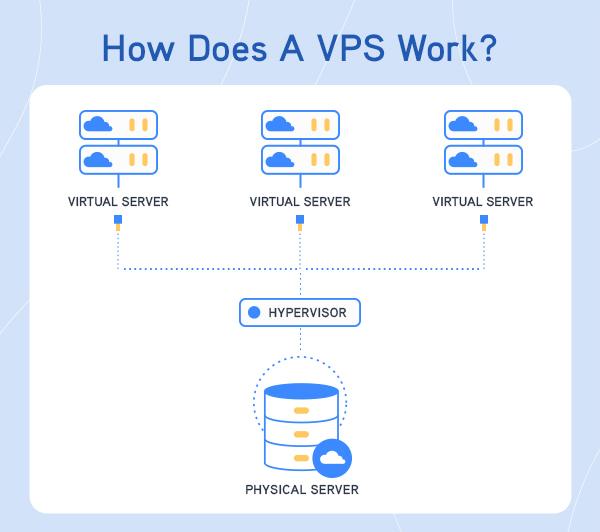
In today’s digital landscape, where cyber threats loom large and data breaches are a constant concern, securing your Virtual Private Server (VPS) environment is not just a recommendation—it’s a necessity. As businesses increasingly rely on VPS hosting for scalability, performance, and control, the importance of implementing robust security measures cannot be overstated. Whether you are a seasoned developer or a small business owner venturing into the world of web hosting, understanding essential security practices is crucial to safeguard your sensitive information and maintain the trust of your users. In this article, we will explore the key security practices that can help fortify your VPS hosting environment against potential vulnerabilities, ensuring that your online presence remains secure and resilient. Let’s dive into the fundamental strategies that every VPS owner should adopt to create a bulletproof shield around their digital assets.
Table of Contents
- Understanding the Importance of VPS Security for Your Online Presence
- Implementing Strong Access Controls and User Management
- Regularly Updating and Patching Your Software and Applications
- Utilizing Effective Backup Strategies to Protect Your Data
- Concluding Remarks
Understanding the Importance of VPS Security for Your Online Presence
In today’s increasingly digital world, the integrity of your online presence hinges significantly on the security measures taken within your Virtual Private Server (VPS) environment. Given that VPS hosting provides users with dedicated resources and greater control over server configurations, it is vital to implement robust security practices. This ensures that your data and applications remain shielded from malicious attacks that can compromise sensitive information or disrupt services. Some of the key aspects to focus on include:
- Regular Software Updates: Keep your operating system and all applications up to date to minimize vulnerabilities.
- Firewall Implementation: Utilize firewalls to manage incoming and outgoing traffic, establishing a solid barrier against threats.
- Strong Password Policies: Enforce complex password requirements and change them routinely to prevent unauthorized access.
- Access Controls: Limit access to the server based on roles and responsibilities, ensuring that only authorized personnel can reach sensitive areas.
Moreover, it is crucial to monitor your VPS for any irregular activities. Regular auditing can help identify potential breaches before they escalate into severe issues. Implementing security plugins, setting up user account restrictions, and maintaining data backups can further fortify your defenses. Consider the following measures to enhance your VPS security:
| Security Measure | Description |
|---|---|
| Intrusion Detection Systems (IDS) | Detect and respond to unauthorized access or anomalies in real-time. |
| SSL Certificates | Encrypt data transmissions to enhance user trust and protect sensitive information. |
| Regular Backups | Ensure data recovery is swift and reliable in case of a breach or data loss. |
Implementing Strong Access Controls and User Management
In a VPS hosting environment, establishing robust access controls and user management protocols is imperative for safeguarding your data and maintaining system integrity. Begin by implementing role-based access control (RBAC) to ensure that users have permission levels tailored to their responsibilities. This means only granting access to sensitive resources to those who genuinely need it for their work. Regularly review and update user roles to reflect any changes in team structure or job functions, reducing the risk of unauthorized access.
Moreover, it is essential to employ strong authentication mechanisms. Consider using multi-factor authentication (MFA) to add an extra layer of security, requiring users to provide two or more verification methods to gain access. Additionally, maintaining an organized log of user activities not only aids in transparency but also helps in tracing any potentially malicious actions. Here are some key elements to focus on:
- Account Lockout Policies: Lock accounts after a specified number of failed login attempts.
- User Provisioning Process: Streamline how new users are created and roles assigned.
- Regular Audits: Conduct frequent reviews of user access logs and permissions.
| User Type | Access Level | Permissions |
|---|---|---|
| Administrator | Full Access | Manage all resources |
| Developer | Limited Access | Deploy applications |
| Viewer | Read-Only Access | View logs and reports |
Regularly Updating and Patching Your Software and Applications
One of the most critical components of maintaining a secure environment for your VPS hosting is ensuring that all your software and applications are regularly updated and patched. Cybercriminals are always on the lookout for vulnerabilities in applications, and outdated software can leave your system exposed. By implementing a structured update policy, you can safeguard your data against potential exploits. Here’s how to effectively manage your updates:
- Automate Updates: Utilize automatic updates wherever possible for your operating system and applications to mitigate risks.
- Schedule Regular Checks: Set aside time, at least once a month, to review and update software that does not support automatic updates.
- Test Updates: Before deploying significant updates on a live environment, test them in a staging area to ensure compatibility and performance stability.
In addition to patching software, closely monitor the release notes and security advisories from your vendors. Keeping thorough documentation of your updates is essential, as it provides an audit trail for compliance and accountability. Consider implementing a change management system, as outlined in the table below, to help facilitate a seamless update process:
| Update Frequency | Responsible Party | Documentation Required |
|---|---|---|
| Weekly | System Administrator | Change Log |
| Monthly | IT Team | Update Report |
| Quarterly | Security Officer | Security Audit |
Utilizing Effective Backup Strategies to Protect Your Data
In today’s digital landscape, data loss can occur from various unforeseen circumstances, such as hardware failures, cyber-attacks, or human error. To mitigate these risks, implementing effective backup strategies is essential. Regularly scheduled backups help ensure that your critical data remains intact and can be quickly restored when needed. Consider the following best practices for maintaining robust backup routines:
- Automate Backup Processes: Use automated tools to schedule backups at regular intervals, reducing the reliance on manual intervention.
- Utilize Offsite Storage: Store backups in a separate physical or cloud location to prevent data loss in case of local disasters.
- Test Backup Restoration: Periodically perform test restorations to verify that your backup data is complete and recoverable.
When designing your backup strategy, it’s crucial to choose the right type of backup solution. Options like full, incremental, and differential backups each have their unique advantages. For instance, a full backup captures all data and is ideal for initial setups, while incremental backups only save changes made since the last backup, optimizing storage space and time. Below is a comparison of backup types:
| Backup Type | Description | Advantages |
|---|---|---|
| Full Backup | Copies all selected data. | Comprehensive, easy to restore. |
| Incremental Backup | Stores only changes since the last backup. | Faster, uses less storage. |
| Differential Backup | Captures changes since the last full backup. | Balance of speed and storage efficiency. |
By integrating these practices into your routine, you can significantly enhance your data protection measures and ensure your VPS hosting environment remains resilient against potential threats. Remember that a well-structured backup strategy not only secures your data but also provides peace of mind in an increasingly volatile digital world.
Concluding Remarks
securing your VPS hosting environment is not just an option; it’s a necessity in today’s digital landscape. By implementing the essential security practices outlined in this article, such as regular updates, effective firewall configurations, and routine security audits, you can significantly reduce vulnerabilities and enhance the overall integrity of your hosting setup.
Remember, cybersecurity is an ongoing commitment that requires awareness and adaptation to new threats. Stay informed about the latest security trends and best practices to ensure your VPS remains a fortress for your data. Whether you manage a personal project or a critical business application, investing time and resources into proper security measures will pay dividends in peace of mind and operational reliability.
We hope you found this guide valuable as you navigate the complexities of VPS security. If you have experiences or tips of your own, we’d love to hear about them in the comments below. Together, we can foster a safer online environment for everyone. Happy hosting!