
Essential Security Practices for Safe VPS Hosting
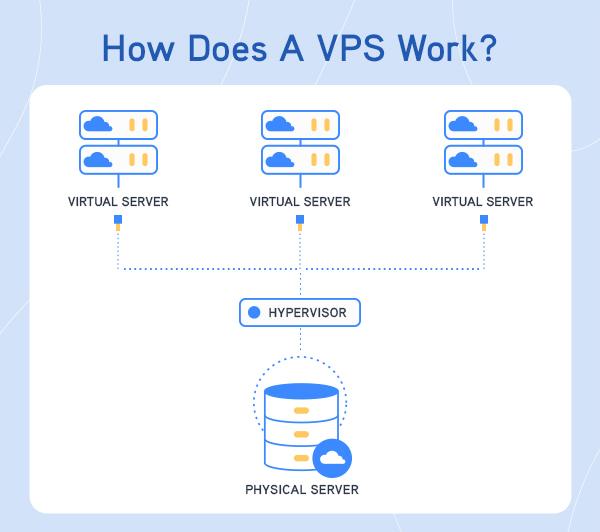
In today’s digital landscape, where online presence and data integrity are paramount, ensuring the security of your Virtual Private Server (VPS) is not just an option—it’s a necessity. With the increasing sophistication of cyber threats and the growing reliance on cloud-based services, businesses and individuals alike must take proactive measures to safeguard their assets. VPS hosting offers a level of flexibility and control that is ideal for both developers and businesses; however, it also comes with unique vulnerabilities that can be exploited if left unprotected. In this article, we will explore essential security practices that every VPS user should implement to enhance their security posture, mitigate risks, and ensure a safe hosting environment. Whether you’re a seasoned IT professional or a small business owner taking your first steps into the world of VPS hosting, understanding these practices is crucial to maintaining the integrity of your server and the data it houses. Let’s dive in and ensure your VPS remains a fortress in the ever-evolving battlefield of cybersecurity.
Table of Contents
- Understanding the Importance of Security in VPS Hosting
- Strengthening Your VPS with Firewall Configurations
- Implementing Regular Backups and Disaster Recovery Plans
- Enhancing Access Control with SSH Keys and User Permissions
- In Retrospect
Understanding the Importance of Security in VPS Hosting
Security is a cornerstone of any successful VPS hosting solution, serving as the first line of defence against potential threats that can compromise your data and disrupt your services. With a virtual private server, you are afforded greater control and customization compared to shared hosting, but this also means greater responsibility in managing your security posture. Protecting your server should encompass various layers of security measures to create a robust environment. Consider implementing the following practices:
- Firewalls: Utilize both software and hardware firewalls to regulate incoming and outgoing traffic based on predetermined security rules.
- Regular Updates: Keep your operating system and all software up to date to patch vulnerabilities that could be exploited by attackers.
- Strong Password Policies: Enforce complex passwords and change them regularly to reduce the risk of unauthorized access.
- Data Encryption: Encrypt sensitive data both at rest and in transit to ensure that it remains confidential even if intercepted.
Moreover, monitoring and responding to security incidents is critical. Establish a framework for incident response that includes continuous monitoring and logging of server activities. This allows for the quick identification of unusual patterns that may indicate a breach. Below is a simplified table listing key security measures and their benefits:
| Security Measure | Benefit |
|---|---|
| Intrusion Detection Systems | Identifies and responds to potential security breaches. |
| Backup Solutions | Ensures data recovery in case of loss or breach. |
| Access Control Mechanisms | Limits access to sensitive data based on user roles. |
Strengthening Your VPS with Firewall Configurations
To effectively bolster your Virtual Private Server (VPS) security, implementing robust firewall configurations is crucial. A firewall acts as a barrier between your VPS and potential threats from the internet, enabling you to control incoming and outgoing traffic based on predetermined security rules. This adds an additional layer of protection, helping to prevent unauthorized access and mitigating risks. Here are some key practices to consider when setting up your firewall configurations:
- Define Ingress and Egress Rules: Clearly specify which connections are allowed to enter and exit your VPS. Only permit necessary services and block the rest.
- Utilize Stateful Inspection: Opt for firewalls that recognise and track the state of active connections rather than simply filtering packets.
- Implement Logging and Monitoring: Keep track of all access attempts, successful or otherwise, to maintain situational awareness and respond quickly to potential threats.
Furthermore, regularly updated rulesets and automated alerts are vital in maintaining an effective firewall. The use of an automated solution allows for rapid response to changing threat landscapes. Additionally, consider creating a whitelist of specific IP addresses that are authorized to access your VPS, while blocking all other external IPs. A simple table can illustrate the essential components of your firewall configuration:
| Rule Type | Action | Source IP | Destination Port |
|---|---|---|---|
| HTTP | Allow | Any | 80 |
| SSH | Allow | Whitelist Only | 22 |
| MySQL | Deny | Any | 3306 |
By adhering to these outlined practices and consistently reviewing your firewall configurations, you can create a fortified environment that minimizes vulnerabilities and enhances the overall security of your VPS setup.
Implementing Regular Backups and Disaster Recovery Plans
For any Virtual Private Server (VPS) hosting environment, the implementation of regular backups and robust disaster recovery plans is crucial in safeguarding your data. By establishing a backup schedule, you not only protect against data loss due to hardware failures, but also cyber threats such as ransomware. A well-thought-out plan should include:
- Frequency of Backups: Determine whether daily, weekly, or monthly backups suit your environment best.
- Backup Locations: Utilize multiple locations – both offsite and cloud storage – to ensure redundancy.
- Type of Backups: Choose from full, incremental, or differential backups based on your recovery needs and available resources.
Moreover, regular testing of your disaster recovery plan is just as essential as creating one. Ensure that your team is familiar with recovery procedures and can execute them under pressure. Create a disaster recovery timeline that outlines roles, responsibilities, and communication channels to facilitate a swift response during emergencies. Consider using the following table to map out your disaster recovery protocols:
| Step | Description | Responsible Party |
|---|---|---|
| Assessment | Evaluate the damage and identify affected systems. | IT Team |
| Backup Restoration | Restore data from backups based on the backup strategy. | System Admin |
| System Verification | Check that systems are operational and secure before going live. | QA Team |
Enhancing Access Control with SSH Keys and User Permissions
Access control is fundamental to securing your Virtual Private Server (VPS) environment. One of the most effective methods to enhance this control is by utilizing SSH keys. Unlike traditional passwords, SSH keys are a pair of cryptographic keys that significantly reduce the risk of unauthorized access. By requiring a private key stored on your local machine and a public key stored on the server, you not only bolster security but also streamline the login process. Implementing SSH keys involves the following steps:
- Generate a key pair using your terminal.
- Copy the public key to the VPS.
- Disable password authentication in your SSH configuration.
In addition to SSH keys, managing user permissions is crucial for maintaining a secure VPS environment. By granting only necessary permissions to users and services, you mitigate potential risks associated with over-privileged accounts. It’s essential to practise the principle of least privilege (PoLP), ensuring users have only the access needed to perform their tasks. To effectively manage user permissions, consider the following strategies:
- Create user roles based on job functions.
- Regularly audit permissions and access rights.
- Utilize groups to simplify user management.
In Retrospect
implementing robust security practices for your VPS hosting environment is not just a precaution—it’s a necessity. By understanding the potential vulnerabilities and taking proactive measures such as strengthening access controls, regular updates, and monitoring, you can significantly reduce the risk of cyber threats. Remember, security is an ongoing process; staying informed about the latest threats and continually refining your strategies is key to maintaining a secure VPS.
As you navigate the complexities of VPS hosting, prioritize security as an integral part of your overall strategy. By fostering a culture of security awareness and utilizing the tools and practices discussed in this article, you can create a solid foundation that not only protects your valuable data but also builds trust with your clients and users. Stay vigilant, stay secure, and empower your business with the confidence that comes from having a well-protected online presence. Thank you for reading, and here’s to a safer hosting experience!